DNS Resolution in Dell Security Management Server Virtual Fails to Resolve Hostnames for Zones not Hosted on the First Listed DNS Server Entry
Summary: On a Dell Security Management Server Virtual with multiple DNS Servers listed in the network configuration, the name resolution fails for hostnames that are not hosted on the first listed DNS Server. ...
Symptoms
Affected Products:
- Dell Security Management Server Virtual
Cause
The DNS Server reply to the DNS client on the Dell Security Management Server Virtual is the cause.
In Dell Security Management Server Virtual, the DNS resolution fails in the shell if the first listed DNS Server in the network settings is reachable and if this DNS Server cannot successfully resolve the FQDN hostname.
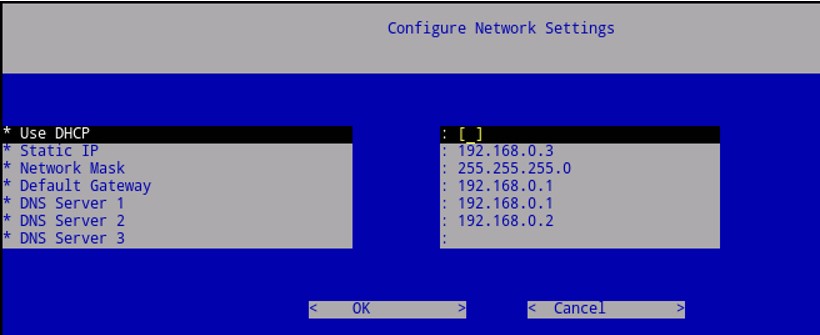
Figure 1: (English Only) Configure Network Settings
Scenario:
- Dell Security Management Server Virtual is configured with two DNS Server entries.
- From the shell, it is possible to ping both DNS Servers using their IP addresses.
- The DNS Server does not have any Stub Zones or forwarders pointing to the other DNS server.
Under those circumstances, it is possible to resolve all the hostnames that are hosted on the first listed DNS server.
Resolution of hostnames that are hosted only on the second listed DNS server fails unless the first DNS server is unreachable.
Swapping the order of the DNS servers that are listed in the Network settings in Dell Security Management Server Virtual confirms that only the first listed DNS server is used.
Resolution
The DNS client is behaving as expected as per the workflow below:
- The Dell Security Management Server Virtual queries the first DNS Server in the list
- The contacted DNS Server, if not authoritative for the zone, queries the root hints.
- If the root hints are not reachable, the DNS Server replies to the client with RCODE 2 Server Fail. This forces the client to query the second DNS Server in the list.
16/02/2018 10:48:12 05FC PACKET 0000000CCFFB81A0 UDP Snd 192.168.0.3 d6d7 R Q [8281 DR SERVFAIL] A (8)dom2dc01(7)dom2dll(3)com(0)
- If the root hints are reachable and they cannot resolve the query, or because the first-level domain does not exist (.local), or because the first-level domain exists (.com), but not the second-level domain (.mydomain.com), the DNS Server replies to the query RCODE 3 NXDOMAIN.
16/02/2018 10:56:24 0818 PACKET 0000000CCF160100 UDP Snd 192.168.0.3 6130 R Q [8381 DR NXDOMAIN] A (4)dc02(4)dom2(4)loc2(0)
RCODE 3 Name Error - Meaningful only for responses from an authoritative name server, this code signifies that the domain name that is referenced in the query does not exist (https://www.ietf.org/rfc/rfc1035.txt 
This response code prevents the client from querying the next server in the list and causes the DNS resolution to fail. This is by design. The same behavior is showing from the DNS client on a Windows client.
One possible workaround is to create on each DNS Server a Stub Zone pointing to the other DNS Server.
Alternatively, it is possible to add the second listed DNS server to the forwarders on the first listed DNS server.
To contact support, reference Dell Data Security International Support Phone Numbers.
Go to TechDirect to generate a technical support request online.
For additional insights and resources, join the Dell Security Community Forum.