Bluetooth Unavailable on Wyse 5070 Thin Client
Summary: Bluetooth is unavailable on the Wyse 5070 Thin Client if wireless local area network (WLAN) or Wireless Gigabit Alliance (WiGig) functionality is disabled in the BIOS.
This article applies to
This article does not apply to
This article is not tied to any specific product.
Not all product versions are identified in this article.
Symptoms
Affected Hardware:
- Wyse 5070 Thin Client
- Wyse 5070 Extended Thin Client
To determine if WLAN/WiGig is disabled in the BIOS:
- Restart the endpoint.
- During POST press F2 to boot into BIOS.
- In the left menu pane of BIOS, expand Wireless and then click Wireless Device Enabled.
- Confirm if WLAN/WiGig is checked.
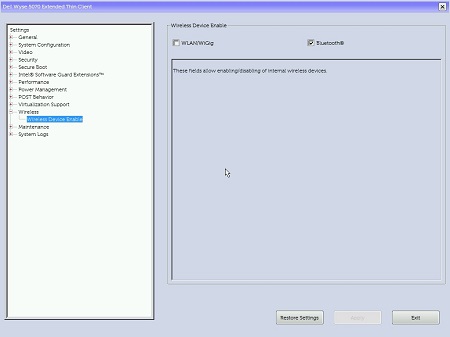
Figure 1: (English Only) Wyse 5070 Extended Thin Client BIOS
Cause
Not Applicable
Resolution
WLAN/WiGig must only be disabled in the operating system, to retain Bluetooth functionality without WLAN/WiGig, reference the Knowledge Base article How to Disable Wireless for Wyse 5070 Thin Client for more information.
Affected Products
Wyse 5070 Thin ClientArticle Properties
Article Number: 000133681
Article Type: Solution
Last Modified: 03 Jun 2024
Version: 10
Find answers to your questions from other Dell users
Support Services
Check if your device is covered by Support Services.