Dell Networking Občasná vysoká latence ICMP u přepínačů řady S s firmwarem OS9
Summary: Dell Networking Občasná vysoká latence ICMP u přepínačů řady S s firmwarem OS9
Symptoms
Občasný problém s vysokou latencí se objevuje při pokusu o provedení příkazu ICMP ping z klientského zařízení do brány, obvykle IP adresy rozhraní VLAN. K tomuto problému stále dochází, i když jste přímo připojeni k přepínači brány, který má malý nebo žádný produkční provoz. Zákazníci se obávají, že to bude mít dopad na běžný produkční provoz.
K problému dochází na všech platformách řady S s firmwarem OS9.
Testovací scénář pro test ICMP (žádný produkční provoz)
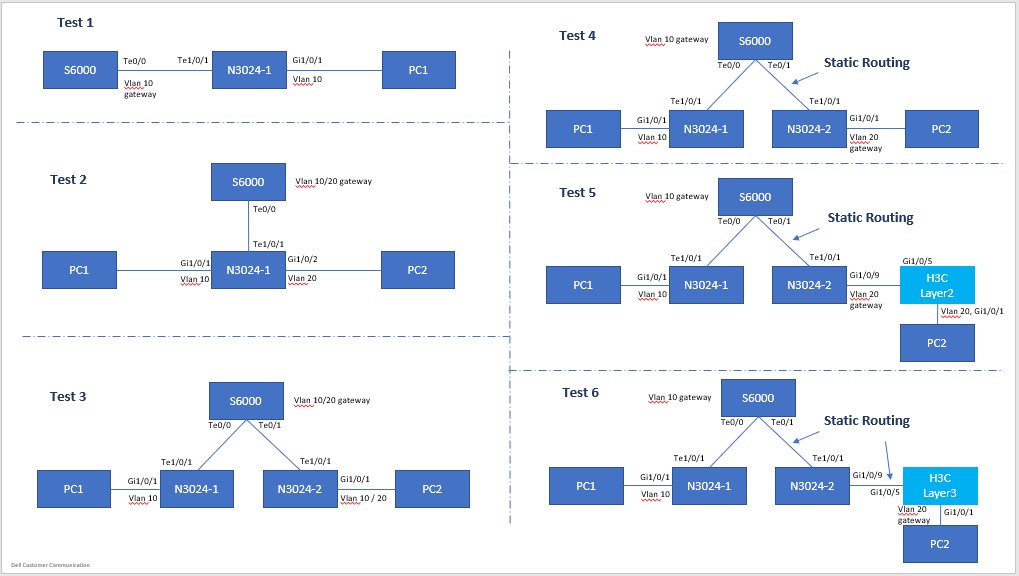
Konfigurace topologie
PC1: 192.168.10.100/24, Gateway: 192.168.10.1/24, VLAN10

    PC2: 192.168.10.200/24, Gateway: 192.168.10.1/24, VLAN10
NeboPC2: 192.168.20.200/24, Gateway: 192.168.20.1/24, VLAN20
Brána přepínače ping PC1 (přímo připojená) Test 1-6; Stejný výsledek bez ohledu na topologii
Pinging 192.168.10.1 with 32 bytes of data:
Reply from 192.168.10.1: bytes=32 time<1ms TTL=255
Reply from 192.168.10.1: bytes=32 time=5ms TTL=255
Reply from 192.168.10.1: bytes=32 time=47ms TTL=255  <------ high latency !
Reply from 192.168.10.1: bytes=32 time=5ms TTL=255
Reply from 192.168.10.1: bytes=32 time=5ms TTL=255
Reply from 192.168.10.1: bytes=32 time=1ms TTL=255
Reply from 192.168.10.1: bytes=32 time<1ms TTL=255
Reply from 192.168.10.1: bytes=32 time<1ms TTL=255
Reply from 192.168.10.1: bytes=32 time<1ms TTL=255
Reply from 192.168.10.1: bytes=32 time<1ms TTL=255
Reply from 192.168.10.1: bytes=32 time=32ms TTL=255  <------ high latency !
Reply from 192.168.10.1: bytes=32 time<1ms TTL=255
Reply from 192.168.10.1: bytes=32 time<1ms TTL=255
Reply from 192.168.10.1: bytes=32 time<1ms TTL=255
Reply from 192.168.10.1: bytes=32 time<1ms TTL=255
Reply from 192.168.10.1: bytes=32 time<1ms TTL=255
Reply from 192.168.10.1: bytes=32 time=6ms TTL=255
Reply from 192.168.10.1: bytes=32 time<1ms TTL=255
Reply from 192.168.10.1: bytes=32 time=40ms TTL=255  <------ high latency !
Reply from 192.168.10.1: bytes=32 time<1ms TTL=255
Reply from 192.168.10.1: bytes=32 time<1ms TTL=255
……
>>> (truncated)

Ping statistics for 192.168.10.1:
    Packets: Sent = 8280,Received = 8280,Lost = 0 (0% Loss)
Approximate round trip times in milli-seconds:
    Minimum = 0ms,Maximum = 55ms,Average = 1ms
Ping mezi dvěma počítači, tranzitní provoz (vrstva 2, ve stejných a různých sítích VLAN) (test 1–3)
Pinging 192.168.10.200 with 32 bytes of data:
Reply from 192.168.10.200: bytes=32 time=1ms TTL=128
Reply from 192.168.10.200: bytes=32 time=1ms TTL=128
Reply from 192.168.10.200: bytes=32 time<1ms TTL=128
Reply from 192.168.10.200: bytes=32 time=1ms TTL=128
Reply from 192.168.10.200: bytes=32 time=1ms TTL=128
Reply from 192.168.10.200: bytes=32 time<1ms TTL=128
……
>>> (truncated),
……
Reply from 192.168.10.200: bytes=32 time<1ms TTL=128
Reply from 192.168.10.200: bytes=32 time<1ms TTL=128
Reply from 192.168.10.200: bytes=32 time<1ms TTL=128
Reply from 192.168.10.200: bytes=32 time<1ms TTL=128
Reply from 192.168.10.200: bytes=32 time<1ms TTL=128
Reply from 192.168.10.200: bytes=32 time=1ms TTL=128

Ping statistics for 192.168.10.200:
    Packets: Sent = 1233,Received = 1233,Lost = 0 (0% Loss)
Approximate round trip times in milli-seconds:
    Minimum = 0ms,Maximum = 2ms,Average = 0ms
Ping mezi dvěma počítači, tranzitní provoz (vrstva 3, ve dvou sítích vlan) (testy 4–6)
Pinging 192.168.20.200 with 32 bytes of data:
Reply from 192.168.20.200: bytes=32 time<1ms TTL=127
Reply from 192.168.20.200: bytes=32 time<1ms TTL=127
Reply from 192.168.20.200: bytes=32 time<1ms TTL=127
Reply from 192.168.20.200: bytes=32 time=1ms TTL=127
Reply from 192.168.20.200: bytes=32 time<1ms TTL=127
Reply from 192.168.20.200: bytes=32 time=1ms TTL=127
Reply from 192.168.20.200: bytes=32 time=1ms TTL=127
Reply from 192.168.20.200: bytes=32 time=1ms TTL=127
Reply from 192.168.20.200: bytes=32 time=1ms TTL=127
……
>>> (truncated),
……
Reply from 192.168.20.200: bytes=32 time<1ms TTL=127
Reply from 192.168.20.200: bytes=32 time<1ms TTL=127
Reply from 192.168.20.200: bytes=32 time=1ms TTL=127
Reply from 192.168.20.200: bytes=32 time=1ms TTL=127
Reply from 192.168.20.200: bytes=32 time<1ms TTL=127
Reply from 192.168.20.200: bytes=32 time=1ms TTL=127

Ping statistics for 192.168.20.200:
    Packets: Sent = 808,Received = 808,Lost = 0 (0% Loss)
Approximate round trip times in milli-seconds:
    Minimum = 0ms,Maximum = 2ms,Average = 0ms
Cause
Vysvětlení výsledků
Technický tým společnosti Dell potvrdil, že se jedná o normální a očekávané chování vzhledem k plánování procesoru a řazení do fronty.
Resolution
Testování ICMP by se mělo používat pouze jako prostředek k testování dostupnosti, nikoli latence nebo ztráty v důsledku tohoto chování. Latence provozu ICMP není odrazem dopadu na normální provozní provoz. Toto chování může být také zhoršeno zaneprázdněným procesorem – to znamená přepínač, který je v plné výrobě a je na něm větší provoz.