OS9ファームウェアを実行しているSシリーズ スイッチで発生するDell Networkingの断続的な高ICMPレイテンシー
Summary: OS9ファームウェアを実行しているSシリーズ スイッチで発生するDell Networkingの断続的な高ICMPレイテンシー
This article applies to
This article does not apply to
This article is not tied to any specific product.
Not all product versions are identified in this article.
Symptoms
クライアント デバイスからゲートウェイ(通常はVLANインターフェイスのIP)に対してICMP pingを実行しようとすると、高遅延に関する断続的な問題が発生します。この問題は、本番トラフィックがほとんどまたはまったくないゲートウェイ スイッチに直接接続されている場合でも発生する可能性があります。これは通常の本番トラフィックへの影響を反映しているのではないかというお客様の懸念がありました
OS9ファームウェアを実行しているすべてのSシリーズ プラットフォームで問題が発生します。
ICMPテストのテストシナリオ(実稼働トラフィックなし)
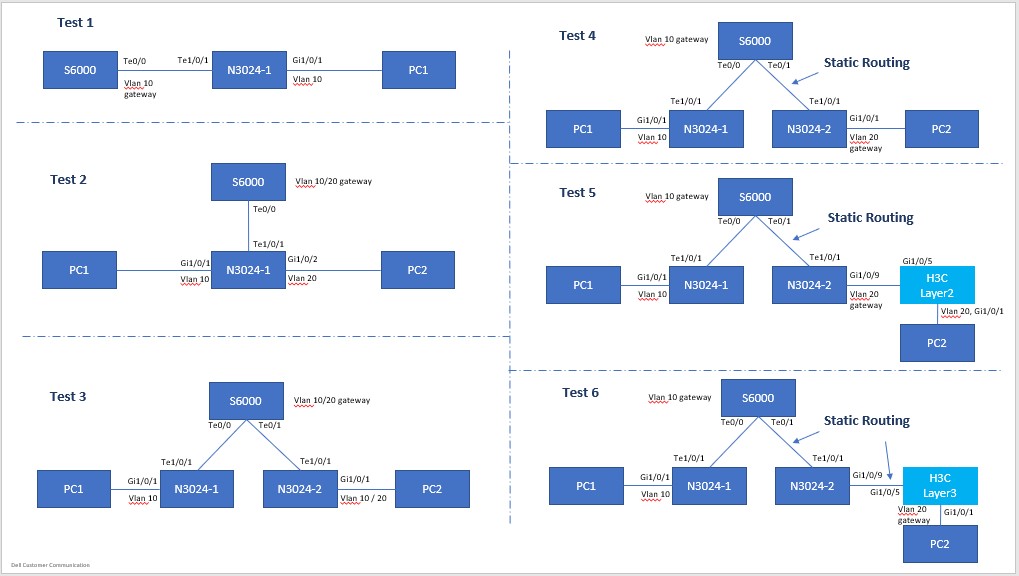
トポロジー構成
PC1: 192.168.10.100/24, Gateway: 192.168.10.1/24, VLAN10

    PC2: 192.168.10.200/24, Gateway: 192.168.10.1/24, VLAN10
またはPC2: 192.168.20.200/24, Gateway: 192.168.20.1/24, VLAN20
注:クライアント デバイス間のpingは通常影響を受けないため、テストのすべての結果がここにリストされているわけではありません。この問題は、クライアント デバイスからスイッチ上のゲートウェイIPにpingを実行する場合にのみ発生します。
PC1 pingスイッチゲートウェイ(直接接続)テスト1-6。トポロジーに関係なく、同じ結果が表示されます
Pinging 192.168.10.1 with 32 bytes of data:
Reply from 192.168.10.1: bytes=32 time<1ms TTL=255
Reply from 192.168.10.1: bytes=32 time=5ms TTL=255
Reply from 192.168.10.1: bytes=32 time=47ms TTL=255  <------ high latency !
Reply from 192.168.10.1: bytes=32 time=5ms TTL=255
Reply from 192.168.10.1: bytes=32 time=5ms TTL=255
Reply from 192.168.10.1: bytes=32 time=1ms TTL=255
Reply from 192.168.10.1: bytes=32 time<1ms TTL=255
Reply from 192.168.10.1: bytes=32 time<1ms TTL=255
Reply from 192.168.10.1: bytes=32 time<1ms TTL=255
Reply from 192.168.10.1: bytes=32 time<1ms TTL=255
Reply from 192.168.10.1: bytes=32 time=32ms TTL=255  <------ high latency !
Reply from 192.168.10.1: bytes=32 time<1ms TTL=255
Reply from 192.168.10.1: bytes=32 time<1ms TTL=255
Reply from 192.168.10.1: bytes=32 time<1ms TTL=255
Reply from 192.168.10.1: bytes=32 time<1ms TTL=255
Reply from 192.168.10.1: bytes=32 time<1ms TTL=255
Reply from 192.168.10.1: bytes=32 time=6ms TTL=255
Reply from 192.168.10.1: bytes=32 time<1ms TTL=255
Reply from 192.168.10.1: bytes=32 time=40ms TTL=255  <------ high latency !
Reply from 192.168.10.1: bytes=32 time<1ms TTL=255
Reply from 192.168.10.1: bytes=32 time<1ms TTL=255
……
>>> (truncated)

Ping statistics for 192.168.10.1:
    Packets: Sent = 8280,Received = 8280,Lost = 0 (0% Loss)
Approximate round trip times in milli-seconds:
    Minimum = 0ms,Maximum = 55ms,Average = 1ms
2台のPC間のPing、トランジットトラフィック(レイヤ2、同じVLANと異なるVLAN内)(テスト1-3)
Pinging 192.168.10.200 with 32 bytes of data:
Reply from 192.168.10.200: bytes=32 time=1ms TTL=128
Reply from 192.168.10.200: bytes=32 time=1ms TTL=128
Reply from 192.168.10.200: bytes=32 time<1ms TTL=128
Reply from 192.168.10.200: bytes=32 time=1ms TTL=128
Reply from 192.168.10.200: bytes=32 time=1ms TTL=128
Reply from 192.168.10.200: bytes=32 time<1ms TTL=128
……
>>> (truncated),
……
Reply from 192.168.10.200: bytes=32 time<1ms TTL=128
Reply from 192.168.10.200: bytes=32 time<1ms TTL=128
Reply from 192.168.10.200: bytes=32 time<1ms TTL=128
Reply from 192.168.10.200: bytes=32 time<1ms TTL=128
Reply from 192.168.10.200: bytes=32 time<1ms TTL=128
Reply from 192.168.10.200: bytes=32 time=1ms TTL=128

Ping statistics for 192.168.10.200:
    Packets: Sent = 1233,Received = 1233,Lost = 0 (0% Loss)
Approximate round trip times in milli-seconds:
    Minimum = 0ms,Maximum = 2ms,Average = 0ms
2台のPC間のPing、トランジットトラフィック(レイヤ3、2つのVLAN)(テスト4〜6)
Pinging 192.168.20.200 with 32 bytes of data:
Reply from 192.168.20.200: bytes=32 time<1ms TTL=127
Reply from 192.168.20.200: bytes=32 time<1ms TTL=127
Reply from 192.168.20.200: bytes=32 time<1ms TTL=127
Reply from 192.168.20.200: bytes=32 time=1ms TTL=127
Reply from 192.168.20.200: bytes=32 time<1ms TTL=127
Reply from 192.168.20.200: bytes=32 time=1ms TTL=127
Reply from 192.168.20.200: bytes=32 time=1ms TTL=127
Reply from 192.168.20.200: bytes=32 time=1ms TTL=127
Reply from 192.168.20.200: bytes=32 time=1ms TTL=127
……
>>> (truncated),
……
Reply from 192.168.20.200: bytes=32 time<1ms TTL=127
Reply from 192.168.20.200: bytes=32 time<1ms TTL=127
Reply from 192.168.20.200: bytes=32 time=1ms TTL=127
Reply from 192.168.20.200: bytes=32 time=1ms TTL=127
Reply from 192.168.20.200: bytes=32 time<1ms TTL=127
Reply from 192.168.20.200: bytes=32 time=1ms TTL=127

Ping statistics for 192.168.20.200:
    Packets: Sent = 808,Received = 808,Lost = 0 (0% Loss)
Approximate round trip times in milli-seconds:
    Minimum = 0ms,Maximum = 2ms,Average = 0ms
Cause
結果の説明
これは、CPUのスケジュールとキューイングによる正常な予期された動作であることがDellエンジニアリングによって確認されています。
Resolution
ICMP テストは、この動作による遅延や損失ではなく、到達可能性をテストする手段としてのみ使用する必要があります。ICMPトラフィックの遅延は、通常の本番トラフィックへの影響を反映したものではありません。この動作は、CPUがビジー状態の場合、つまり、フル稼働中でトラフィック量が多いスイッチの場合にも悪化する可能性があります。
Affected Products
PowerSwitch S3048-ON, PowerSwitch S4048-ON, PowerSwitch S4810-ON, PowerSwitch S4820T, PowerSwitch S5000, Dell Networking S3100 Series, PowerSwitch S4048T-ON, PowerSwitch S4112F-ON/S4112T-ON, PowerSwitch S4128F-ON/S4128T-ON
, PowerSwitch S4148F-ON/S4148T-ON/S4148FE-ON, PowerSwitch S4148U-ON, PowerSwitch S4248FB-ON /S4248FBL-ON, PowerSwitch S5048F-ON, PowerSwitch S5148F-ON, PowerSwitch S5212F-ON, PowerSwitch S5224F-ON, PowerSwitch S5232F-ON, PowerSwitch S5248F-ON, PowerSwitch S5296F-ON, PowerSwitch S6010-ON, PowerSwitch S6100-ON
...
Article Properties
Article Number: 000135228
Article Type: Solution
Last Modified: 13 Nov 2025
Version: 6
Find answers to your questions from other Dell users
Support Services
Check if your device is covered by Support Services.