Dell Networking Återkommande hög ICMP-latens förekommer i switchar i S-serien som kör fast programvara från OS9
Summary: Dell Networking Återkommande hög ICMP-latens förekommer i switchar i S-serien som kör fast programvara från OS9
Symptoms
Ett tillfälligt problem med hög latens uppstår när du försöker utföra en ICMP-ping från en klientenhet till gatewayen, vanligtvis IP-adressen för VLAN-gränssnittet. Det här problemet kan fortfarande ses även när det är direkt anslutet till en gatewayswitch som har liten eller ingen produktionstrafik. Det har funnits en viss kundoro för att detta återspeglar en påverkan på den normala produktionstrafiken.
Problem förekommer på alla plattformar i S-serien som kör fast OS9-programvara.
Testscenario för ICMP-test (ingen produktionstrafik)
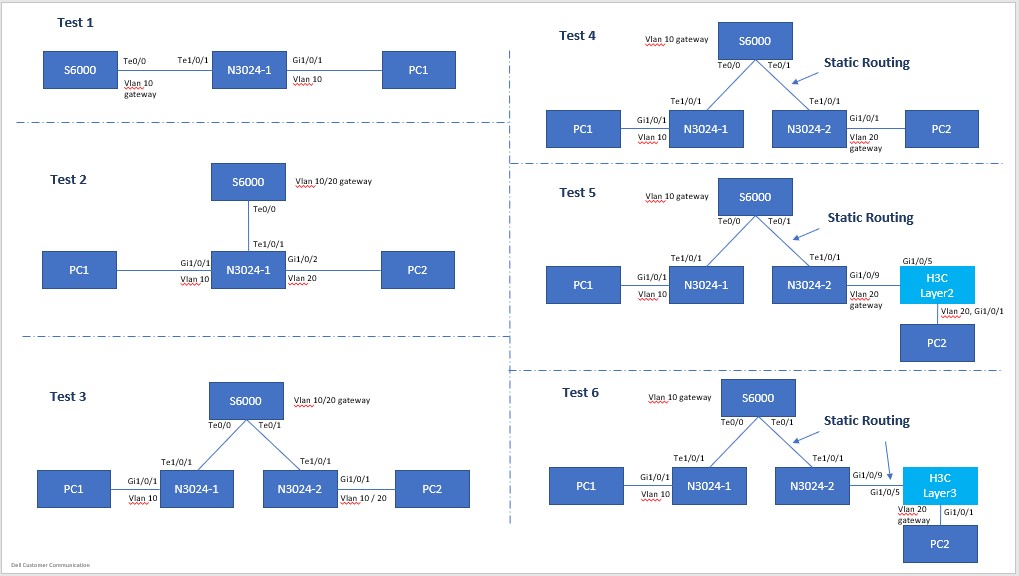
Topologikonfiguration
PC1: 192.168.10.100/24, Gateway: 192.168.10.1/24, VLAN10

    PC2: 192.168.10.200/24, Gateway: 192.168.10.1/24, VLAN10
EllerPC2: 192.168.20.200/24, Gateway: 192.168.20.1/24, VLAN20
PC1 ping switch gateway (direktansluten) Test 1-6; Samma resultat ses, oavsett topologi
Pinging 192.168.10.1 with 32 bytes of data:
Reply from 192.168.10.1: bytes=32 time<1ms TTL=255
Reply from 192.168.10.1: bytes=32 time=5ms TTL=255
Reply from 192.168.10.1: bytes=32 time=47ms TTL=255  <------ high latency !
Reply from 192.168.10.1: bytes=32 time=5ms TTL=255
Reply from 192.168.10.1: bytes=32 time=5ms TTL=255
Reply from 192.168.10.1: bytes=32 time=1ms TTL=255
Reply from 192.168.10.1: bytes=32 time<1ms TTL=255
Reply from 192.168.10.1: bytes=32 time<1ms TTL=255
Reply from 192.168.10.1: bytes=32 time<1ms TTL=255
Reply from 192.168.10.1: bytes=32 time<1ms TTL=255
Reply from 192.168.10.1: bytes=32 time=32ms TTL=255  <------ high latency !
Reply from 192.168.10.1: bytes=32 time<1ms TTL=255
Reply from 192.168.10.1: bytes=32 time<1ms TTL=255
Reply from 192.168.10.1: bytes=32 time<1ms TTL=255
Reply from 192.168.10.1: bytes=32 time<1ms TTL=255
Reply from 192.168.10.1: bytes=32 time<1ms TTL=255
Reply from 192.168.10.1: bytes=32 time=6ms TTL=255
Reply from 192.168.10.1: bytes=32 time<1ms TTL=255
Reply from 192.168.10.1: bytes=32 time=40ms TTL=255  <------ high latency !
Reply from 192.168.10.1: bytes=32 time<1ms TTL=255
Reply from 192.168.10.1: bytes=32 time<1ms TTL=255
……
>>> (truncated)

Ping statistics for 192.168.10.1:
    Packets: Sent = 8280,Received = 8280,Lost = 0 (0% Loss)
Approximate round trip times in milli-seconds:
    Minimum = 0ms,Maximum = 55ms,Average = 1ms
Pinga mellan två datorer, transittrafik (lager 2, i samma och olika vlan) (test 1–3)
Pinging 192.168.10.200 with 32 bytes of data:
Reply from 192.168.10.200: bytes=32 time=1ms TTL=128
Reply from 192.168.10.200: bytes=32 time=1ms TTL=128
Reply from 192.168.10.200: bytes=32 time<1ms TTL=128
Reply from 192.168.10.200: bytes=32 time=1ms TTL=128
Reply from 192.168.10.200: bytes=32 time=1ms TTL=128
Reply from 192.168.10.200: bytes=32 time<1ms TTL=128
……
>>> (truncated),
……
Reply from 192.168.10.200: bytes=32 time<1ms TTL=128
Reply from 192.168.10.200: bytes=32 time<1ms TTL=128
Reply from 192.168.10.200: bytes=32 time<1ms TTL=128
Reply from 192.168.10.200: bytes=32 time<1ms TTL=128
Reply from 192.168.10.200: bytes=32 time<1ms TTL=128
Reply from 192.168.10.200: bytes=32 time=1ms TTL=128

Ping statistics for 192.168.10.200:
    Packets: Sent = 1233,Received = 1233,Lost = 0 (0% Loss)
Approximate round trip times in milli-seconds:
    Minimum = 0ms,Maximum = 2ms,Average = 0ms
Pinga mellan två datorer, transittrafik (Layer3, i två vlan) (test 4–6)
Pinging 192.168.20.200 with 32 bytes of data:
Reply from 192.168.20.200: bytes=32 time<1ms TTL=127
Reply from 192.168.20.200: bytes=32 time<1ms TTL=127
Reply from 192.168.20.200: bytes=32 time<1ms TTL=127
Reply from 192.168.20.200: bytes=32 time=1ms TTL=127
Reply from 192.168.20.200: bytes=32 time<1ms TTL=127
Reply from 192.168.20.200: bytes=32 time=1ms TTL=127
Reply from 192.168.20.200: bytes=32 time=1ms TTL=127
Reply from 192.168.20.200: bytes=32 time=1ms TTL=127
Reply from 192.168.20.200: bytes=32 time=1ms TTL=127
……
>>> (truncated),
……
Reply from 192.168.20.200: bytes=32 time<1ms TTL=127
Reply from 192.168.20.200: bytes=32 time<1ms TTL=127
Reply from 192.168.20.200: bytes=32 time=1ms TTL=127
Reply from 192.168.20.200: bytes=32 time=1ms TTL=127
Reply from 192.168.20.200: bytes=32 time<1ms TTL=127
Reply from 192.168.20.200: bytes=32 time=1ms TTL=127

Ping statistics for 192.168.20.200:
    Packets: Sent = 808,Received = 808,Lost = 0 (0% Loss)
Approximate round trip times in milli-seconds:
    Minimum = 0ms,Maximum = 2ms,Average = 0ms
Cause
Förklaring av resultat
Det har bekräftats med Dells tekniker att detta är ett normalt och förväntat beteende på grund av CPU-schemaläggning och köer.
Resolution
ICMP-testning bör endast användas som ett sätt att testa nåbarheten, snarare än svarstid eller förlust på grund av detta beteende. ICMP-trafikfördröjning är inte en återspegling av påverkan på normal produktionstrafik. Det här beteendet kan också förvärras av en upptagen processor – det vill säga för en switch som är i full produktion med en högre mängd trafik på den.