Dell Networking OS9 Bellenimi çalıştıran S serisi Anahtarlarda Görülen Aralıklı Yüksek ICMP Gecikme Süresi
Summary: Dell Networking OS9 Bellenimi çalıştıran S serisi Anahtarlarda Görülen Aralıklı Yüksek ICMP Gecikme Süresi
Symptoms
Bir istemci aygıtından genellikle VLAN arayüzünün IP'si olan ağ geçidine ICMP ping'i gerçekleştirmeye çalışırken yüksek gecikme süresiyle ilgili aralıklı bir sorun görülür. Bu sorun, üretim trafiği çok az olan veya hiç olmayan bir ağ geçidi anahtarına doğrudan bağlandığında bile görülebilir. Bazı müşteriler, bunun normal üretim trafiği üzerinde bir etkiyi yansıttığına dair endişeler olmuştur.
Sorun, OS9 bellenimini çalıştıran tüm S serisi platformlarda görülür.
ICMP testi için test senaryosu (Üretim trafiği yok)
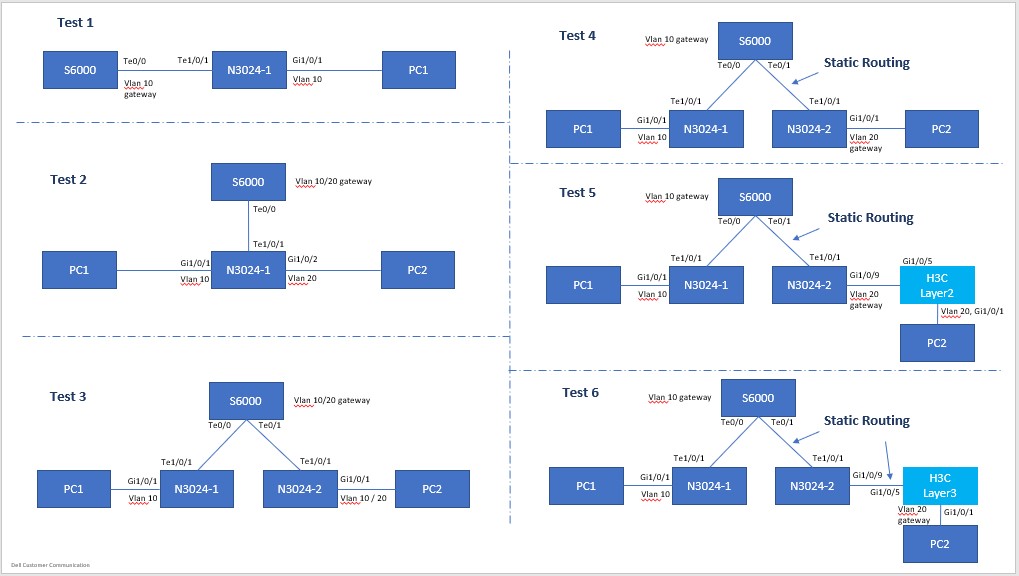
Topoloji Yapılandırması
PC1: 192.168.10.100/24, Gateway: 192.168.10.1/24, VLAN10

    PC2: 192.168.10.200/24, Gateway: 192.168.10.1/24, VLAN10
VeyaPC2: 192.168.20.200/24, Gateway: 192.168.20.1/24, VLAN20
PC1 ping anahtarı ağ geçidi (doğrudan bağlı) Test 1-6; Topolojiden bağımsız olarak aynı sonuç görülüyor
Pinging 192.168.10.1 with 32 bytes of data:
Reply from 192.168.10.1: bytes=32 time<1ms TTL=255
Reply from 192.168.10.1: bytes=32 time=5ms TTL=255
Reply from 192.168.10.1: bytes=32 time=47ms TTL=255  <------ high latency !
Reply from 192.168.10.1: bytes=32 time=5ms TTL=255
Reply from 192.168.10.1: bytes=32 time=5ms TTL=255
Reply from 192.168.10.1: bytes=32 time=1ms TTL=255
Reply from 192.168.10.1: bytes=32 time<1ms TTL=255
Reply from 192.168.10.1: bytes=32 time<1ms TTL=255
Reply from 192.168.10.1: bytes=32 time<1ms TTL=255
Reply from 192.168.10.1: bytes=32 time<1ms TTL=255
Reply from 192.168.10.1: bytes=32 time=32ms TTL=255  <------ high latency !
Reply from 192.168.10.1: bytes=32 time<1ms TTL=255
Reply from 192.168.10.1: bytes=32 time<1ms TTL=255
Reply from 192.168.10.1: bytes=32 time<1ms TTL=255
Reply from 192.168.10.1: bytes=32 time<1ms TTL=255
Reply from 192.168.10.1: bytes=32 time<1ms TTL=255
Reply from 192.168.10.1: bytes=32 time=6ms TTL=255
Reply from 192.168.10.1: bytes=32 time<1ms TTL=255
Reply from 192.168.10.1: bytes=32 time=40ms TTL=255  <------ high latency !
Reply from 192.168.10.1: bytes=32 time<1ms TTL=255
Reply from 192.168.10.1: bytes=32 time<1ms TTL=255
……
>>> (truncated)

Ping statistics for 192.168.10.1:
    Packets: Sent = 8280,Received = 8280,Lost = 0 (0% Loss)
Approximate round trip times in milli-seconds:
    Minimum = 0ms,Maximum = 55ms,Average = 1ms
İki bilgisayar arasında ping, aktarım trafiği (Katman2, aynı ve farklı VLAN'larda) (Test 1-3)
Pinging 192.168.10.200 with 32 bytes of data:
Reply from 192.168.10.200: bytes=32 time=1ms TTL=128
Reply from 192.168.10.200: bytes=32 time=1ms TTL=128
Reply from 192.168.10.200: bytes=32 time<1ms TTL=128
Reply from 192.168.10.200: bytes=32 time=1ms TTL=128
Reply from 192.168.10.200: bytes=32 time=1ms TTL=128
Reply from 192.168.10.200: bytes=32 time<1ms TTL=128
……
>>> (truncated),
……
Reply from 192.168.10.200: bytes=32 time<1ms TTL=128
Reply from 192.168.10.200: bytes=32 time<1ms TTL=128
Reply from 192.168.10.200: bytes=32 time<1ms TTL=128
Reply from 192.168.10.200: bytes=32 time<1ms TTL=128
Reply from 192.168.10.200: bytes=32 time<1ms TTL=128
Reply from 192.168.10.200: bytes=32 time=1ms TTL=128

Ping statistics for 192.168.10.200:
    Packets: Sent = 1233,Received = 1233,Lost = 0 (0% Loss)
Approximate round trip times in milli-seconds:
    Minimum = 0ms,Maximum = 2ms,Average = 0ms
İki bilgisayar arasında ping, aktarım trafiği (Layer3, iki VLAN'da) (Test 4-6)
Pinging 192.168.20.200 with 32 bytes of data:
Reply from 192.168.20.200: bytes=32 time<1ms TTL=127
Reply from 192.168.20.200: bytes=32 time<1ms TTL=127
Reply from 192.168.20.200: bytes=32 time<1ms TTL=127
Reply from 192.168.20.200: bytes=32 time=1ms TTL=127
Reply from 192.168.20.200: bytes=32 time<1ms TTL=127
Reply from 192.168.20.200: bytes=32 time=1ms TTL=127
Reply from 192.168.20.200: bytes=32 time=1ms TTL=127
Reply from 192.168.20.200: bytes=32 time=1ms TTL=127
Reply from 192.168.20.200: bytes=32 time=1ms TTL=127
……
>>> (truncated),
……
Reply from 192.168.20.200: bytes=32 time<1ms TTL=127
Reply from 192.168.20.200: bytes=32 time<1ms TTL=127
Reply from 192.168.20.200: bytes=32 time=1ms TTL=127
Reply from 192.168.20.200: bytes=32 time=1ms TTL=127
Reply from 192.168.20.200: bytes=32 time<1ms TTL=127
Reply from 192.168.20.200: bytes=32 time=1ms TTL=127

Ping statistics for 192.168.20.200:
    Packets: Sent = 808,Received = 808,Lost = 0 (0% Loss)
Approximate round trip times in milli-seconds:
    Minimum = 0ms,Maximum = 2ms,Average = 0ms
Cause
Sonuçların Açıklanması
CPU zamanlaması ve kuyruğa alma nedeniyle bunun normal ve beklenen bir davranış olduğu Dell Mühendislik ekibi ile doğrulanmıştır.
Resolution
ICMP testi, bu davranıştan kaynaklanan gecikme veya kayıptan ziyade yalnızca erişilebilirliği test etmek için bir araç olarak kullanılmalıdır. ICMP trafik gecikmesi, normal üretim trafiği üzerindeki etkinin bir yansıması değildir. Bu davranış, meşgul bir CPU tarafından daha da kötüleşebilir - bu, üzerinde daha fazla trafik olan tam üretim olan bir anahtar içindir.