Dell Networking에서 OS9 펌웨어를 실행하는 S-Series 스위치에서 ICMP 레이턴시가 간헐적으로 발생함
Summary: Dell Networking에서 OS9 펌웨어를 실행하는 S-Series 스위치에서 ICMP 레이턴시가 간헐적으로 발생함
This article applies to
This article does not apply to
This article is not tied to any specific product.
Not all product versions are identified in this article.
Symptoms
클라이언트 디바이스에서 게이트웨이(일반적으로 VLAN 인터페이스의 IP)로 ICMP ping을 수행하려고 할 때 높은 레이턴시와 관련된 간헐적인 문제가 발생합니다. 이 문제는 프로덕션 트래픽이 거의 또는 전혀 없는 게이트웨이 스위치에 직접 연결된 경우에도 계속 나타날 수 있습니다. 정상적인 운영 트래픽에 영향을 미치는 것 아니냐는 고객의 우려가 있었습니다.
OS9 펌웨어를 실행하는 모든 S-Series 플랫폼에서 나타나는 문제입니다.
ICMP 테스트를 위한 테스트 시나리오(프로덕션 트래픽 없음)
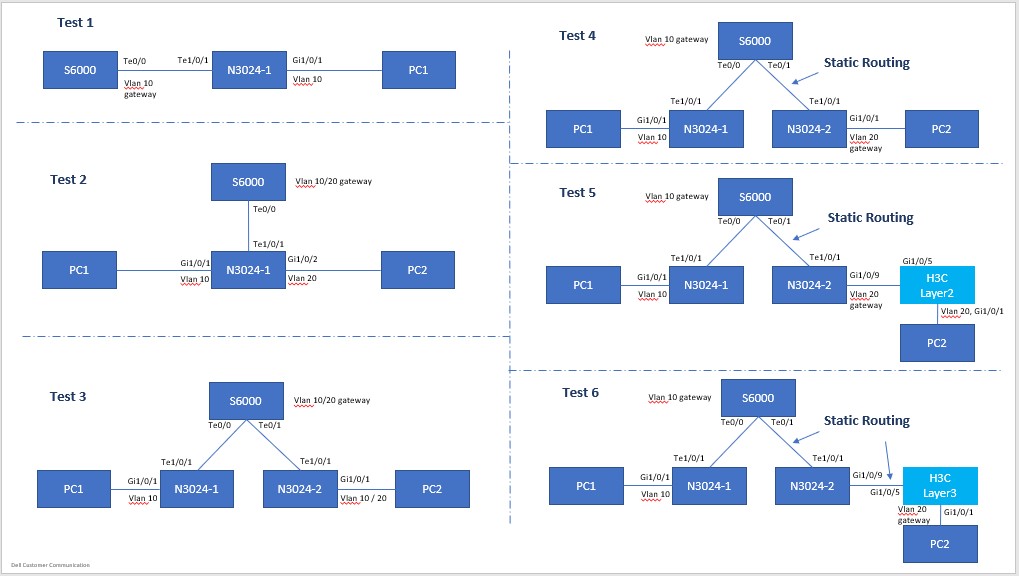
토폴로지 구성
PC1: 192.168.10.100/24, Gateway: 192.168.10.1/24, VLAN10

    PC2: 192.168.10.200/24, Gateway: 192.168.10.1/24, VLAN10
또는PC2: 192.168.20.200/24, Gateway: 192.168.20.1/24, VLAN20
참고: 클라이언트 디바이스 간의 Ping은 일반적으로 영향을 받지 않으므로 모든 테스트 결과가 여기에 나열되지는 않습니다. 이 문제는 클라이언트 디바이스에서 스위치의 게이트웨이 IP로 ping하는 경우에만 발생합니다.
PC1 핑 스위치 게이트웨이(직접 연결됨) 테스트 1-6; 토폴로지에 관계없이 동일한 결과 표시
Pinging 192.168.10.1 with 32 bytes of data:
Reply from 192.168.10.1: bytes=32 time<1ms TTL=255
Reply from 192.168.10.1: bytes=32 time=5ms TTL=255
Reply from 192.168.10.1: bytes=32 time=47ms TTL=255  <------ high latency !
Reply from 192.168.10.1: bytes=32 time=5ms TTL=255
Reply from 192.168.10.1: bytes=32 time=5ms TTL=255
Reply from 192.168.10.1: bytes=32 time=1ms TTL=255
Reply from 192.168.10.1: bytes=32 time<1ms TTL=255
Reply from 192.168.10.1: bytes=32 time<1ms TTL=255
Reply from 192.168.10.1: bytes=32 time<1ms TTL=255
Reply from 192.168.10.1: bytes=32 time<1ms TTL=255
Reply from 192.168.10.1: bytes=32 time=32ms TTL=255  <------ high latency !
Reply from 192.168.10.1: bytes=32 time<1ms TTL=255
Reply from 192.168.10.1: bytes=32 time<1ms TTL=255
Reply from 192.168.10.1: bytes=32 time<1ms TTL=255
Reply from 192.168.10.1: bytes=32 time<1ms TTL=255
Reply from 192.168.10.1: bytes=32 time<1ms TTL=255
Reply from 192.168.10.1: bytes=32 time=6ms TTL=255
Reply from 192.168.10.1: bytes=32 time<1ms TTL=255
Reply from 192.168.10.1: bytes=32 time=40ms TTL=255  <------ high latency !
Reply from 192.168.10.1: bytes=32 time<1ms TTL=255
Reply from 192.168.10.1: bytes=32 time<1ms TTL=255
……
>>> (truncated)

Ping statistics for 192.168.10.1:
    Packets: Sent = 8280,Received = 8280,Lost = 0 (0% Loss)
Approximate round trip times in milli-seconds:
    Minimum = 0ms,Maximum = 55ms,Average = 1ms
두 PC, 트랜짓 트래픽 간 Ping(레이어 2, 동일하거나 다른 VLAN에 있음)(테스트 1-3)
Pinging 192.168.10.200 with 32 bytes of data:
Reply from 192.168.10.200: bytes=32 time=1ms TTL=128
Reply from 192.168.10.200: bytes=32 time=1ms TTL=128
Reply from 192.168.10.200: bytes=32 time<1ms TTL=128
Reply from 192.168.10.200: bytes=32 time=1ms TTL=128
Reply from 192.168.10.200: bytes=32 time=1ms TTL=128
Reply from 192.168.10.200: bytes=32 time<1ms TTL=128
……
>>> (truncated),
……
Reply from 192.168.10.200: bytes=32 time<1ms TTL=128
Reply from 192.168.10.200: bytes=32 time<1ms TTL=128
Reply from 192.168.10.200: bytes=32 time<1ms TTL=128
Reply from 192.168.10.200: bytes=32 time<1ms TTL=128
Reply from 192.168.10.200: bytes=32 time<1ms TTL=128
Reply from 192.168.10.200: bytes=32 time=1ms TTL=128

Ping statistics for 192.168.10.200:
    Packets: Sent = 1233,Received = 1233,Lost = 0 (0% Loss)
Approximate round trip times in milli-seconds:
    Minimum = 0ms,Maximum = 2ms,Average = 0ms
두 PC 간 Ping, 전송 트래픽(레이어 3, 두 VLAN에서)(테스트 4-6)
Pinging 192.168.20.200 with 32 bytes of data:
Reply from 192.168.20.200: bytes=32 time<1ms TTL=127
Reply from 192.168.20.200: bytes=32 time<1ms TTL=127
Reply from 192.168.20.200: bytes=32 time<1ms TTL=127
Reply from 192.168.20.200: bytes=32 time=1ms TTL=127
Reply from 192.168.20.200: bytes=32 time<1ms TTL=127
Reply from 192.168.20.200: bytes=32 time=1ms TTL=127
Reply from 192.168.20.200: bytes=32 time=1ms TTL=127
Reply from 192.168.20.200: bytes=32 time=1ms TTL=127
Reply from 192.168.20.200: bytes=32 time=1ms TTL=127
……
>>> (truncated),
……
Reply from 192.168.20.200: bytes=32 time<1ms TTL=127
Reply from 192.168.20.200: bytes=32 time<1ms TTL=127
Reply from 192.168.20.200: bytes=32 time=1ms TTL=127
Reply from 192.168.20.200: bytes=32 time=1ms TTL=127
Reply from 192.168.20.200: bytes=32 time<1ms TTL=127
Reply from 192.168.20.200: bytes=32 time=1ms TTL=127

Ping statistics for 192.168.20.200:
    Packets: Sent = 808,Received = 808,Lost = 0 (0% Loss)
Approximate round trip times in milli-seconds:
    Minimum = 0ms,Maximum = 2ms,Average = 0ms
Cause
결과 설명
Dell 엔지니어링 팀에서 CPU 스케줄링 및 대기열로 인한 정상적이고 예상되는 동작임을 확인했습니다.
Resolution
ICMP 테스트는 이 동작으로 인한 대기 시간이나 손실이 아닌 도달 가능성을 테스트하는 수단으로만 사용해야 합니다. ICMP 트래픽 레이턴시는 정상적인 운영 트래픽에 미치는 영향을 반영하지 않습니다. 이 동작은 사용량이 많은 CPU에 의해서도 악화될 수 있습니다. 즉, 더 많은 양의 트래픽이 있는 전체 운영 중인 스위치의 경우입니다.
Affected Products
PowerSwitch S3048-ON, PowerSwitch S4048-ON, PowerSwitch S4810-ON, PowerSwitch S4820T, PowerSwitch S5000, Dell Networking S3100 Series, PowerSwitch S4048T-ON, PowerSwitch S4112F-ON/S4112T-ON, PowerSwitch S4128F-ON/S4128T-ON
, PowerSwitch S4148F-ON/S4148T-ON/S4148FE-ON, PowerSwitch S4148U-ON, PowerSwitch S4248FB-ON /S4248FBL-ON, PowerSwitch S5048F-ON, PowerSwitch S5148F-ON, PowerSwitch S5212F-ON, PowerSwitch S5224F-ON, PowerSwitch S5232F-ON, PowerSwitch S5248F-ON, PowerSwitch S5296F-ON, PowerSwitch S6010-ON, PowerSwitch S6100-ON
...
Article Properties
Article Number: 000135228
Article Type: Solution
Last Modified: 13 Nov 2025
Version: 6
Find answers to your questions from other Dell users
Support Services
Check if your device is covered by Support Services.