Windows Server: Cannot convert the Server Core evaluation edition to the Standard non-evaluation edition
Summary: The Server Core edition (without the graphical interface) of Windows Server Standard cannot be converted from an evaluation to non-evaluation version. There is no known fix for this issue other than to reinstall the evaluation with the Desktop Experience graphical interface. ...
Symptoms
If the Windows Server Standard evaluation, which can be downloaded from Microsoft
The supported procedure for performing this conversion is the same as that for upgrading a Standard edition installation to the Datacenter edition:
- Run
dism /online /get-targeteditionsto list the available editions to which the running OS can be converted. - Run
dism /online /set-edition:<target> /productkey:<key> /accepteulato begin the conversion. In this command,<target>is the name of the target edition from the output of step #1, and<key>is a valid product key for that edition.
This procedure is documented in several locations, including Microsoft's website. However, when the first command is run on a Server Core installation of the Standard evaluation edition, the output lists ServerDatacenterCor as the only possible target edition: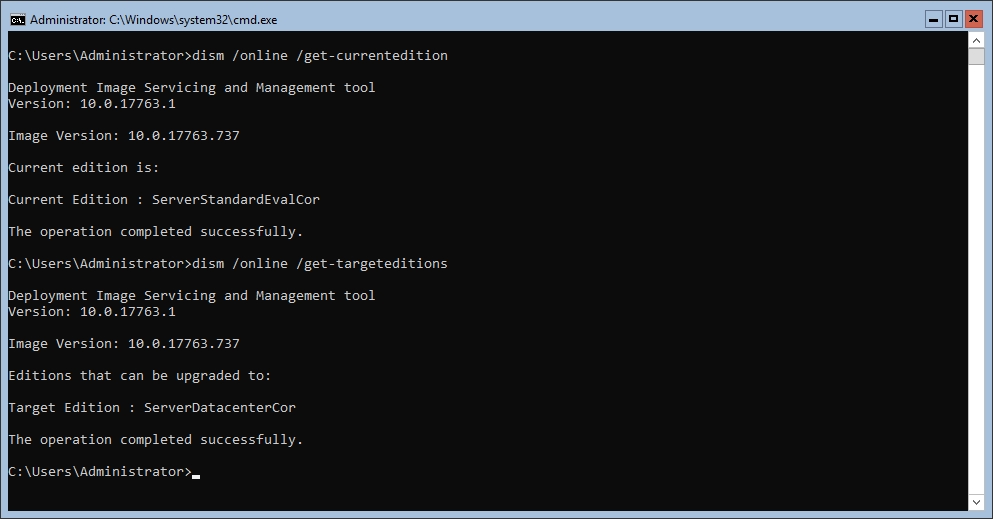
Figure 1: ServerDatacenterCor is shown as the only available target edition.ServerStandardCor should also be listed as a target edition, but it is missing. If the conversion is attempted with ServerStandardCor as the target, the following error is displayed:
Figure 2: Error 1168 is given when ServerStandardCor is specified as the target edition.
. It cannot be used to activate Windows Server 2019 outside of a KMS environment.
The dism.log file mentioned in the screenshot above indicates that the conversion is allowed and begins running. However, it soon fails with the following error:
DISM Transmog Provider: PID=### TID=### Failed to copy edition license file. - ThreadSkuInstallEula(hr:0x80070490)
Error code 0x80070490 translates to "Element not found."
Cause
This is a known issue. Microsoft mentions it here,
Resolution
This appears to be an issue in the Windows Server Standard evaluation image when installed in Server Core mode. There is no known solution for this issue other than reinstalling the evaluation operating system with the Desktop Experience included. Testing has shown that this version can be converted to the non-evaluation version using the dism.exe commands mentioned above.
The dism /online /cleanup-image /restorehealth command does not fix this issue, as it is not a result of component store corruption.
Converting from the Windows Server Standard Core evaluation to the ServerDatacenterCor edition does succeed. However, this requires a valid Windows Server Datacenter edition product key.