IDPA:DPA 重新部署後,DPA 中的資料收集失敗
Summary: 本知識文章提供在重新部署 IDPA DPA 後,解決 DPA 資料收集問題的指示。
This article applies to
This article does not apply to
This article is not tied to any specific product.
Not all product versions are identified in this article.
Symptoms
DPA 已重新部署在 IDPA 系統上,但報告中沒有資料。嘗試執行除錯資料收集失敗。
dpaagent.log已停止或顯示「存儲和轉發佇列已滿」。這表示代理無法與APP伺服器通信。
Cause
代理已失去與應用服務的連接。原因不明。
Resolution
注意:此問題的修正已新增至 goidpa 工具,請遵循以下 KB 安裝 goidpa:
然後在 ACM 上執行下列命令:
./goidpa dpa agent-register
如果 goidpa 命令無法解決此問題,請按照以下過程手動配置代理並將其重新註冊到 APP 伺服器。
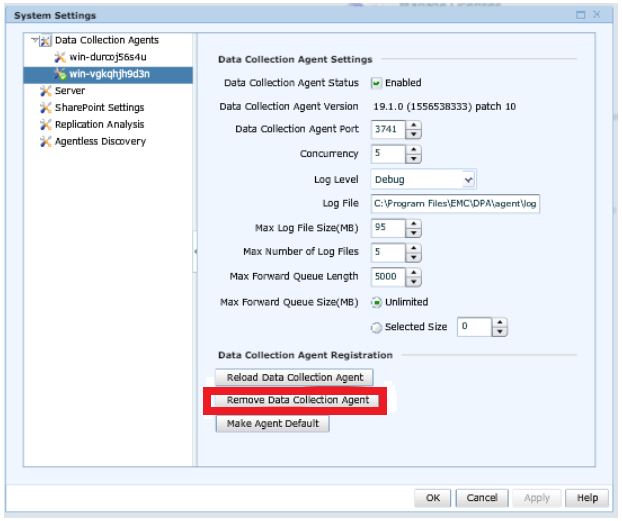
- 在 DPA UI 中,前往系統管理員>系統>設定系統設定。在彈出框中,按兩下 數據收集代理 旁邊的箭頭以展開清單。突出顯示正在使用的代理、應用程式或單獨的數據收集伺服器。然後按一下 移除代理程式 按鈕。
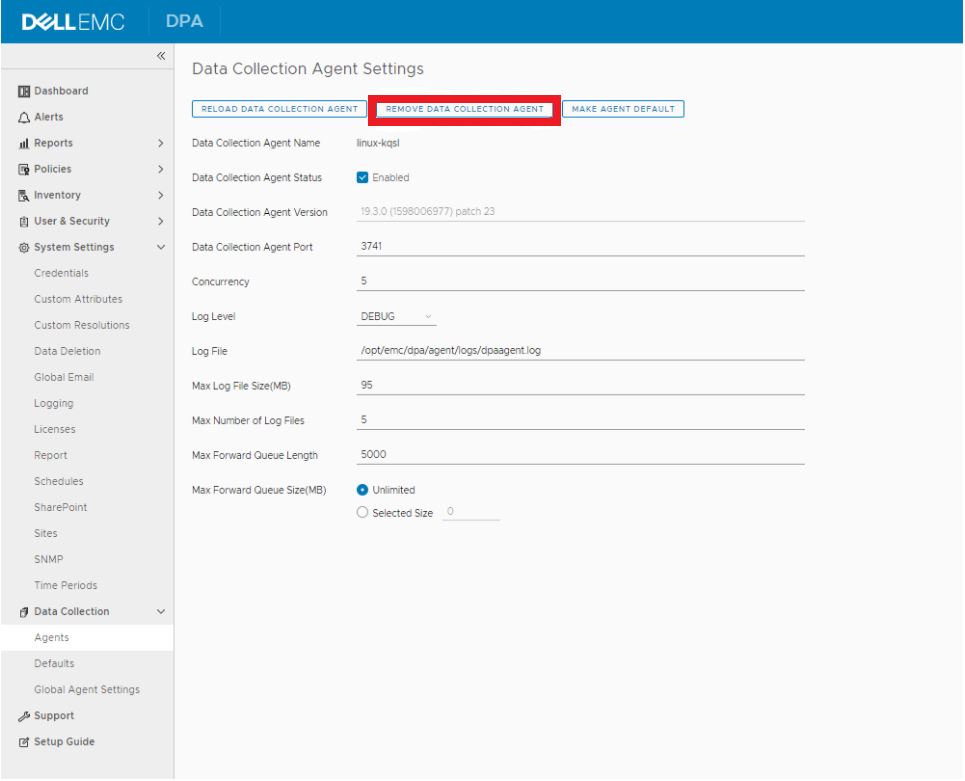
在 IDPA 2.6 或 DPA 19.3 中,前往 資料收集>代理 程式,然後反白顯示代理程式,然後按一下 資料收集代理程式設定 按鈕。然後按一下 移除代理程式按鈕。
- 登入 DPA APP 伺服器,然後前往
/opt/emc/dpa/services/bin directory並執行下列命令:
./dpa.sh app agentpassword
輸入密碼 (通常是 IDPA 一般密碼) 並確認密碼。
./dpa.sh app restart - 登入 DPA 代理程式伺服器 (對於 DP 4400,這是應用程式伺服器)。
- 瀏覽至
/opt/emc/dpa/agent/etc並執行下列步驟:
- 瀏覽至
vi dpaagent_config.xml
#Check the <servername> tag, is this the DPA APP IP address? If it is not then change to the DPA APP IP. Once this is the DPA APP IP save and exit.
./dpa stop-
- 瀏覽至
/opt/emc/dpa/agent/data並執行下列步驟:
- 瀏覽至
mkdir olddata
mv * olddata/-
- 瀏覽至
/opt/emc/dpa/agent/etc並執行下列步驟:
- 瀏覽至
./dpa start -
- 瀏覽至
/opt/emc/dpa/agent/bin並執行下列步驟:
- 瀏覽至
./dpaagent --set-credentials
#put in the passwork you set in step 2, confirm the password -
- 瀏覽至
/opt/emc/dpa/agent/etc並執行下列步驟:
- 瀏覽至
./dpa start -
- 瀏覽至
/opt/emc/dpa/agent/logs並檢查dpaagent.log,查看重新啟動後是否有任何錯誤。
- 瀏覽至
- 再次開啟 DPA UI,然後前往系統管理員>系統>設定系統設定。在彈出框中,按兩下 數據收集代理 旁邊的箭頭以展開清單。查看代理是否再次出現。
前往 清查>物件庫>應用程式標籤。選取 Avamar,然後按一下 內容 按鈕,在 內容 快顯方塊中,按一下 資料收集 標籤。選取 Avamar Job Monitor 集合,然後按一下歷程記錄按鈕。檢查上次的資料收集是否成功。
如有任何問題,請聯絡 Dell 支援。
Affected Products
Integrated Data Protection Appliance FamilyProducts
Data Protection Advisor, PowerProtect Data Protection SoftwareArticle Properties
Article Number: 000181653
Article Type: Solution
Last Modified: 02 Dec 2025
Version: 3
Find answers to your questions from other Dell users
Support Services
Check if your device is covered by Support Services.