PowerFlex:不允许混合使用 LACP 和非 LACP 端口组 VXFM00529
Summary: PowerFlex Manager更新服务详细信息失败,并显示错误“不允许混合使用 LACP 和非 LACP 端口组”,这是由重复的端口组名称或容错端口组活动上行链路导致的。
This article applies to
This article does not apply to
This article is not tied to any specific product.
Not all product versions are identified in this article.
Symptoms
重复的端口组名称可能会导致 PowerFlex Manager中的更新服务详细信息失败。
当管理和生产 DC/群集在单个 vCenter 上具有重复的端口组名称时,会出现这些问题。
对于设备和机架构建,使用单个 vCenter。MGMT(例如 LAG)和 PROD(例如 lag1)的 LAG 名称不同。
这会导致 PowerFlex Manager资源清册数据无法正确读取端口组。进而会导致更新服务详细信息失败,并显示错误“不允许混合使用 LACP 和非 LACP 端口组”。
如果在 vCenter 中手动创建端口组,并且其活动上行链路未设置为与 PROD 端口组相同(例如 lag1),也可能会出现相同的错误。
在下面的附件中,Fault Tolerant 端口组是手动创建的,其活动上行链路与 PROD 端口组不同(例如 lag1)。 
在下面的附件中,容错端口组现在具有与 PROD 端口组相同的活动上行链路(例如 lag1)。 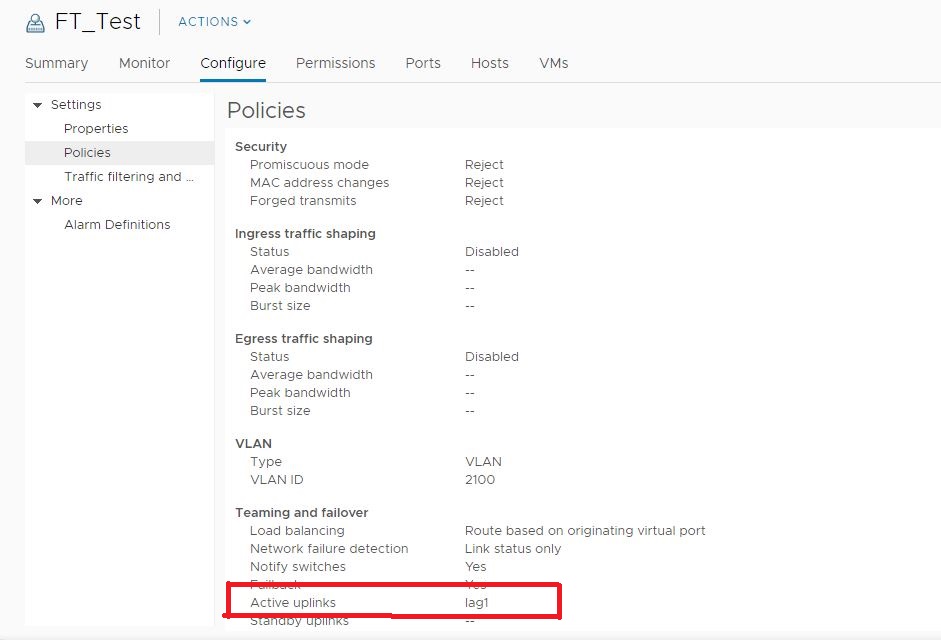
Cause
PowerFlex Manager不会正确记录端口组,除非它们具有唯一名称。
Resolution
检查 vCenter 中的所有端口组,以确认 lag 是活动上行链路,并且没有重复的端口组名称。如果有,请将管理端口组重命名为唯一名称,并在 PowerFlex Manager中更新 vCenter 资源清册。
如果端口组是手动创建的,请验证其活动上行链路是否与 PROD 端口组相同(例如,lag1)。
此问题预计将在未来的 PowerFlex Manager 版本中得到解决。
Affected Products
PowerFlex rackProducts
PowerFlex custom node, PowerFlex appliance R650, PowerFlex appliance R6525, PowerFlex appliance R660, PowerFlex appliance R6625, Powerflex appliance R750, PowerFlex appliance R760, PowerFlex appliance R7625, PowerFlex custom node
, PowerFlex custom node R650, PowerFlex custom node R6525, PowerFlex custom node R660, PowerFlex custom node R6625, PowerFlex custom node R750, PowerFlex custom node R760, PowerFlex custom node R7625, PowerFlex custom node R860, PowerFlex appliance R640, PowerFlex appliance R740XD, PowerFlex appliance R7525, PowerFlex appliance R840
...
Article Properties
Article Number: 000184619
Article Type: Solution
Last Modified: 25 Nov 2025
Version: 4
Find answers to your questions from other Dell users
Support Services
Check if your device is covered by Support Services.