PowerFlex: Performance Settings that Should be Set Before and After RCM Upgrades
Summary: PowerFlex Rebuild, Rebalance, and Maintenance policies that should be set before and after RCM upgrades.
This article applies to
This article does not apply to
This article is not tied to any specific product.
Not all product versions are identified in this article.
Symptoms
During RCM upgrades, it can take a long time to perform protected maintenance mode operations.
Current Rebuild, Rebalance, or Maintenance policies may result in extended data transfer times to other SDSs in the same protection domain.
Current Rebuild, Rebalance, or Maintenance policies may result in extended data transfer times to other SDSs in the same protection domain.
Cause
If Rebuild, Rebalance, and Maintenance Policy values are left at default values, I/O prioritization toward RCM upgrades may not be maximized. Wait times per node may take longer than expected.
Description of what these values do are listed below:
Description of what these values do are listed below:
- Rebuild at a system level creates blocks of data due to a failure of a drive. Rebuild creates the second copy in order to make your system fully protected, hence the higher priority the sooner you are fully protected again.
- Rebalance at an operation level maintains the separation of data across SDSs within the same protection domain.
- Maintenance policy defines the number of threads per disk during protected maintenance mode.
Resolution
Procedure:
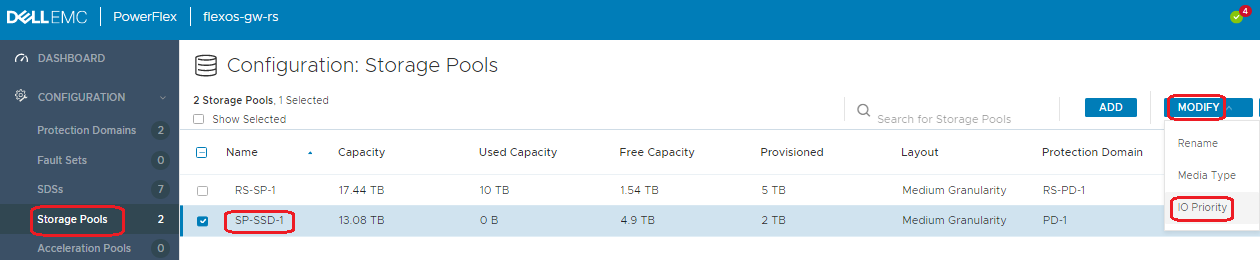

Note: If the client allows, all three can be set to "unlimited."
- From within PowerFlex Presentation Server, go to Configuration > Storage Pools > Choose a storage pool > Modify > I/O Priority. Take note of existing settings.
- Change Rebuild, Rebalance, and Maintenance Mode values according to charts below:
Note: Ensure that customer is ok with these changes before changing the values. If I/O workload has historically been high, they may choose to not make change.
- Before starting RCM upgrade, ensure that the following three values are set:
Note: This ensures that each node finishes RCM upgrade faster:
| Rebuild policy | unlimited |
| Rebalance policy | unlimited |
| Maintenance Mode policy | Limit concurrent I/O 10 (I/O per drive) |
Note: If the client allows, all three can be set to "unlimited."
- After RCM upgrade is complete, change settings back to values that were documented in step 1.
Below is Engineering default values:
| Rebuild policy | Limit concurrent I/O 1 (I/O per drive) |
| Rebalance policy | Favor Application I/O 1 (I/O per drive) Bandwidth I/O limit: 10240 Kb/s |
| Maintenance Mode policy | limit concurrent I/O 1 (I/O per drive) |
Affected Products
Hyper-converged Systems, PowerFlex rack, ScaleIOArticle Properties
Article Number: 000186547
Article Type: Solution
Last Modified: 28 Apr 2025
Version: 7
Find answers to your questions from other Dell users
Support Services
Check if your device is covered by Support Services.