使用 CreateRemoteThread 或 NtQueueApcThread 的 VMware Carbon Black Cloud Endpoint 程式碼導入警示增加
Summary: 本文探討使用 CreateRemoteThread 或 NTQueueApcThread 的 VMware Carbon Black Cloud Endpoint 程式碼導入警示增加的問題。
This article applies to
This article does not apply to
This article is not tied to any specific product.
Not all product versions are identified in this article.
Symptoms
受影響的產品:
- VMware Carbon Black Cloud Endpoint
受影響的版本:
- v3.7.0.1253
Cause
升級或安裝感應器版本 3.7.0.1253 後,您可透過呼叫功能 CreateRemoteThread 或 NtQueueApcThread,看到程式碼導入顯示的警示增加。

注意:在此範例中,VMware Carbon Black Cloud 回報 svchost.exe 已將程式碼注入系統程序csrss.exe。
Resolution
支援部門正在調查顯示的警示增加的原因,以取得永久修正。
您可以安全地關閉針對下列功能觀察到的 插入程式碼 警示: CreateRemoteThread 或 NtQueueApcThread。
若要確認及關閉這些警示
- 在網頁瀏覽器中,前往 [REGION].conferdeploy.net。
注意:[REGION] = 租戶的地區
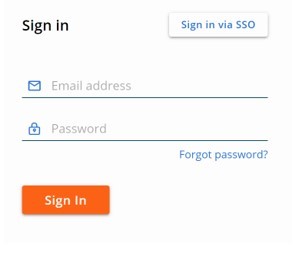
- 登入 VMware Carbon Black Cloud。
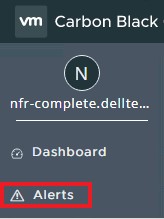
- 在左側功能表窗格中,按一下警示。
- 按一下插入號以展開警示。

- 按一下調查圖示。
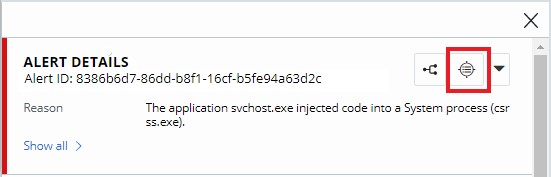
- 確認呼叫的功能為 CreateRemoteThread 或 NtQueueApcThread。
 注意:如果除了 CreateRemoteThread 或 NtQueueApcThread 以外的任何其他功能有出現導入程式碼警示,請聯絡支援以進一步調查。請參閱如何取得 VMware Carbon Black Cloud Endpoint 的支援。
 - 展開對應的事件,然後按一下關閉警示。

- 按一下關閉
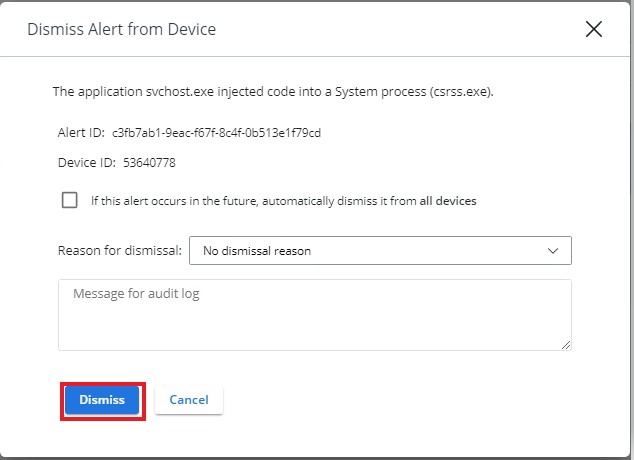 注意:您可以選擇關閉所有未來發生的項目,方法是勾選如果 未來出現此警示,請自動從所有裝置中將其關閉。

如要聯絡支援部門,請參閱 Dell Data Security 國際支援電話號碼。
請前往 TechDirect,以線上產生技術支援要求。
如需更多深入見解與資源,請加入 Dell 安全性社群論壇。
Affected Products
VMware Carbon BlackArticle Properties
Article Number: 000191040
Article Type: Solution
Last Modified: 08 Aug 2024
Version: 5
Find answers to your questions from other Dell users
Support Services
Check if your device is covered by Support Services.