ClickOnceを使用して導入したアプリケーションが、Dell Encryption EnterpriseまたはDell Encryption Personalを実行しているPCで起動できない
Summary: Dell Encryption EnterpriseまたはDell Encryption Personalを実行しているPCを再起動すると、ClickOnceを使用して導入したアプリケーションがスタートしないことがあります。
This article applies to
This article does not apply to
This article is not tied to any specific product.
Not all product versions are identified in this article.
Symptoms
対象製品:
- Dell Encryption Enterprise
- Dell Encryption Personal
影響を受けるバージョン:
- v10.2~11.0
対象オペレーティング システム:
- Windows
ClickOnceを使用して導入されたアプリケーションは、再起動後にDell Encryptionを使用したコンピューターで起動に失敗し、アプリケーションのサイド バイ サイド構成が正しくないため、アプリケーションの起動に失敗したことが確認されています。ユーザーがアプリケーションを起動しようとすると、次のエラーが表示されることがあります。
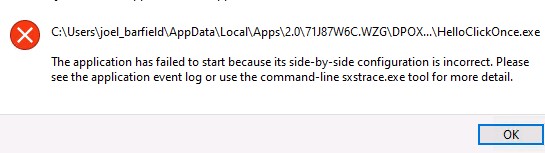
図1: (英語のみ)アプリケーションの起動中にエラーが発生しました
Cause
これは、ClickOnceアプリケーション.configによって使用されるファイル、または .manifestファイルの破損が終了しているためです。暗号化ドライバーは、これらのメタデータ ファイルを適切にハード リンクできません。
Resolution
この問題は、Dell Encryption EnterpriseとDell Encryption Personal Editionのv11.1で解決済みです。
サポートに問い合わせるには、「Dell Data Securityのインターナショナル サポート電話番号」を参照してください。
TechDirectにアクセスして、テクニカル サポート リクエストをオンラインで生成します。
さらに詳しい情報やリソースについては、「デル セキュリティ コミュニティー フォーラム」に参加してください。
Affected Products
Dell EncryptionArticle Properties
Article Number: 000191189
Article Type: Solution
Last Modified: 06 Sept 2023
Version: 3
Find answers to your questions from other Dell users
Support Services
Check if your device is covered by Support Services.