PowerFlex 3.X: SSL-oletusvarmenteen uusiminen
Summary: PowerFlex Manager luo käyttöönoton yhteydessä 2 vuoden oletusarvoisen itse allekirjoitetun SSL-varmenteen. Voit korvata tämän SSL-oletusvarmenteen luomalla CSR:n, varmentamalla sen luotetulla varmenteen myöntäjällä ja lataamalla allekirjoitetun varmenteen PowerFlex Manageriin. Jos et käytä luotettua varmenteen myöntäjää ja sinun on uusittava oletusarvoinen itse allekirjoitettu SSL-varmenne, voit käyttää seuraavia ohjeita. ...
Instructions
Tämä luo uuden 2 vuoden itse allekirjoitetun SSL-varmenteen. Tämä tulisi tehdä vain, jos oletusarvoinen itse allekirjoitettu SSL-varmenne on edelleen käytössä.
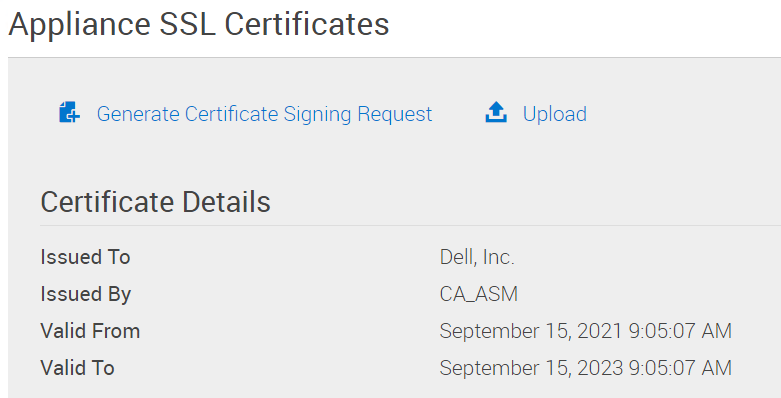
1 - Varmista, että oletusarvoinen SSL-varmenne on edelleen käytössä:
PowerFlex Manager -> Asetukset -> Virtuaalilaitteiden hallinta -> Laitteen SSL-varmenteet
Varmenteen tiedot -kohdassa lukee Dell, Inc. ja Myöntänyt CA_ASM
Valid From -päivämäärä on PowerFlex Managerin käyttöönottopäivä.
"Voimassa uuteen" -päivämäärä on 2 vuotta myöhemmin.
2 – Kirjaudu PowerFlex Manager -laitteeseen delladmin-käyttäjänä.
3-
sudo su -
4. Poista vanhat itse allekirjoitetut CA-tiedot:
   >  cd /opt/Dell/ssl
   >  rake reset_ca
5 – Poista vanha itse allekirjoitettu varmenne.
> rm /etc/pki/tls/certs/localhost.crt
6 – Käynnistä PowerFlex Manager uudelleen
> shutdown -r now
7. Varmista, että uusi itse allekirjoitettu SSL-varmenne on ladattu: PowerFlex Manager -> Asetukset -> Virtuaalilaitteiden hallinta -> Laitteen SSL-varmenteet "Varmenteen tiedot" -kohdassa lukee "Myönnetty", "Dell, Inc." ja "Myöntäjä", "CA_ASM". Voimassa vuodesta -päivämäärä on kuluva päivämäärä. "Voimassa uuteen" -päivämäärä on 2 vuotta myöhemmin.