PowerFlex 3.X:如何續約預設的 SSL 憑證
Summary: PowerFlex Manager 在部署時會產生 2 年預設的自我簽署 SSL 憑證。 您可以透過產生 CSR 來更換此預設的 SSL 憑證,該憑證必須由受信任的認證機構簽署,然後將已簽署的憑證上傳至 PowerFlex Manager。 如果您不是使用受信任的證書頒發機構,並且必須續訂預設的自簽名 SSL 證書,則可以使用以下說明。
This article applies to
This article does not apply to
This article is not tied to any specific product.
Not all product versions are identified in this article.
Instructions
這將生成一個新的 2 年自我簽署 SSL 證書。 僅當仍在使用預設的自我簽署 SSL 憑證時,才應執行此操作。
1- 確認仍在使用預設的 SSL 憑證:
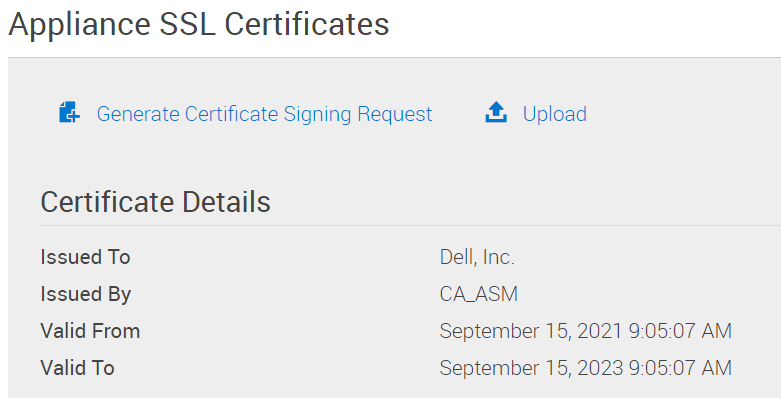
PowerFlex Manager -> 設定 -> 虛擬裝置管理 -> 裝置 SSL 憑證
「憑證詳細資料」會顯示為「簽發給」「Dell, Inc.」和「簽發者」CA_ASM
「有效起始」日期將為 PowerFlex Manager 部署的日期。
「有效期限」日期將為 2 年後。
2- 使用 delladmin 使用者登入 PowerFlex Manager 裝置
3-
sudo su -
4- 刪除舊的自我簽署 CA 資料:
   >  cd /opt/Dell/ssl
   >  rake reset_ca
5- 移除舊的自我簽署憑證。
> rm /etc/pki/tls/certs/localhost.crt
6- 重新啟動 PowerFlex Manager
> shutdown -r now
7- 確認已載入新的自我簽署 SSL 憑證:PowerFlex Manager -> 設定 -> 虛擬裝置管理 -> 裝置 SSL 憑證 「憑證詳細資料」會顯示為「簽發給」「Dell, Inc.」和「簽發者」 「CA_ASM」「有效起始」日期將為目前日期。「有效期限」日期將為 2 年後。
Affected Products
PowerFlex rackProducts
VxFlex Ready Nodes, PowerFlex custom node, PowerFlex appliance R650, PowerFlex appliance R6525, PowerFlex appliance R660, PowerFlex appliance R6625, Powerflex appliance R750, PowerFlex appliance R760, PowerFlex appliance R7625, PowerFlex custom node
, PowerFlex custom node R650, PowerFlex custom node R6525, PowerFlex custom node R660, PowerFlex custom node R6625, PowerFlex custom node R750, PowerFlex custom node R760, PowerFlex custom node R7625, PowerFlex custom node R860, PowerFlex appliance R640, PowerFlex appliance R740XD, PowerFlex appliance R7525, PowerFlex appliance R840
...
Article Properties
Article Number: 000191512
Article Type: How To
Last Modified: 25 Nov 2025
Version: 5
Find answers to your questions from other Dell users
Support Services
Check if your device is covered by Support Services.