OEM SUSE Linux Enterprise İşletim Sistemi Etkinleştirme
Summary: OEM SUSE Linux Enterprise İşletim Sistemini etkinleştirmek için işlem ve prosedür.
This article applies to
This article does not apply to
This article is not tied to any specific product.
Not all product versions are identified in this article.
Instructions
Perakende veya OEM Tarafından Satın Alınan Ürün veya Aboneliği Etkinleştirme
- Dell Digital Locker'dan (DDL) SUSE kayıt Kodunu, aşağıdaki hesapta DDL hesabınızla https://www.dell.com/support/software.
- Ardından SUSE Müşteri Merkezinde (SUSE Müşteri Merkezi) oturum açın
 . Zaten hesabınız yoksa bir hesap oluşturun.
 - Soldaki kenar çubuğundaki "My Tools" (Araçlarım) bölümünü belirleyin ve "Activate Subscriptions" (Abonelikleri Etkinleştir) öğesini seçin.
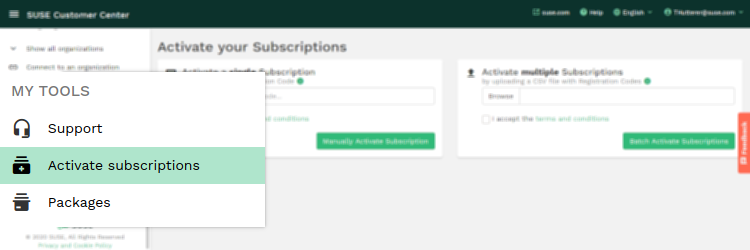
- Sayfada, bir CSV dosyası yükleyerek tek bir aboneliği veya birden çok aboneliği etkinleştirmek için iki seçenek bulunur. İkinci adım, abonelikleri mevcut veya yeni bir kuruluşla ilişkilendirmenizi sağlar.
Additional Information
Daha fazla bilgi için bkz.
https://scc.suse.com/docs/userguide#UG-Activating-and-Managing-Subscriptions

https://scc.suse.com/docs/userguide#UG-Activating-and-Managing-Subscriptions
Affected Products
SUSE Linux Enterprise Server 11, SUSE Linux Enterprise Server 12, SUSE Linux Enterprise Server 15Article Properties
Article Number: 000198754
Article Type: How To
Last Modified: 26 Jun 2025
Version: 10
Find answers to your questions from other Dell users
Support Services
Check if your device is covered by Support Services.