Dell Networking OS10: Installation af et nyt billede med ONIE
Summary: Ny OS10-afbildning installeres ved hjælp af ONIE
Instructions
Forudsætninger:
BEMÆRK: Når ONIE startede i ONIE-installationstilstand, fortsætter ONIE-installationstilstanden, indtil et operativsystem er installeret korrekt.
- Aktiv konsolforbindelse til switchen
- Adgang til ONIE>ONIE-installationen
- IP-adresse, undernetmaske og standardgateway (efter behov), der er tildelt administrationsgrænsefladen enten ved hjælp af DHCP (Dynamic Host Configuration Protocol) eller manuelt
- Filserveroplysninger med operativsystemet indlæst med HTTP-, TFTP- eller FTP-tjenester skal være tilgængelige for switchen (HTTP bruges til denne artikel).
Instruktioner:
ONIE Afinstaller: Hvis switchen har et operativsystem installeret, skal ONIE afinstalleres før installation af et nyt operativsystem.
-
Når kontakten starter op, er der en skærm med den installerede softwareversion eller et valg om at åbne ONIE. Brug pil op eller pil ned til at vælge ONIE. Brug af pilene stopper også den automatiske nedtællingstimer (figur 1).

-
Når ONIE-menuen er tilgængelig, skal du bruge pil op og pil ned til at vælge ONIE: Afinstaller OS, og tryk på ENTER. Igen er der en nedtællingstimer, som stopper, når pilene bruges (figur 2).
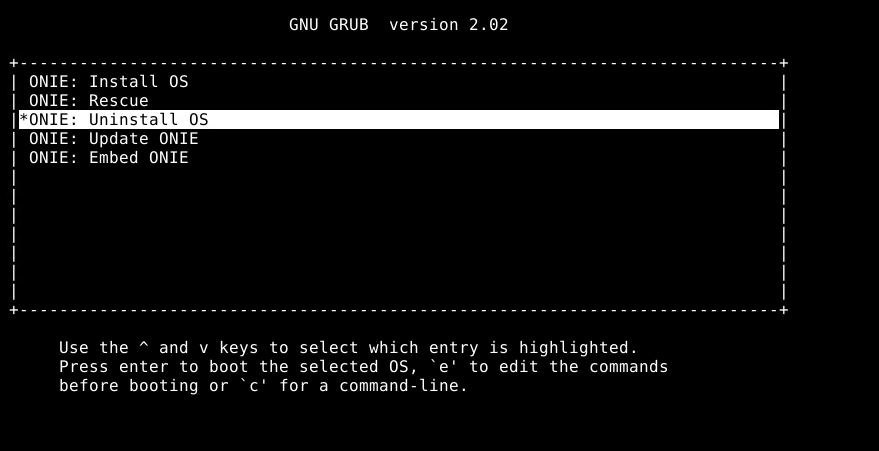
Figur 2: ONIE-undermenu
-
ONIE afinstallerer alle eksisterende operativsystemer (Figur 3).

Figur 3: Eksempel på afinstallation af ONIE
-
Switchen genstarter og starter ONIE-installationsprocessen.
ONIE manuel OS-installation: Installation af et operativsystem manuelt med en bestemt IP-adresse, tjeneste og filnavn.
- Brug af
onie-nos-installkommando. HTTP-, FTP- og TFTP-indstillinger tilgængelige.
ONIE:/ # onie-nos-install ftp://user:password@x.x.x.x/PKGS_OS10-Enterprise-10.5.3.2.89buster-installer-x86_64.binNOTE: Do not change the OS10 filename.
- Switchen uploader OS10 og installerer derefter billedet i begge partitioner.
Example system output:
discover: installer mode detected.
Stopping: discover... done.
Info: Attempting ftp://user:password@x.x.x.x/PKGS_OS10-Enterprise-10.5.3.2.89buster-installer-x86_64.bin ...
Connecting to x.x.x.x (x.x.x.x:21)
installer            100% |*******************************|   776M  0:00:00 ETA
ONIE: Executing installer: ftp://user:password@x.x.x.x/PKGS_OS10-Enterprise-10.5.3.2.89buster-installer-x86_64.bin
Initializing installer ... OK
Verifying image checksum ... OK
OS10 Installer: machine: dellemc_s5248f_c3538
Deleting logical volume SYSROOT ... OK
Creating logical volume SYSROOT ... OK
Creating ext4 filesystem on SYSROOT ... OK
Extracting OS10 ...
OK
Installing OS10 on primary volume ...
OK
Setting up shared data ... OK
Synchronizing standby image ... OK
OS10 installation is complete.
3. Når switchen har fuldført installationen af afbildningen på begge partitioner, genstarter switchen og starter ved hjælp af den primære partition. OS10-eksempel:

Figur 4: Eksempel på afinstallation af ONIE
- Når switchen viser brugernavnsprompten, skal du logge på switchen ved hjælp af standardlegitimationsoplysningerne (
OS10: user=admin, password=admin).

Figur 5: OS10-logineksempel
- Kontroller, at operativsystemet blev indlæst i partitioner. OS10-eksempel:

Figur 6: Eksempel på Vis versionsoutput

Figur 7: Eksempel på Vis startdetaljeoutput
Du kan få yderligere hjælp ved at se udgivelsesdokumentationen til Dell SmartFabric OS10 User Guide eller ved at kontakte Dells tekniske support.
Se relateret KB-artikel 125512: Informationscenter for Dell SmartFabric OS10.