NetWorker Web 界面无法获取控制面板监视的最新计数
Summary: NetWorker Web 用户界面 (NWUI) 用于管理 NetWorker 数据区。 NWUI 控制面板选项卡显示错误“无法获取控制面板的最新计数”,并且不显示策略、工作流和作的详细信息。
This article applies to
This article does not apply to
This article is not tied to any specific product.
Not all product versions are identified in this article.
Symptoms
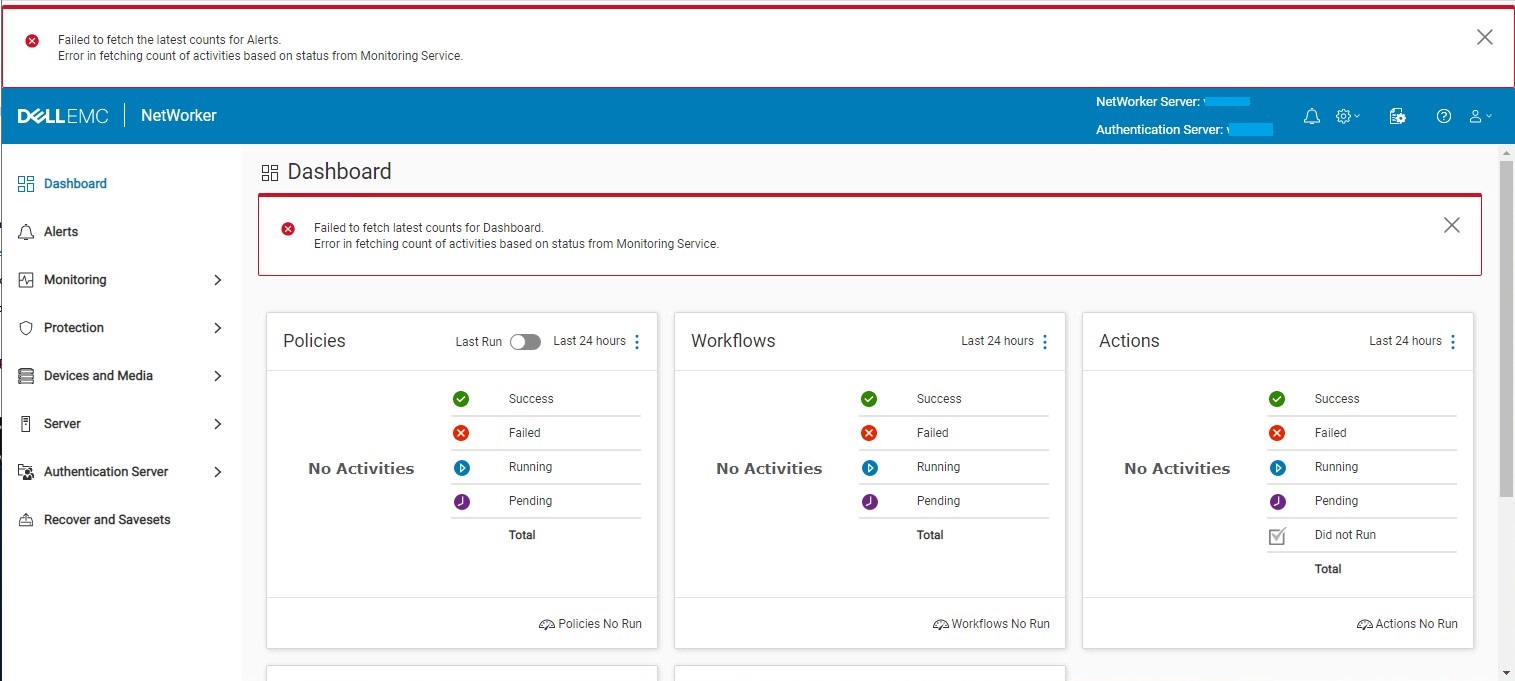
NWUI 控制台显示:
Failed to fetch latest counts for Dashboard
Error is fetching count of activities based on status from Monitoring Service
The C:\Program Files\EMC NetWorker\nsr\authc-server\tomcat\logs\nwui.log shows:
...
HH:MM:SS [https-jsse-nio-9090-exec-6] INFO  c.e.n.c.n.impl.GlobalApi - Authenticating user Administrator on authentication server Emcbkp01p.berlitz.com.co.
HH:MM:SS [https-jsse-nio-9090-exec-6] INFO  c.e.n.c.n.impl.GlobalApi - Testing server details for nw calls.
HH:MM:SS [https-jsse-nio-9090-exec-8] ERROR c.e.n.c.n.i.MonitoringApi - Error in fetching count of activities based on status from Monitoring Service. java.net.ConnectException: Connection refused: connect
...
C:\Program Files\EMC NetWorker\nwui\monitoring\app\logs\monitoring-app.log 显示:
...
YYYY-MM-DD HH:MM:SS [TomcatWebServer] [main] INFO  org.springframework.boot.web.embedded.tomcat.TomcatWebServer - Tomcat initialized with port(s): 9095 (https)
YYYY-MM-DD HH:MM:SS [DirectJDKLog] [main] INFO  org.apache.coyote.http11.Http11NioProtocol - Initializing ProtocolHandler ["https-jsse-nio-9095"]
YYYY-MM-DD HH:MM:SS [DirectJDKLog] [main] INFO  org.apache.catalina.core.StandardService - Starting service [Tomcat]
YYYY-MM-DD HH:MM:SS [DirectJDKLog] [main] INFO  org.apache.catalina.core.StandardEngine - Starting Servlet engine: [Apache Tomcat/9.0.48]
YYYY-MM-DD HH:MM:SS [DirectJDKLog] [main] INFO  org.apache.catalina.core.ContainerBase.[Tomcat].[localhost].[/monitoring] - Initializing Spring embedded WebApplicationContext
YYYY-MM-DD HH:MM:SS [ServletWebServerApplicationContext] [main] INFO  org.springframework.boot.web.servlet.context.ServletWebServerApplicationContext - Root WebApplicationContext: initialization completed in 3092 ms
YYYY-MM-DD HH:MM:SS [DataSourceConfig] [main] INFO  monitoring - DB password file not present.
YYYY-MM-DD HH:MM:SS [DataSourceConfig] [main] ERROR monitoring - Unable to retrieve the database password from Keystore
java.lang.NullPointerException: null
	at com.dell.emc.nw.monitoring.utils.DataSourceConfig.getDBPasswordFromKeystore(DataSourceConfig.java:75) ~[classes!/:?]
	at com.dell.emc.nw.monitoring.utils.DataSourceConfig.getDataSource(DataSourceConfig.java:64) ~[classes!/:?]
	at com.dell.emc.nw.monitoring.utils.DataSourceConfig$$EnhancerBySpringCGLIB$$c434748a.CGLIB$getDataSource$0(<generated>) ~[classes!/:?]
...
Cause
监视过程需要 NWUI 密钥库的权限才能填充控制面板信息。而 "monitoringdbpasswordalias" 别名已从 NWUI 密钥库 (nwui.keystore) 文件中删除,并且监视进程无法进行身份验证。失踪的原因 "monitoringdbpasswordalias" 别名未知。
NWUI 密钥库应显示 "monitoringdbpasswordalias" 别名:
C:\>"C:\Program Files\NRE\java\jre1.8.0_321\bin\keytool.exe" -list -keystore  "C:\Program Files\EMC NetWorker\nwui\monitoring\app\conf\nwui.keystore"
Enter keystore password:
Keystore type: PKCS12
Keystore provider: SunJSSE

Your keystore contains 3 entries

emcauthctomcat, MONTH DD, YYYY, PrivateKeyEntry,
Certificate fingerprint (SHA-256): B2:D3:E1:8D:65:12:8D:51:3F:EA:CA:41:9C:A9:93:C2:21:8D:A7:A7:25:F8:CE:69:F9:21:90:55:37:43:6E:4E
emcauthcsaml, MONTH DD, YYYY, PrivateKeyEntry,
Certificate fingerprint (SHA-256): 5B:9D:23:57:5F:A7:A0:0F:83:D5:AE:61:C2:06:AF:60:0C:60:19:F8:7B:4F:6E:D2:BC:18:DD:96:6E:A1:A5:FB
monitoringdbpasswordalias, MONTH DD, YYYY SecretKeyEntry,
受影响的环境缺少 "monitoringdbpasswordalias" 别名:
C:\>"C:\Program Files\NRE\java\jre1.8.0_321\bin\keytool.exe" -list -keystore  "C:\Program Files\EMC NetWorker\nwui\monitoring\app\conf\nwui.keystore"
Enter keystore password:
Keystore type: PKCS12
Keystore provider: SunJSSE

Your keystore contains 2 entries

emcauthctomcat, MONTH DD, YYYY, PrivateKeyEntry,
Certificate fingerprint (SHA-256): B2:D3:E1:8D:65:12:8D:51:3F:EA:CA:41:9C:A9:93:C2:21:8D:A7:A7:25:F8:CE:69:F9:21:90:55:37:43:6E:4E
emcauthcsaml, MONTH DD, YYYY, PrivateKeyEntry,
Certificate fingerprint (SHA-256): 5B:9D:23:57:5F:A7:A0:0F:83:D5:AE:61:C2:06:AF:60:0C:60:19:F8:7B:4F:6E:D2:BC:18:DD:96:6E:A1:A5:FB
Resolution
而 "monitoringdbpasswordalias" 必须在 NWUI 密钥库中重新创建别名。需要 NWUI 密钥库密码才能向 NWUI 密钥库文件进行身份验证。在此过程中,应使用 <NWUI 密钥库密码代替密码>。
- 使用 “以管理员身份运行” 选项打开命令提示符窗口。
- 创建 pg_hba.conf 的副本:
copy "C:\Program Files\EMC NetWorker\nwui\monitoring\nwuidb\pgdata\pg_hba.conf" "C:\Program Files\EMC NetWorker\nwui\monitoring\nwuidb\pgdata\pg_hba.conf_original"
- 使用文本编辑器打开 pg_hba.conf 文件:
notepad "C:\Program Files\EMC NetWorker\nwui\monitoring\nwuidb\pgdata\pg_hba.conf"
- 将文件底部所有未注释用户的 METHOD 从“md5”更改为“trust”
- 保存对 pg_hba.conf 的更改
- 停止 “NetWorker WebUI 数据库” 和 “NetWorker Web Management UI 服务器”
services: net stop nwui - 启动 “NetWorker WebUI 数据库” 和“NetWorker Web Management UI 服务器”服务:
net start nwui - 使用 连接到 NWUI 数据库
psql:
"C:\Program Files\EMC NetWorker\nwui\monitoring\postgres\12\bin\psql" -U nwuiuser -d nwui -p 5435
- 将 “nwuiruser” 密码更改为 NWUI 密钥库密码:
ALTER USER nwuiuser WITH PASSWORD 'password'; - 退出psql 连接:
quit - 停止 “NetWorker WebUI 数据库” 和 “NetWorker Web Management UI 服务器” 服务:
net stop nwui - 创建新文件 nwuidb.conf:
notepad "C:\Program Files\EMC NetWorker\nwui\monitoring\nwuidb\pgdata\nwuidb.conf"
- 在新的 nwuidb.conf 文件中输入 NWUI 密钥库密码 <密码的> Base64 编码: https://www.base64encode.org/
- 保存对新 nwuidb.conf文件的更改。
- 恢复 pg_hba.conf:
copy "C:\Program Files\EMC NetWorker\nwui\monitoring\nwuidb\pgdata\pg_hba.conf_original" "C:\Program Files\EMC NetWorker\nwui\monitoring\nwuidb\pgdata\pg_hba.conf"
- 启动 “NetWorker WebUI 数据库”和“NetWorker Web Management UI 服务器”服务:
net start nwui - 确认
monitoringdbpasswordalias是在 NWUI 密钥库中创建的:
"C:\Program Files\NRE\java\jre1.8.0_321\bin\keytool.exe" -list -keystore "C:\Program Files\EMC NetWorker\nwui\monitoring\app\conf\nwui.keystore"
- 验证是否在 NWUI 中不再遇到症状。
Article Properties
Article Number: 000199953
Article Type: Solution
Last Modified: 30 Oct 2025
Version: 2
Find answers to your questions from other Dell users
Support Services
Check if your device is covered by Support Services.