MHC Azure Stack: OEM-type FirmwareCheckRollens tilstand OEM har oprettet en undtagelse
Summary: Skriv FirmwareCheckHealth for rolle OEM oprettede en undtagelse under kørsel af Test-OEMFirmwareHealth iDRAC har kritiske Større fejl kunne ikke fortsætte med firmwareopdateringen.
This article applies to
This article does not apply to
This article is not tied to any specific product.
Not all product versions are identified in this article.
Symptoms
Forhåndskontrol af OEM mislykkes Fejl:

Klik på "Download oversigt".
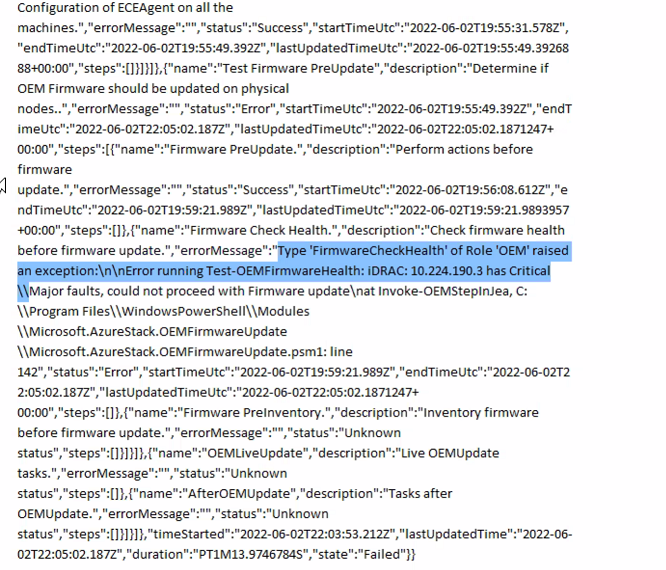
Error.json:
Oem Package Update
Perform Oem Extension update.

BeforeOEMUpdate
Tasks before OEMUpdate.

Test Firmware PreUpdate
Determine if OEM Firmware should be updated on physical nodes.

Firmware Check Health.
Check firmware health before update.
Klik på "Download oversigt".
Error.json:
Type ‘FirmwareCheckHealth’ of Role ‘OEM’ raised an exception:\n\nError running Test-OEMFirmwareHealth: iDRAC: 10.224.190.3 has Critical Major faults, could not proceed with Firmware update….
Cause
Tre af de fire servere havde hukommelsesfejl. Disse skal løses, før du fortsætter.
The memory health monitor feature has detected a degradation in the DIMM installed in DIMM_A6. Reboot system to initiate self-heal process.
Resolution
Du kan løse dette problem ved at rette hukommelsesfejlene.
- Dræn noden med iDRAC, der viser den defekte hukommelse.
- Når de er drænet, skal du køre følgende kommandoer i et PEP PowerShell-vindue.
get-virtualdisk -cimsession "s-cluster"
get-virtualdisk -cimsession "s-cluster" | get-storagejob
- Når alle storagejob er fuldført, koldstarter du serveren fra iDRAC
- Kontrollér, at DIMM-modulet er helet:
The self-heal operation successfully completed at DIMM DIMM_A6.
- Start noden i vinduet Azure Stack.
- Genoptag noden i vinduet Azure Stack.
Affected Products
Integrated System for Microsoft Azure Stack Hub 14GArticle Properties
Article Number: 000200301
Article Type: Solution
Last Modified: 08 Sept 2025
Version: 3
Find answers to your questions from other Dell users
Support Services
Check if your device is covered by Support Services.