Check for and enable WBEM on a ESXi 6.5 and later operating system
Summary: This article describes how to check for and enable WBEM on a ESXi 6.5 and later operating system regarding uses with monitoring software, such as Dell OpenManage Integration for VMware. ...
Instructions
How to enable WBEM Manually on ESXi 6.5 and above to work with System's Management tools.
Scope: WBEM/WSMAN is leveraged by monitoring agents, such as Dell OpenManage Integration for VMware vCenter (OMIVV) to interface with ESXi hosts. If one or both are having issues, this can lead to connectivity issues in the connection profile setup.
To check and adjust settings, setup an SSH session into the ESXi host.
Check WBEM Status:
#esxcli system wbem get
Enable WBEM:
#esxcli system wbem set -enable true - to enable wbem
If an issue persists or issues observed to enable wbem, attempt reset.
#esxcli system wbem set --enable false
#esxcli system wbem set --enable true
Once wbem is enabled, test connectivity.
Restart management Services including WSMAN.
#/etc/init.d/sfcbd-watchdog restart
#/etc/init.d/wsman restart
Reference the following VMware Knowledge Base Article if needed: https://kb.vmware.com/s/article/1025757

Scenario example for OMIVV:
WBEM is required to be set as enabled in ESXi 6.5 in order to allow OMIVV to inventory it. The host connection profile wizard attempts to enable it on initial discovery. However, on some scenarios, the setting may not get enabled on the ESXi host.
- OMIVV 4.1 had a button to enable it on the host during the discovery process.
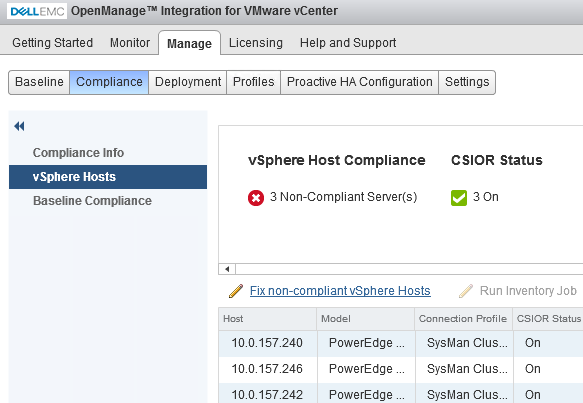
- OMIVV 4.2 tries to enable it automatically. If it is unable to, it can still try fixing it by going into Manage -> Compliance -> Vsphere hosts and clicking Fix non-compliant vSphere hosts. Such as:
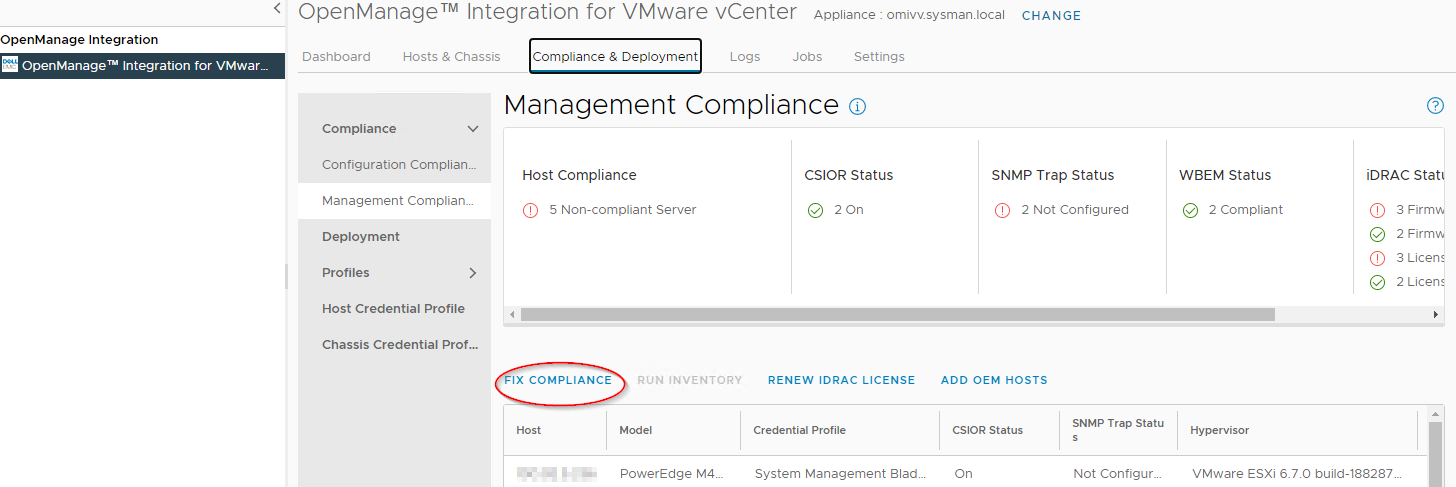
- On OMIVV 5.x, the information WBEM can attempt to enable by going to Compliance & Deployment -> Management Compliance -> Fix Compliance: