哪些 ESXCLI 命令可用來檢視主機硬體組態、儲存裝置資訊和虛擬交換器資訊
Summary: 下列文章假裝提供某些 ESXCLI 命令的相關資訊,這些命令可用來收集特定 ESXi 元件中的組態相關資訊,例如主機硬體組態、儲存裝置資訊和虛擬交換器資訊等。
This article applies to
This article does not apply to
This article is not tied to any specific product.
Not all product versions are identified in this article.
Instructions
您應該透過 putty 工作階段或 DCUI 存取 ESXi 主機,才能發出 ESXCLI 命令。
若要檢視 vSphere 環境的硬體組態,請使用下列 ESXCLI 命令來檢視 ESXi 主機上的時間和日期:
esxcli hardware clock get

檢視主機上的 CPU 數目。您必須按下空白鍵才能捲動輸出。完成後,按 q 退出實用程式。
esxcli hardware cpu list | less

在此範例中,我們搜尋了 vmnic2。
若要檢視 vSphere 環境的儲存組態,請發出下列 ESXCLI 命令:
若要檢視主機可用的 VMFS 範圍數量:
esxcli storage vmfs extent list

若要檢視 SCSI 主機匯流排配接卡。
esxcli storage core adapter list

若要檢視 SCSI 路徑統計資料。
esxcli storage core path stats get
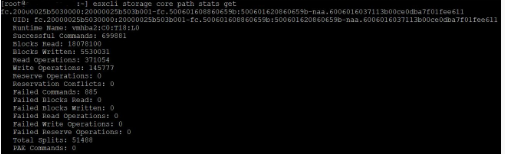
檢視目前連線至 ESXi 主機的 LUN 清單。
esxcli storage core device list
查看引導分區和每個主機可用的數據存儲。
esxcli storage filesystem list

若要檢視 vSphere 環境的虛擬交換器組態,請發出下列 ESXCLI 命令:
若要檢視 DNS 伺服器的 IP 位址。
esxcli network ip dns server list

若要檢視實體 NIC
esxcli network nic list

檢視主機有兩個標準交換器可供使用。
esxcli network vswitch standard list
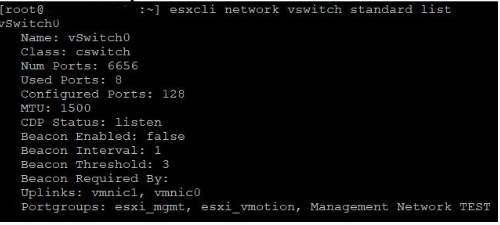
可檢視可用的分散式交換器。
esxcli network vswitch dvs vmware list | more
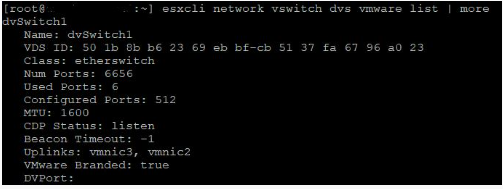
檢視標準交換器連接埠群組。
esxcli network vswitch standard portgroup list
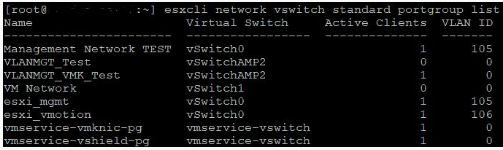
檢視主機上的 VMkernel 介面。
esxcli network ip interface list | less

檢視主機上 VMkernel 介面的 IP 位址和子網路遮罩。
esxcli network ip interface ipv4 get

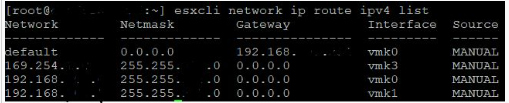
檢視主機上 VMkernel 介面的預設閘道位址。
esxcli network ip route ipv4 list
Affected Products
VMware ESXiArticle Properties
Article Number: 000204754
Article Type: How To
Last Modified: 09 Dec 2024
Version: 3
Find answers to your questions from other Dell users
Support Services
Check if your device is covered by Support Services.