哪些 ESXCLI 命令可用于查看主机硬件配置、存储信息和虚拟交换机信息
Summary: 以下文章假装提供有关某些 ESXCLI 命令的信息,这些命令可用于收集有关某些 ESXi 组件中的配置的信息,例如主机硬件配置、存储信息和虚拟交换机信息。
This article applies to
This article does not apply to
This article is not tied to any specific product.
Not all product versions are identified in this article.
Instructions
您应通过 putty 会话或 DCUI 访问 ESXi 主机,以便发出 ESXCLI 命令。
要查看 vSphere 环境的硬件配置,请发出以下 ESXCLI 命令以查看 ESXi 主机上的时间和日期:
esxcli hardware clock get

查看主机上的 CPU 数量。您必须按空格键滚动输出。完成后,按 q退出 less 实用程序。
esxcli hardware cpu list | less

在此示例中,我们搜索了 vmnic2。
要查看 vSphere 环境的存储配置,请发出以下 ESXCLI 命令:
要查看主机可用的 VMFS 扩展区的数量,请执行以下操作:
esxcli storage vmfs extent list

要查看 SCSI 主机总线适配器。
esxcli storage core adapter list

查看 SCSI 路径统计信息。
esxcli storage core path stats get

查看当前连接到 ESXi 主机的 LUN 的列表。
esxcli storage core device list
查看每个主机可用的引导分区和数据存储区。
esxcli storage filesystem list

要查看 vSphere 环境的虚拟交换机配置,请发出以下 ESXCLI 命令:
查看 DNS 服务器的 IP 地址。
esxcli network ip dns server list

要查看物理 NIC,请执行以下操作:
esxcli network nic list

要查看主机有两台标准交换机可用。
esxcli network vswitch standard list

要查看可用的分布式交换机。
esxcli network vswitch dvs vmware list | more
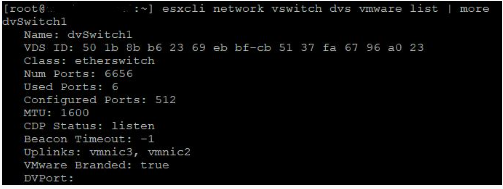
要查看标准交换机端口组。
esxcli network vswitch standard portgroup list
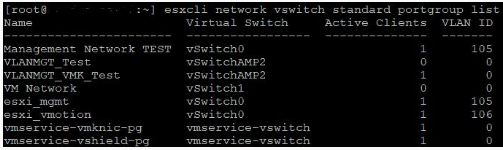
查看主机上的 VMkernel 接口。
esxcli network ip interface list | less
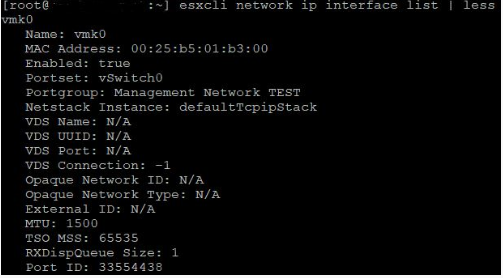
查看主机上 VMkernel 接口的 IP 地址和子网掩码。
esxcli network ip interface ipv4 get
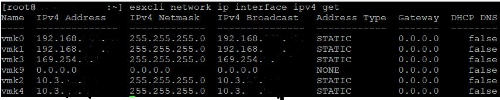
查看主机上 VMkernel 接口的默认网关地址。
esxcli network ip route ipv4 list

Affected Products
VMware ESXiArticle Properties
Article Number: 000204754
Article Type: How To
Last Modified: 09 Dec 2024
Version: 3
Find answers to your questions from other Dell users
Support Services
Check if your device is covered by Support Services.