PowerProtect Data Protection Appliance:IDPA:升級搜尋元件的程序
Summary: 獨立升級搜尋元件的程序。此程序可用來將 IDPA 上的 Search 元件升級至版本 19.6.6.5331,執行版本 2.7.8。
This article applies to
This article does not apply to
This article is not tied to any specific product.
Not all product versions are identified in this article.
Instructions
將 Search 升級至 19.6.6 的程序。
只有已在版本 2.7.8 或更新版本的 IDPA 上,才會執行此程序。請勿使用此過程將 IDPA 上的搜索升級到任何其他版本,否則可能會破壞相容性。
如果 IDPA 的版本低於 2.7.8,請先升級 IDPA,然後再繼續。
程序
- 從以下連結下載 Search 19.6.6 升級檔案:
下載搜尋 19.6.6 升級套裝 (需要以註冊使用者身分登入 Dell 支援才能檢視此下載。)
注意:需要下載檔案前,請先登入 Dell 支援 入口網站。

在「搜尋控制索引」節點上:
注意:IDPA 8X00 系列有三個索引節點,請從
Control Index Node
- 以 root 身分複製升級檔案
search-upgrade-19.6.6.5331.zip的輸出傳送至/tmp在Search Master Index節點,使用您的 SCP 軟體。 - SSH 至搜尋控制索引節點,並執行下列命令以重設密碼箱:
ruby /usr/local/search/cis/Tools/update_passphrase.rb /home/search/passphrase

LD_LIBRARY_PATH=/usr/local/search/cis/CST/lib ruby usr/local/search/cis/Tools/reset_lockbox.rb- 如果型號是 DP8x00,則 SSH 至第二個和第三個搜尋索引節點,並執行下列命令:
LD_LIBRARY_PATH=/usr/local/search/cis/CST/lib ruby /usr/local/search/cis/Tools/reset_lockbox.rb-
在「搜索控制索引」節點(所有模型)上,運行以下命令:
service puppetmaster stop
service puppet stop
rm -rf /etc/puppet/status/*-
將升級二進位移至
/etc/puppet/repository/,授予適當的許可權,然後啟動木偶服務。
mv /tmp/search-upgrade-19.6.6.5331.zip /etc/puppet/repository/
chmod 777 /etc/puppet/repository/search-upgrade-19.6.6.5331.zip
service puppetmaster start
service puppet start
- 請等待一段時間,升級應會開始,可能需要 5 分鐘或更久。
若要確認升級是否已開始,請確認檔案 search-upgrade-19.6.6.5331.zip-running 存在於 /etc/puppet/status 資料夾。
- 應
/etc/puppet/status/search-upgrade-19.6.6.5331.zip-running15 分鐘後未顯示,請查看下列記錄,以取得其未執行原因的詳細資訊:/etc/puppet/log/puppet_agent.log - 讓它執行,Search 節點會在升級工作流程期間多次重新開機。
注意:在 Integrated Data Protection Appliance 8X00 系列上,它會先執行搜尋控制索引節點,然後重新開機。然後移動到第一個索引節點,重新啟動,然後以第二個索引節點結束。
- 當這些檔案出現在
/etc/puppet/status資料夾。
search-upgrade-19.6.6.5331.zip-allcompleted
search-upgrade-19.6.6.5331.zip-completed
如果狀態變更為:
search-upgrade-19.6.6.5331.zip-failed
這表示升級失敗,請聯絡 Dell 支援部門,並提供以下資訊: /etc/puppet/log/puppet_agent.log.
- 如果
.zip-failed檔案未顯示,請執行此命令以驗證升級是否成功:
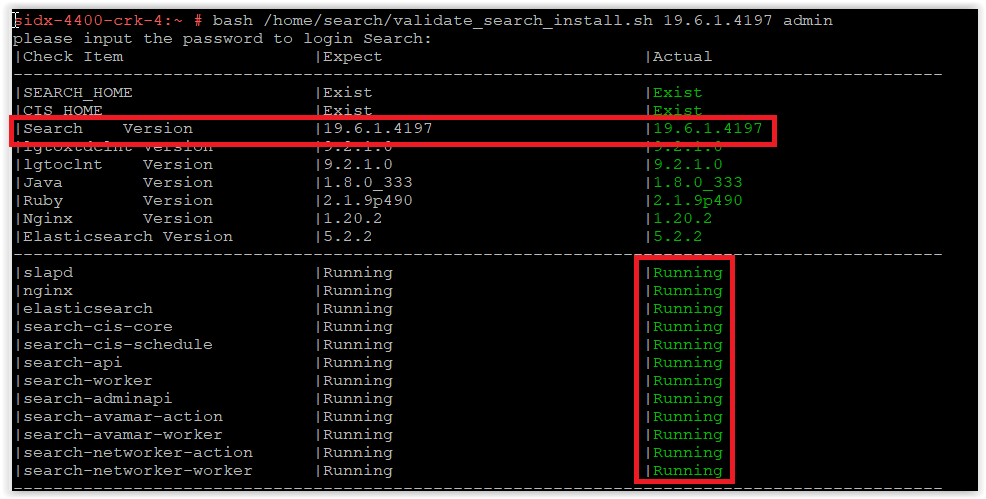
bash /home/search/validate_search_install.sh 19.6.6.5331 admin
出現提示時輸入密碼。
確認 Search 已升級至 19.6.6.5331,如以下螢幕截圖所示:
確認 Search 已升級至 19.6.6.5331,如以下螢幕截圖所示:
注意:螢幕擷取畫面顯示 19.6.1.4197,應顯示:19.6.6.5331
如果
search-cis-core service 未執行,執行以下兩個命令:
ruby /usr/local/search/cis/Tools/update_passphrase.rb /home/search/passphrase
LD_LIBRARY_PATH=/usr/local/search/cis/CST/lib ruby /usr/local/search/cis/Tools/reset_lockbox.rb
如果 IDPA 是 DP8x00 型號,則 SSH 至第二個和第三個搜尋索引節點,並執行下列命令:
LD_LIBRARY_PATH=/usr/local/search/cis/CST/lib ruby /usr/local/search/cis/Tools/reset_lockbox.rb
service search-cis-core start
重新執行已驗證的指令檔,並確認所有服務都在執行中:
bash /home/search/validate_search_install.sh 19.6.6.5331 admin
如果
search-cis-core 仍無法執行,請聯絡 Dell 支援。
- 確認升級成功後,請移除升級套件:
rm /etc/puppet/repository/search-upgrade-19.6.6.5331.zip
- 以上為止 PowerProtect Data Protection 系列應用裝置與 IDPA 內的搜尋元件升級
Additional Information
Search 19.6.2 中修復的安全問題
元件 |
問題 ID |
問題標題 |
|---|---|---|
| 搜尋 | 751600 | 適用於 Linux 核心的 SUSE Enterprise Linux 安全性更新 (SUSE-SU-2022:0068-1) |
| 搜尋 | 751683 | 適用於 samba 的 SUSE Enterprise Linux 安全性更新 (SUSE-SU-2022:0323-1) |
| 搜尋 | 751696 | 適用於 Linux 核心的 SUSE Enterprise Linux 安全性更新 (SUSE-SU-2022:0364-1) |
| 搜尋 | 751712 | 適用於 glibc 的 SUSE Enterprise Linux 安全性更新 (SUSE-SU-2022:0441-1) - 新偵測到 |
| 搜尋 | 751721 | 適用於 tiff 的 SUSE Enterprise Linux 安全性更新 (SUSE-SU-2022:0496-1) - 新偵測到 |
| 第三方元件 | CVE | 更多資訊 |
|---|---|---|
| 甲骨文 JRE | CVE-2022-32215 CVE-2022-21634、CVE-2022-21597、CVE-2022-21628、CVE-2022-21626、CVE-2022-21618、CVE-2022-39399、CVE-2022-21624、CVE-2022-21619 |
https://www.oracle.com/security-alerts/cpuoct2022.html #AppendixJAVA  |
| 恩金克斯 | CVE-2022-41742 | http://nginx.org/en/security_advisories.html |
| Apache log4j | CVE-2021-44228 CVE-2021-45046 CVE-2021-45105 CVE-2021-44832 |
Apache Log4j 遠端代碼執行 |
| 桑巴 | CVE-2022-32746 CVE-2022-32745 CVE-2022-1615 |
https://www.suse.com/security/cve/CVE-2022-32746.html |
| 核心 | CVE-2022-33981 | https://www.suse.com/security/cve/CVE-2022-33981.html |
| Python | CVE-2021-28861 | https://www.suse.com/security/cve/CVE-2021-28861.html |
| OpenSSL | CVE-2022-1292 CVE-2022-2068 |
https://www.suse.com/security/cve/CVE-2022-1292.html https://www.suse.com/security/cve/CVE-2022-2068.html |
Affected Products
PowerProtect Data Protection Appliance, PowerProtect Data Protection Software, Integrated Data Protection Appliance Family, Integrated Data Protection Appliance SoftwareProducts
PowerProtect DP4400, PowerProtect DP5300, PowerProtect DP5800, PowerProtect DP8300, PowerProtect DP8800, PowerProtect DP5900, PowerProtect DP8400, PowerProtect DP8900Article Properties
Article Number: 000206371
Article Type: How To
Last Modified: 01 May 2025
Version: 10
Find answers to your questions from other Dell users
Support Services
Check if your device is covered by Support Services.