PowerStore:建立 NAS 伺服器的複製失敗,並顯示錯誤「已達到檔案系統的最大數量。(0xE080100D0029)」,即使未達到限制
Summary: 建立 NAS 伺服器的複製可能會失敗,並顯示錯誤「已達到檔案系統的最大數量。(0xE080100D0029)」,即使未達到限制。本文提供建立 NAS 伺服器的因應措施。
This article applies to
This article does not apply to
This article is not tied to any specific product.
Not all product versions are identified in this article.
Symptoms
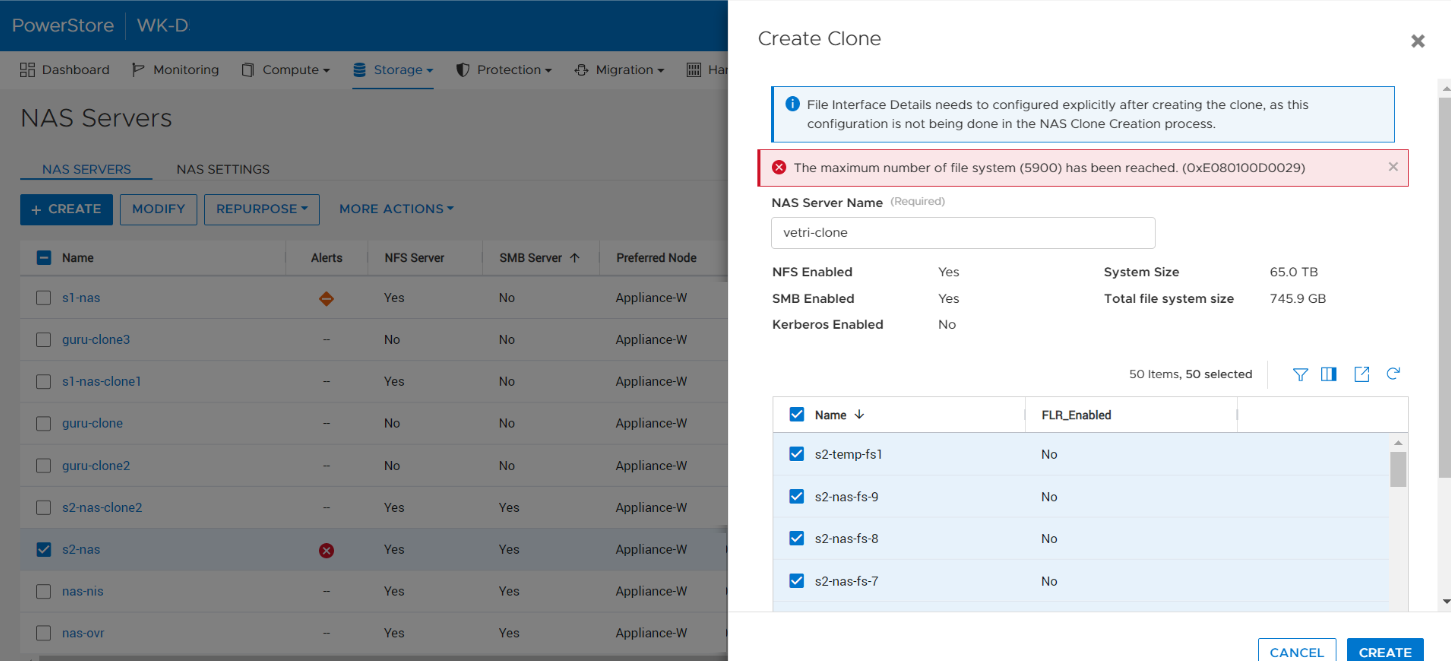
當使用者嘗試透過在 PowerStore Manager NAS 伺服器中選取所有檔案系統或未指定file_systems參數 (REST) 來建立 NAS 伺服器的複製時,作業會失敗並顯示錯誤:已 達到檔案系統的最大數量 (檔案系統限制值>)。(0xE080100D0029), 即使應用裝置中的檔案系統數量尚未達到上限。
Cause
此問題發生于某些情況下,其中來源 NAS 伺服器在檔案系統上建立了許多快照,且這些快照會計入限制計算中。
Resolution
此問題已規劃在未來的 PowerStore 版本中解決。
同時,請使用下列因應措施:
- 從 NAS 伺服器移除不要的快照,減少 NAS 伺服器內快照的整體計數。
- 在 PowerStore UI 中複製 NAS 伺服器時,選取 NAS 伺服器內的檔案系統子集。
- 在 REST 呼叫中,明確指定要與 NAS 伺服器一起複製所需的檔案系統。
Affected Products
PowerStoreArticle Properties
Article Number: 000210996
Article Type: Solution
Last Modified: 13 Jun 2025
Version: 5
Find answers to your questions from other Dell users
Support Services
Check if your device is covered by Support Services.