使用外接显示器的 Alienware Aurora R16 没有声音
Summary: 了解无声音的 Alienware Aurora R16,它使用 HDMI 连接到外接显示器。关闭显示器后声音停止播放。
This article applies to
This article does not apply to
This article is not tied to any specific product.
Not all product versions are identified in this article.
Symptoms
使用 HDMI 关闭连接到 Alienware Aurora R16 的显示器时,无声音。声音不会切换回板载音频输出,因此无声音。
受影响的平台:
- Alienware Aurora R16(配备 NVIDIA RTX 3060 或 AMD RX6600XT)
Cause
如果显示器在连接到 HDMI 端口时关闭,则不会使用驱动程序发送热插拔检测 (HPD) 信号。这意味着驱动程序仍认为音频设备存在。作系统继续尝试使用已关闭的显示器进行音频输出,导致无声音。
Resolution
这是预期的行为。
解决办法:
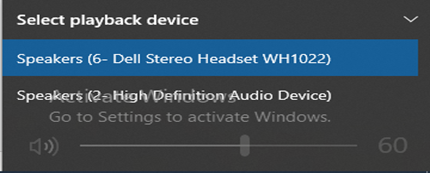
单击右下角系统托盘中的声音图标,然后单击音量滑块上方的 V 形符号以查看可用的播放设备。从此列表中,切换到板载声音。
Affected Products
Alienware Aurora R16Article Properties
Article Number: 000218672
Article Type: Solution
Last Modified: 02 Jul 2025
Version: 3
Find answers to your questions from other Dell users
Support Services
Check if your device is covered by Support Services.