PowerFlex 3.X Præsentationsserverens brugergrænseflade fjerner tilknytninger til klyngen
Summary: Præsentationsserverens brugergrænseflade fjerner tilknytningen til klyngen.
Symptoms
Præsentationsserveren (mgmt-server) scaleio.log rapporterer, at den fjerner tilknytningen til MDM.
 /mgmt-server/logs/scaleio.log:2023-08-27 04:21:42,656 [LiveQueryQueueThreadV2|INFO |com.emc.vxflexos.webui.backend.connection.mdm.MdmLinkService.lambda$tryUnlink$38] Starting unlink from MDM
The PMDM events and trc logs report that it could not connect to the LDAP service.
Primære MDM-begivenheder
 2023-08-27 04:21:34.611000:0016332:MDM_CLI_COMMAND_RECEIVED         INFO     Command logout received, User: 'N/A'. [7529811]
2023-08-27 04:21:34.611000:0016333:CLI_COMMAND_FAILED               WARNING  Command logout was not successful. Error code: Invalid session. Please login and try again.
2023-08-27 04:21:34.619000:0016334:MDM_CLI_COMMAND_RECEIVED         INFO     Command login received, User: 'flexro@sio.lab'. [7529812] Login banner read and approved manually. Originating source IP: 14.14.14.13
2023-08-27 04:21:42.638000:0016335:CLI_COMMAND_FAILED               WARNING  Command login was not successful. Error code: Could not establish the connection with LDAP service. [7529812]
Primær MDM TRC-log
 2023/08/27 04:21:42.637849 71d00001676f:mosLdap_Bind:00130: After ldap_sasl_bind - rc: -1, msg-id: -1
2023/08/27 04:21:42.637857 71d00001676f:mosLdap_PrintError:00193: Error in: ldap_sasl_bind, rc: Can't contact LDAP server (-1)
2023/08/27 04:21:42.637860 71d00001676f:mosLdap_PrintError:00197: Additional information: (null)
2023/08/27 04:21:42.637862 71d00001676f:mosLdap_Bind:00133: Failed to start async operation for username: flexro@sio.lab
2023/08/27 04:21:42.638047 71d00001676f:mosLdap_SearchUserInDomainGroupsIntr:00581: User "flexro@sio.lab" was found in 0 groups - search-user: flexro, bind-user: flexro@sio.lab, rc: LDAP_SESSION_INITIALIZATION_FAIL, time: 8020 ms
2023/08/27 04:21:42.638117 7f09c58c0db0:ldapAuthMgr_Authenticate:00742: LDAP authentication search for user: flexro@sio.lab in domain: ldaps://ad.sio.lab didn't find any matches (LDAP_SESSION_INITIALIZATION_FAIL)
2023/08/27 04:21:42.638236 7f09c58c0db0:mosEventLog_PostInternal:00609: New event added. Message: "Command login was not successful. Error code: Could not establish the connection with LDAP service. [7529812]". Additional info: "" Severity: Warning
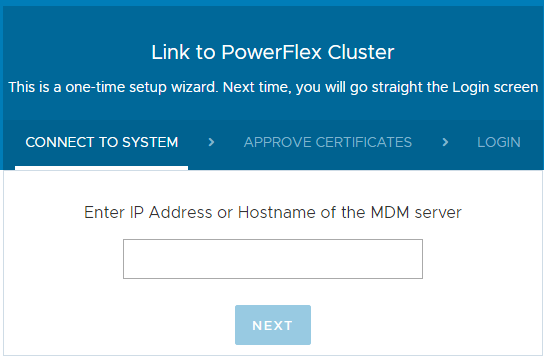
Brugergrænsefladen i præsentationsserveren beder om at tilknytte en PowerFlex-klynge.
Påvirkning
Hvis du ikke kan logge på, skal slutbrugeren knytte præsentationsserveren til en PowerFlex-klynge.
Cause
Påvirkning
Hvis du ikke kan logge på, skal slutbrugeren knytte præsentationsserveren til en PowerFlex-klynge.
Problem
I dette scenarie bruger slutbrugeren LDAP-godkendelse.
Præsentationsserveren har et 8-timers token fra det tidspunkt, hvor en bruger logger på. Når 8-timers tokenet udløber, gøres der et efterfølgende loginforsøg. Men hvis dette forsøg ikke kan oprette forbindelse til LDAP-tjenesten, kan det medføre, at Præsentationsserveren fjernes fra klyngen.
Resolution
Løsning
Knyt præsentationsserveren til PowerFlex-klyngen igen ved hjælp af webbrugergrænsefladen.
Påvirkede versioner
PowerFlex-versionerne 3.5.x og 3.6.x
Fast i version
TBD