Bei der Installation der Youku-Anwendung auf Alienware-Laptops wird eine Warnmeldung angezeigt
Summary: Dieser Artikel enthält Informationen zu Alienware-Laptops, bei denen während der Installation der Youku-Anwendung eine Warnmeldung angezeigt wird.
This article applies to
This article does not apply to
This article is not tied to any specific product.
Not all product versions are identified in this article.
Symptoms
Betroffene Plattformen:
- Alienware x14 R2
- Alienware x16 R1
- Alienware x16 R2
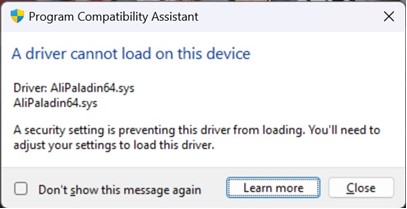
Es wird eine Warnmeldung angezeigt, wenn der Treiber nicht mit AliPaladin64.syswährend der Installation von Youku auf Alienware-Laptops.
Cause
Speicherintegrität blockiert AliPaladin64.sys die Teil der Youku-Installation ist.
Resolution
Problemumgehung:
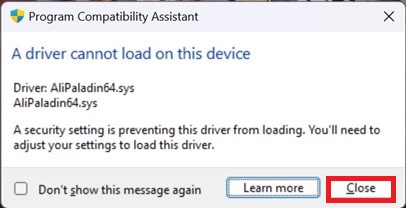
- Drücken Sie auf "Close" und die Installation wird fortgesetzt.
- Klicken Sie auf die Windows-Schaltfläche "Start", geben Sie im Suchfeld "Core Isolation " ein und deaktivieren Sie die Speicherintegrität , bevor Sie Youku installieren (ein Neustart ist erforderlich).

Affected Products
Alienware x14 R2, Alienware x16 R1, Alienware x16 R2Article Properties
Article Number: 000223190
Article Type: Solution
Last Modified: 02 Jul 2025
Version: 6
Find answers to your questions from other Dell users
Support Services
Check if your device is covered by Support Services.