AlienwareノートパソコンにYoukuアプリケーションをインストールすると警告メッセージが表示される
Summary: この記事では、Youkuアプリケーションのインストール中にAlienwareノートパソコンに警告メッセージが表示されることについて説明します。
This article applies to
This article does not apply to
This article is not tied to any specific product.
Not all product versions are identified in this article.
Symptoms
影響を受けるプラットフォーム:
- Alienware x14 R2
- Alienware x16 R1
- Alienware x16 R2
次と互換性のないドライバーに関する警告メッセージが表示される AliPaladin64.sys、AlienwareノートパソコンにYoukuをインストールしているときに実行されます。
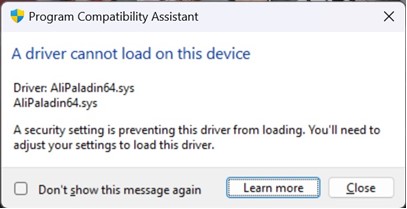
Cause
メモリ整合性がブロックされました AliPaladin64.sys これはYoukuインストールの一部です。
Resolution
対処方法:
- 閉じるを押すと 、 インストールが続行されます。
![[閉じる] ボタン](https://supportkb.dell.com/img/ka0Do000000Zr5VIAS/ka0Do000000Zr5VIAS_ja_1.jpeg)
- Windowsの[スタート]ボタンをクリックし、検索ボックスに 「コア分離 」と入力し、 Youkuをインストールする前にメモリの整合性をオフにしてください (再起動が必要です)。

Affected Products
Alienware x14 R2, Alienware x16 R1, Alienware x16 R2Article Properties
Article Number: 000223190
Article Type: Solution
Last Modified: 02 Jul 2025
Version: 6
Find answers to your questions from other Dell users
Support Services
Check if your device is covered by Support Services.