Dell Unity: Il controllo integrità pre-aggiornamento ha esito negativo con errore: Check_connectemc_sender_1
Summary: Il controllo integrità pre-aggiornamento (PUHC) ha esito negativo con errore: ERROR_CODE=piattaforma::check_connectemc_sender_1|Errore|L'UPGRADE NON PUÒ PROCEDERE (correggibile da Dell) ...
This article applies to
This article does not apply to
This article is not tied to any specific product.
Not all product versions are identified in this article.
Symptoms
Il controllo integrità pre-aggiornamento (PUHC) ha esito negativo con errore:
ERROR_CODE=platform::check_connectemc_sender_1|Error|
UPGRADE CANNOT PROCEED.
check_connectemc_sender_1
errors :0x1000300- Operation failed. Error code: 0x1000300 The requested object could not be found on the system. Recheck the command name. 0x6400bee - Failed to perform the operation because connect home has not been configured
Cause
Nota: A partire da Unity OE 5.3,
ConnectHome Notifiche di connettività tramite <serialNumber>@dell.com non sono più l'impostazione predefinita.
Quando si configura la connettività ConnectHome, includere un indirizzo e-mail dal nome di dominio del sistema o un indirizzo e-mail applicabile che superi l'autenticazione dal server SMTP.
Per abilitare SupportAssist nella versione 5.3 e successive, ConnectEMC deve disporre di un indirizzo e-mail del mittente.
Resolution
Sono disponibili due opzioni per risolvere il problema.
- Ignorare il PUHC ed eseguire l'aggiornamento. Aggiungi l'indirizzo e-mail del mittente in un secondo momento.
- Aggiungere subito l'indirizzo e-mail del mittente, quindi eseguire l'aggiornamento.
Opzione 1. Ignorare il PUHC ed eseguire l'aggiornamento
- Eseguire il comando riportato di seguito:
svc_skip_puhc
- Eseguire il comando seguente per ignorare l'errore:
+58

50: flr::check_for_disk_transitions
51: flr::check_for_faulted_disks
52: flr::check_for_no_pulled_disks
53: flr::check_for_snaps_in_an_active_state
54: flr::check_movesession_exists
55: slic::check_for_slic_committed
56: platform::check_centralized_esrs_version
57: platform::check_unsupported_proxy
58: platform::check_connectemc_sender
- Una volta che
check_connectemc_senderviene ignorato, avviare l'aggiornamento da Unisphere. - Aggiungere l'indirizzo e-mail del mittente per
ConnectEMC. (Vedi sotto)
Opzione 2. Aggiungere l'indirizzo e-mail del mittente, quindi eseguire l'upgrade
Sono disponibili tre opzioni per aggiungere l'indirizzo e-mail del mittente:
- Unisphere
svc_connectemcComandiUemcliComandi
Unisphere:
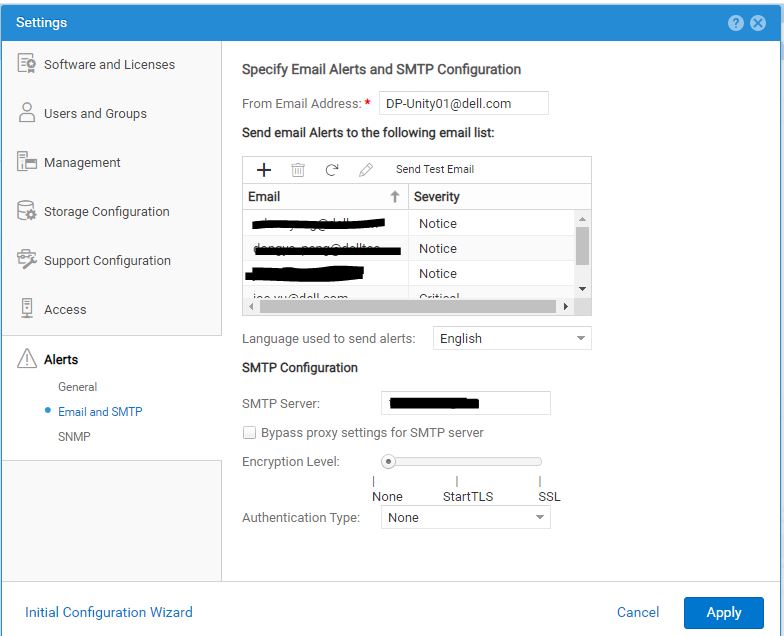
svc_connectemc:
- Eseguire il comando seguente per visualizzare
ConnectEMCStato:
svc_connectemc -s

ConnectEMC: NOTRUNNING DISABLE
- Testare la capacità di
ConnectEMCPer inviare un messaggio al supporto con il comando seguente:
spa:/cores/service/user# svc_connectemc -t

ERROR [spa]: Email (ConnectEMC) not configured
- Eseguire il comando seguente per visualizzare
ConnectEMCDettagli di configurazione:
svc_connectemc -g

INFO [spa]: SMTP Host: smtp.server.com
INFO [spa]: SENDER EMAIL: DP-Unity01@dell.com
INFO [spa]: EMC Destination Email: emailalert@emc.com
- Eseguire il comando seguente per impostare l'indirizzo e-mail
ConnectEMCUtilizza per inviare avvisi:
05:57:12 root@CKM002XXXXX929 spa:/cores/service/user# svc_connectemc -m DP-Unity01@dell.com

INFO [spa]: Verifying peer connectivity ...
ERROR [spa]: Email (ConnectEMC) not configured. Please enable connetEMC first.
- Eseguire il comando seguente per abilitare
ConnectEMC:
05:58:30 root@CKM002XXXXX929 spa:/cores/service/user# svc_connectemc --enable 10.1XX.1XX.1X1 --sendermail DP-Unity01@dell.com

INFO [spa]: Verifying peer connectivity ...
INFO [spa]: Enabling ConnectEMC
INFO [spa]: Verifying peer connectivity ...
INFO [spa]: copying connectEMC config to peer
INFO [spa]: Persisting SMTP server configuration
INFO [spa]: Persisting sender email address configuration
INFO [spa]: ConnectEMC has been enabled successfully.
- Dopo l'abilitazione
ConnectEMC, testare la connessione:svc_connectemc -t INFO [spa]: Test Dialhome request
Uemcli:
- Eseguire il comando seguente per elencare la configurazione corrente:
uemcli /sys/support/connecthome show -detail

1:  Enabled       = yes
   SMTP server     = 10.1XX.1XX.1X1
   E-mail from address = (none)@emc.com
   E-mail to address  = emailalert@emc.com
Prima dell'abilitazione
ConnectEMC, se si verifica il comando di test, l'operazione ha esito negativo con un errore:
Operation failed. Error code: 0x1000300
The requested object could not be found on the system. Recheck the command name. (Error Code:0x1000300)
- Eseguire il comando seguente per abilitare
ConnectEMC:
uemcli -d 10.0.0.1 -u local/joe -p Password /sys/support/connecthome set –enable yes –smtpServer 10.10.22.22 -emailFromAddr DP-Unity01@dell.com
Dopo l'abilitazione
ConnectEMC, se viene testato, viene superato correttamente:
09:05:02 root@CKM002XXXXX929 spb:/cores/service/user# uemcli -u admin -securepassword /sys/support/connecthome test
Password:
Storage system address: 127.0.0.1
Storage system port: 443
HTTPS connection

Remote certificate:
Issuer:   CN=DP-UNITY01
Subject:  CN=DP-UNITY01
Valid from: 2020:06:14:07:13:27
Valid to:  2023:06:14:07:13:27
Serial:   00a382cb17422be9fd
Id:     2957123456
Would you like to:
 [1] Accept the certificate for this session
 [2] Reject the certificate
Please input your selection (The default selection is [1]):
Operation completed successfully.
- Elencare i dettagli correnti dopo la modifica alla configurazione:
uemcli /sys/support/connecthome show -detail

Please input your selection (The default selection is [1]):
1:  Enabled       = yes
   SMTP server     = 10.1XX.1XX.1X1
   E-mail from address = DP-Unity01@dell.com
   E-mail to address  = emailalert@emc.com
Additional Information
Per ulteriori informazioni, consultare la Guida utente per l'interfaccia della riga di comando Unisphere della famiglia Dell Unity.
Affected Products
Dell EMC Unity FamilyArticle Properties
Article Number: 000224165
Article Type: Solution
Last Modified: 18 Dec 2025
Version: 4
Find answers to your questions from other Dell users
Support Services
Check if your device is covered by Support Services.