Dell Unity:アップグレード前ヘルス チェックが次のエラーで失敗する: Check_connectemc_sender_1
Summary: アップグレード前ヘルス チェック(PUHC)が次のエラーで失敗する: ERROR_CODE=プラットフォーム::check_connectemc_sender_1|エラー|アップグレードを続行できません(Dellによる修正可能)
This article applies to
This article does not apply to
This article is not tied to any specific product.
Not all product versions are identified in this article.
Symptoms
アップグレード前ヘルス チェック(PUHC)が次のエラーで失敗する:
ERROR_CODE=platform::check_connectemc_sender_1|Error|
UPGRADE CANNOT PROCEED.
check_connectemc_sender_1
errors :0x1000300- Operation failed. Error code: 0x1000300 The requested object could not be found on the system. Recheck the command name. 0x6400bee - Failed to perform the operation because connect home has not been configured
Cause
注:Unity OE 5.3以降では、
ConnectHome 次を使用した接続性通知 <serialNumber>@dell.com はデフォルトではなくなりました。
ConnectHome接続を構成する場合は、システムのドメイン名のEメール アドレス、またはSMTPサーバーからの認証を渡す該当するEメール アドレスを含めます
5.3以降でSupportAssistを有効にするには、ConnectEMCに「差出人」Eメール アドレスが必要です。
Resolution
この問題を解決するには、2つのオプションがあります。
- PUHCをスキップして、アップグレードを実行します。後で差出人メールアドレスを追加します。
- 送信元Eメール アドレスを今すぐ追加してから、アップグレードを実行します。
オプション1: PUHCをスキップしてアップグレードを実行する
- 次のコマンドを実行します。
svc_skip_puhc
- 次のコマンドを実行して、エラーをスキップします。
+58

50: flr::check_for_disk_transitions
51: flr::check_for_faulted_disks
52: flr::check_for_no_pulled_disks
53: flr::check_for_snaps_in_an_active_state
54: flr::check_movesession_exists
55: slic::check_for_slic_committed
56: platform::check_centralized_esrs_version
57: platform::check_unsupported_proxy
58: platform::check_connectemc_sender
- 次のそれぞれの場合について説明します。
check_connectemc_senderがスキップされた場合は、Unisphereから アップグレードを開始します 。 - 次の差出人Eメール アドレスを追加します:
ConnectEMCの詳細を確認してください。(下記参照)
オプション2: 送信元Eメール アドレスを追加してからアップグレード
差出人Eメール アドレスを追加するには、次の3つのオプションがあります。
- Unisphere
svc_connectemcコマンドUemcliコマンド
Unisphere:
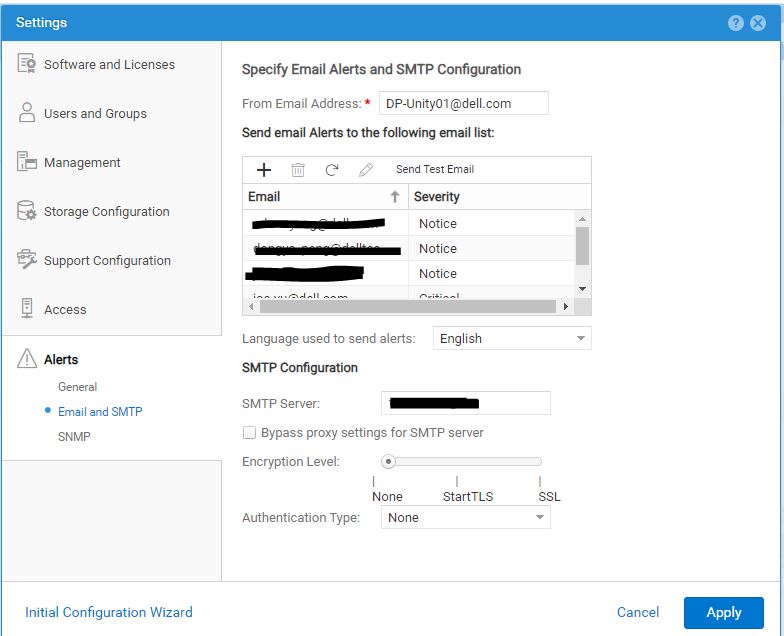
svc_connectemc:
- 次のコマンドを実行して
ConnectEMCステータス:
svc_connectemc -s

ConnectEMC: NOTRUNNING DISABLE
- 次の機能をテストします。
ConnectEMC次のコマンドを使用して、サポートにメッセージを送信します。
spa:/cores/service/user# svc_connectemc -t

ERROR [spa]: Email (ConnectEMC) not configured
- 次のコマンドを実行して
ConnectEMC構成の詳細:
svc_connectemc -g

INFO [spa]: SMTP Host: smtp.server.com
INFO [spa]: SENDER EMAIL: DP-Unity01@dell.com
INFO [spa]: EMC Destination Email: emailalert@emc.com
- 次のコマンドを実行して、Eメール アドレスを設定します
ConnectEMCアラートの送信に使用します。
05:57:12 root@CKM002XXXXX929 spa:/cores/service/user# svc_connectemc -m DP-Unity01@dell.com

INFO [spa]: Verifying peer connectivity ...
ERROR [spa]: Email (ConnectEMC) not configured. Please enable connetEMC first.
- 次のコマンドを実行して
ConnectEMCが使用するJava Runtime Environmentへのパスを定義します。
05:58:30 root@CKM002XXXXX929 spa:/cores/service/user# svc_connectemc --enable 10.1XX.1XX.1X1 --sendermail DP-Unity01@dell.com

INFO [spa]: Verifying peer connectivity ...
INFO [spa]: Enabling ConnectEMC
INFO [spa]: Verifying peer connectivity ...
INFO [spa]: copying connectEMC config to peer
INFO [spa]: Persisting SMTP server configuration
INFO [spa]: Persisting sender email address configuration
INFO [spa]: ConnectEMC has been enabled successfully.
- 有効にした後
ConnectEMCで、 接続をテストします。svc_connectemc -t INFO [spa]: Test Dialhome request
Uemcli:
- 次のコマンドを実行して、現在の構成を一覧表示します。
uemcli /sys/support/connecthome show -detail

1:  Enabled       = yes
   SMTP server     = 10.1XX.1XX.1X1
   E-mail from address = (none)@emc.com
   E-mail to address  = emailalert@emc.com
有効にする前に
ConnectEMCテスト コマンドを検証すると、次のエラーで失敗します。
Operation failed. Error code: 0x1000300
The requested object could not be found on the system. Recheck the command name. (Error Code:0x1000300)
- 次のコマンドを実行して、
ConnectEMCが使用するJava Runtime Environmentへのパスを定義します。
uemcli -d 10.0.0.1 -u local/joe -p Password /sys/support/connecthome set –enable yes –smtpServer 10.10.22.22 -emailFromAddr DP-Unity01@dell.com
有効にした後
ConnectEMCテストすると、正常に合格します。
09:05:02 root@CKM002XXXXX929 spb:/cores/service/user# uemcli -u admin -securepassword /sys/support/connecthome test
Password:
Storage system address: 127.0.0.1
Storage system port: 443
HTTPS connection

Remote certificate:
Issuer:   CN=DP-UNITY01
Subject:  CN=DP-UNITY01
Valid from: 2020:06:14:07:13:27
Valid to:  2023:06:14:07:13:27
Serial:   00a382cb17422be9fd
Id:     2957123456
Would you like to:
 [1] Accept the certificate for this session
 [2] Reject the certificate
Please input your selection (The default selection is [1]):
Operation completed successfully.
- 構成変更後の現在の詳細を一覧表示します。
uemcli /sys/support/connecthome show -detail

Please input your selection (The default selection is [1]):
1:  Enabled       = yes
   SMTP server     = 10.1XX.1XX.1X1
   E-mail from address = DP-Unity01@dell.com
   E-mail to address  = emailalert@emc.com
Additional Information
詳細については、 Dell UnityファミリーUnisphereコマンド ライン インターフェイス ユーザー ガイドを参照してください。
Affected Products
Dell EMC Unity FamilyArticle Properties
Article Number: 000224165
Article Type: Solution
Last Modified: 18 Dec 2025
Version: 4
Find answers to your questions from other Dell users
Support Services
Check if your device is covered by Support Services.