Dell Networking OS10 How to configure LACP Individual
Summary: This article explains how to configure LACP Individual and how it works.
Instructions
Index
Introduction
Configuration Syntax
Sample Configuration and Case Study
Case 1: PortChannel 1 is up. LACP is Up. Both interfaces Eth 1/1/1 and Eth 1/1/2 are Up Physically.
Case 2. PortChannel 1 is up. LACP is Up. Interface Eth 1/1/1 is physically Up and Eth 1/1/2 is Physically Down.
Case 3. PortChannel 1 is up. LACP is Up. Interface Eth 1/1/1 and Eth 1/1/2 is Physically Up but LACP is Down on Eth 1/1/2.
Case 4: PortChannel 1 is down. LACP is Down. Both interfaces Eth 1/1/1 and Eth 1/1/2 are Up physically.
Case 5: PortChannel 1 is down. LACP is Down. Interface Eth 1/1/1 is physically Up and Eth 1/1/2 is Down.
Introduction
The LACP Individual feature sees a configuration where a port, set up for Link Aggregation Control Protocol (LACP), operates independently rather than as part of an aggregated link. This typically happens when the port does not receive LACP Data Units (LACPDUs) from the connected device, which is necessary for forming the aggregated link. In this state, the port remains functional but does not contribute to the aggregated bandwidth or redundancy provided by the link aggregation group. This feature is useful for ensuring that ports can still operate even if LACP negotiation fails or if the connected device does not support LACP.
We can enable the LACP individual feature only on the LAGs. The isolated ports are known as LACP individual ports.
Use cases of LACP Individual Feature.
1>Wake-on-LAN
2>PXE boot
|
NOTE:
• If the peer switch connected to the LAG with LACP individual (isolated) ports does not switch or forward packets among its ports, Dell Technologies suggests enabling port-fast and BPDU-guard on the LACP individually enabled LAG. This ensures that the LACP individual ports can quickly move to the forwarding state.
• If the peer switch does switch or forward packets and is xSTP-aware, Dell Technologies recommends enabling xSTP on the LACP individually enabled LAG to prevent data loops involving individual ports.
• If the peer switch switches or forwards packets and is xSTP-unaware but also forwards xSTP BPDUs (such as a PXE booting device), Dell Technologies advises enabling xSTP on the LACP individually enabled LAG. This prevents loops caused by multiple individual ports as the peer switch forwards the xSTP BPDUs.
• We can enable the LACP individual feature on LAGs with Layer2 modes. The following configurations are mutually exclusive: no switchport and lacp individual.
• If a LACP individual port. All restrictions corresponding to the normal port member configurations are also applicable to the LACP individual ports.
|
|
NOTE: In OS10 Release 10.5.4.x, VLANs within a LAG operating in LACP individual mode may default to a lower Maximum Transmission Unit (MTU) size of 1532 bytes. To address this without requiring firmware updates, you can manually set the MTU on the impacted LAGs using the following commands:
|
Configuration Syntax
OS10# configure terminal OS10(config)# interface port-channel <portchannel number> OS10(conf-if-po-X)# lacp individual |
- We must enable the LACP individual feature on both VLT Peers.
Commands to verify if LACP Individual is functioning.
OS10# show lacp port-channel interface port-channel <portchannel number> OS10# show port-channel summary OS10# show interface port-channel summary OS10# show lacp interface ethernet <1/1/port-number> OS10# show vlan OS10# show mac address-table |
Sample Configuration and Case Study
Sample topology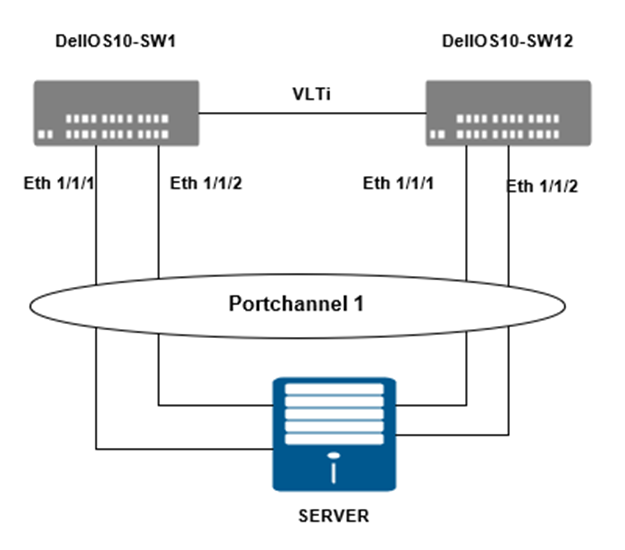
On DellOS10-SW1 lets configure LACP individual.
DellOS10-SW1# configure terminal DellOS10-SW1(config)# interface port-channel 1 DellOS10-SW1(conf-if-po-1)# lacp individual |
Let us verify the configuration of PortChannel1.
DellOS10-SW1# show running-configuration interface port-channel 1 ! interface port-channel1 no shutdown switchport access vlan 1 vlt-port-channel 1 lacp individual |
On DellOS10-SW2 (VLT peer) lets configure LACP individual.
DellOS10-SW2# configure terminal DellOS10-SW2(config)# interface port-channel 1 DellOS10-SW2(conf-if-po-1)# lacp individual |
Let us verify the configuration of PortChannel1.
DellOS10-SW2# show running-configuration interface port-channel 1 ! interface port-channel1 no shutdown switchport access vlan 1 vlt-port-channel 1 lacp individual |
Case 1: PortChannel 1 is up. LACP is Up. Both interfaces Eth 1/1/1 and Eth 1/1/2 are Up physically.
Consider we have PortChannel 1 up. LACP is Up from server side. Both interfaces Eth 1/1/1 and Eth 1/1/2 are up physically.
DellOS10-SW1# show port-channel summary
Flags:  D - Down    I - member up but inactive    P - member up and active
        U - Up (port-channel)    F - Fallback Activated    IND - LACP Individual
--------------------------------------------------------------------------------
Group Port-Channel           Type     Protocol  Member Ports
--------------------------------------------------------------------------------
1    port-channel1    (U)     Eth      DYNAMIC   1/1/1(P) 1/1/2(P)
We can see the member ports Ethernet 1/1/1 and 1/1/2 are member up and active. |
We can see PortChannel 1 part of Vlan 1. Interface Eth 1/1/1 and Eth 1/1/2 is not seen as its part of PortChannel 1. DellOS10-SW1# show vlan
Codes: * - Default VLAN, M - Management VLAN, R - Remote Port Mirroring VLANs,
@ - Attached to Virtual Network, P - Primary, C - Community, I - Isolated,
S - VLAN-Stack VLAN
Q: A - Access (Untagged), T - Tagged
NUM Status Description Q Ports
* 1 Active A Eth1/1/3-1/1/8,1/1/10-1/1/56
A Po1,1000
4094 Active T Po1000 |
DellOS10-SW1# show mac address-table Codes: pv <vlan-id> - private vlan where the mac is originally learnt VlanId Mac Address Type Interface 1 xx:xx:xx:xx:xx:xx dynamic port-channel1 |
We can see Individual: Enabled (Bolded) in output below. This signifies the LACP individual is configured DellOS10-SW1# show lacp port-channel interface port-channel 1 | grep Individual Individual: Enabled When we examine interfaces, we see Individual: false DellOS10-SW1# show lacp interface ethernet 1/1/1 | grep Individual
Individual: false DellOS10-SW1# show lacp interface ethernet 1/1/2 | grep Individual
Individual: false |
Case 2. PortChannel 1 is up. LACP is Up. Interface Eth 1/1/1 is physically Up and Eth 1/1/2 is Physically Down.
Lets Consider the PortChannel is Up from the server side. Interface Eth 1/1/1 is physically Up and Eth 1/1/2 is Physically Down. Here the port Eth 1/2 is does not transition to independent port
We can see Eth 1/1/1 is physically Up and Eth 1/1/2 is Down. Eth 1/2 is not independent port DellOS10-SW1# show port-channel summary
Flags: D - Down I - member up but inactive P - member up and active
U - Up (port-channel) F - Fallback Activated IND - LACP Individual
--------------------------------------------------------------------------------
Group Port-Channel Type Protocol Member Ports
--------------------------------------------------------------------------------
1 port-channel1 (UF) Eth DYNAMIC 1/1/1(P) 1/1/2(D) |
PortChannel 1 is part of vlan 1. Eth 1/1 is part of LACP Portchannel 1. Eth 1/2 is not independent port DellOS10-SW1# show vlan
Codes: * - Default VLAN, M - Management VLAN, R - Remote Port Mirroring VLANs,
@ - Attached to Virtual Network, P - Primary, C - Community, I - Isolated,
S - VLAN-Stack VLAN
Q: A - Access (Untagged), T - Tagged
NUM Status Description Q Ports
* 1 Active A Eth1/1/3-1/1/8,1/1/10-1/1/56
A Po1,1000 |
Case 3. PortChannel 1 is up. LACP is Up. Interface Eth 1/1/1 and Eth 1/1/2 is Physically Up but LACP is Down on Eth 1/1/2.
Lets Consider the PortChannel is Up from the server side. Interface Eth 1/1/1 is physically Up and LACP is up. Eth 1/1/2 is physically up but LACP is down due to some reason like a miss-cabling.
Here the port Eth 1/1/2 transition to independent port
We can see Eth 1/1/1 is physically Up and LACP is up. Eth 1/1/2 is physically up but LACP is down . Eth 1/1/2 is independent port. DellOS10-SW1# show port-channel summary Flags: D - Down I - member up but inactive P - member up and active U - Up (port-channel) F - Fallback Activated IND - LACP Individual -------------------------------------------------------------------------------- Group Port-Channel Type Protocol Member Ports -------------------------------------------------------------------------------- 1 port-channel1 (U) Eth DYNAMIC 1/1/1(P) 1/1/2(IND) |
PortChannel 1 is part of vlan 1. Eth 1/1 is part of LACP Portchannel 1. Eth 1/2 is independent port and part of vlan 1 DellOS10-SW1# show vlan
Codes: * - Default VLAN, M - Management VLAN, R - Remote Port Mirroring VLANs,
@ - Attached to Virtual Network, P - Primary, C - Community, I - Isolated,
S - VLAN-Stack VLAN
Q: A - Access (Untagged), T - Tagged
NUM Status Description Q Ports
* 1 Active A Eth1/1/2-1/1/8,1/1/10-1/1/56
A Po1,1000
|
Mac address is learned on Portchannel 1 and Eth 1/1/2 DellOS10-SW1# show mac address-table #Codes: pv <vlan-id> - private vlan where the mac is originally learnt VlanId Mac Address Type Interface 1 xx:xx:xxx:xx:xx:xx dynamic port-channel1 1 yy:yy:yy:yy:yy:yy dynamic ethernet1/1/2 |
We can see Individual: Enabled (Bolded) in output below. This signifies the LACP individual is configured DellOS10-SW1# show lacp port-channel interface port-channel 1 | grep Individual Individual: Enabled Lets examine the interfaces. Individual is false for Eth 1/1/1. DellOS10-SW1# show lacp interface ethernet 1/1/1 | grep Individual
Individual: false However for Eth 1/1/2 Individual is True. DellOS10-SW1# show lacp interface ethernet 1/1/2 | grep Individual
Individual: true |
Case 4: PortChannel 1 is down. LACP is Down. Both interfaces Eth 1/1/1 and Eth 1/1/2 are Up physically.
Lets Consider the PortChannel is down from the server side. However the physical NIC of the server is up. Here we see the interfaces Eth 1/1/1 and 1/1/2 transition to Individual ports. They both get the trunk/access configuration of PortChannel and start to learn mac address as if they are two independent ports.
|
We can see both Eth 1/1/1 and Eth 1/1/2 has transitioned to LACP Individual
DellOS10-SW1# show port-channel summary Flags: D - Down I - member up but inactive P - member up and active U - Up (port-channel) F - Fallback Activated IND - LACP Individual -------------------------------------------------------------------------------- Group Port-Channel Type Protocol Member Ports -------------------------------------------------------------------------------- 1 port-channel1 (D) Eth DYNAMIC 1/1/1(IND) 1/1/2(IND) |
|
DellOS10-SW1# show vlan
Codes: * - Default VLAN, M - Management VLAN, R - Remote Port Mirroring VLANs,
@ - Attached to Virtual Network, P - Primary, C - Community, I - Isolated,
S - VLAN-Stack VLAN
Q: A - Access (Untagged), T - Tagged
NUM Status Description Q Ports
* 1 Active A Eth1/1/1-1/1/8,1/1/10-1/1/56
A Po1,1000 |
|
We can see that both interfaces have learned mac address.
DellOS10-SW1# show mac address-table | grep ethernet 1 xx:xx:xx:xx:xx:xx dynamic ethernet1/1/2 1 yy:yy:yy:yy:yy:yy dynamic ethernet1/1/1 |
|
DellOS10-SW1# show lacp port-channel interface port-channel 1 | grep Individual
Individual: Enabled
When we examine interfaces, we see Individual: true
DellOS10-SW1# show lacp interface ethernet 1/1/1 | grep Individual
  Individual: true
DellOS10-SW1# show lacp interface ethernet 1/1/2 | grep Individual
Individual: true |
Case 5: PortChannel 1 is down. LACP is Down. Interface Eth 1/1/1 is physically Up and Eth 1/1/2 is Down.
Lets consider that PortChannel is down. Eth 1/1/1 is Up and Eth 1/1/2 is down. This means Server NIC connected to Eth 1/1/1 is Up and NIC connected to Eth 1/1/2 is down physically.
|
DellOS10-SW1# show port-channel summary

Flags:  D - Down    I - member up but inactive    P - member up and active
        U - Up (port-channel)    F - Fallback Activated    IND - LACP Individual
--------------------------------------------------------------------------------
Group Port-Channel           Type     Protocol  Member Ports
--------------------------------------------------------------------------------
1 port-channel1 (D) Eth DYNAMIC 1/1/1(IND) 1/1/2(D) |
|
DellOS10-SW1# show vlan Codes: * - Default VLAN, M - Management VLAN, R - Remote Port Mirroring VLANs, @ - Attached to Virtual Network, P - Primary, C - Community, I - Isolated, S - VLAN-Stack VLAN Q: A - Access (Untagged), T - Tagged NUM Status Description Q Ports * 1 Active A Eth1/1/1,1/1/3-1/1/8,1/1/10-1/1/56 A Po1,1000 |
|
Ethernet 1/1/1 learned mac address from server
DellOS10-SW1# show mac address-table | grep ether 1 xx:xx:xx:xx:xx:xx dynamic ethernet1/1/1 |
|
We can see Individual: Enabled in output below. This signifies the LACP individual is configured. DellOS10-SW1# show lacp port-channel interface port-channel 1 | grep Individual Individual: Enabled
DellOS10-SW1# show lacp interface ethernet 1/1/1 | grep Individual
  Individual: true
DellOS10-SW1# show lacp interface ethernet 1/1/2 | grep Individual Individual: |