セキュア コネクト ゲートウェイ仮想エディション: 管理者パスワードのリセット
Summary: この手順では、忘れたセキュア コネクト ゲートウェイ仮想エディションの管理者パスワードをリセットする方法について説明しますが、rootパスワードを知っている必要があります。
This article applies to
This article does not apply to
This article is not tied to any specific product.
Not all product versions are identified in this article.
Instructions
手順:
注:回避策を適用する前に、VMのスナップショットを作成します。
- SSHとroot認証情報(ユーザー名とパスワード)を使用してセキュア コネクト ゲートウェイ アプライアンス システムに接続します。
- 正常にログインした後、次のコマンドを実行します。
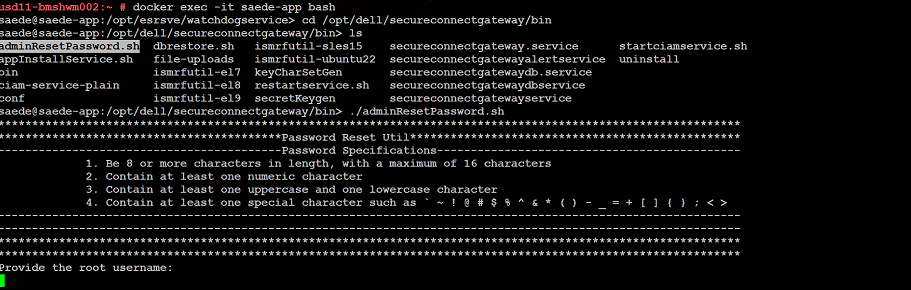
➢ docker exec -it saede-app bash
➢ cd /opt/dell/secureconnectgateway/bin
➢ ls
➢ ./adminResetPassword.sh
パスワード要件:
パスワードは次のとおりである必要があります。
- 8文字以上(最大16文字)
- 数字を1文字以上含むこと
- 大文字と小文字をそれぞれ1文字以上含むこと
- 次のような特殊文字を1文字以上含むこと
' ~ ! @ # $ % ^ & * ( ) - _ + = { } [ ] ; < >
rootのユーザー名とパスワードを入力します。
新しい管理者パスワードを入力します。
Additional Information
パスワードを変更するコマンドのスクリーンショット:
Affected Products
Secure Connect Gateway - Virtual EditionArticle Properties
Article Number: 000250890
Article Type: How To
Last Modified: 29 Dec 2025
Version: 2
Find answers to your questions from other Dell users
Support Services
Check if your device is covered by Support Services.