安全連線閘道虛擬版本:重設管理員密碼
Summary: 此程序說明如何為安全連線閘道虛擬版本重設遺忘的系統管理員密碼,但您必須知道根密碼。
This article applies to
This article does not apply to
This article is not tied to any specific product.
Not all product versions are identified in this article.
Instructions
程序:
注意:請先拍攝虛擬機器的快照,再套用因應措施。
- 使用具有根認證 (使用者名稱和密碼) 的 SSH 連線至安全連線閘道裝置系統。
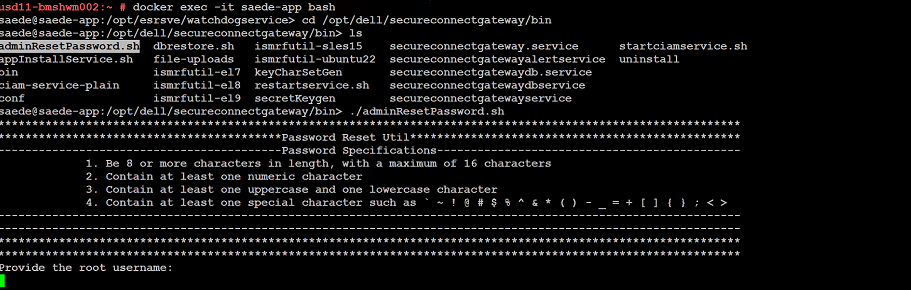
- 成功登入後,請執行下列命令:
➢ docker exec -it saede-app bash
➢ cd /opt/dell/secureconnectgateway/bin
➢ ls
➢ ./adminResetPassword.sh
密碼要求:
密碼必須為:
- 長度為 8 個字元以上,最多 16 個字元
- 至少包含一個數字字元
- 至少包含一個大寫與一個小寫字元
- 包含至少一個特殊字元,例如
' ~ ! @ # $ % ^ & * ( ) - _ + = { } [ ] ; < >
提供根帳戶使用者名稱和密碼。
提供新的管理員密碼。
Additional Information
變更密碼的命令螢幕擷取畫面:
Affected Products
Secure Connect Gateway - Virtual EditionArticle Properties
Article Number: 000250890
Article Type: How To
Last Modified: 29 Dec 2025
Version: 2
Find answers to your questions from other Dell users
Support Services
Check if your device is covered by Support Services.