NMC 사용자 인터페이스를 시작하는 데 시간이 오래 걸림
Summary: NMC가 로그인 페이지를 여는 데 4-5분 정도 걸립니다.
This article applies to
This article does not apply to
This article is not tied to any specific product.
Not all product versions are identified in this article.
Symptoms
- NMC가 로그인 페이지를 여는 데 4-5분 정도 걸립니다.
- Java 추적 로그(C:\Users\<user>\AppData\LocalLow\Sun\Java\Deployment\log\javaws_<some numbers.trace>)에 연결 시간 초과 오류가 표시됩니다.
network: Connecting socket://ocsp.entrust.net:80 with proxy=DIRECT
security: Failing over to CRLs: java.net.SocketTimeoutException: connect timed out
network: Connecting socket://crl.entrust.net:80 with proxy=DIRECT
com.sun.deploy.security.RevocationChecker$StatusUnknownException: java.net.SocketTimeoutException: connect timed out
Suppressed: com.sun.deploy.security.RevocationChecker$StatusUnknownException: sun.security.provider.certpath.PKIX$CertStoreTypeException: java.net.SocketTimeoutException: connect timed out
Caused by: sun.security.provider.certpath.PKIX$CertStoreTypeException: java.net.SocketTimeoutException: connect timed out
Caused by: java.net.SocketTimeoutException: connect timed out
Cause
느린 응답 시간은 인터넷 또는 외부 연결이 없는 NMC 클라이언트에 의해 발생합니다. NMC UI가 시작되면 Java가 Entrust 웹 페이지에 연결하여 인증서를 확인하려고 시도합니다. 여러 번 시도하지 않으면 시간이 초과됩니다.
Resolution
Java에서 해지 확인을 비활성화합니다.
- Java 제어판을 엽니다. Advanced 탭 - Perform TLS Certificate revocation check on으로 이동합니다.
- NRE의 경우: C:\Program Files\NRE\java\jre#.#.#_###\bin\으로 이동합니다javacpl.exe
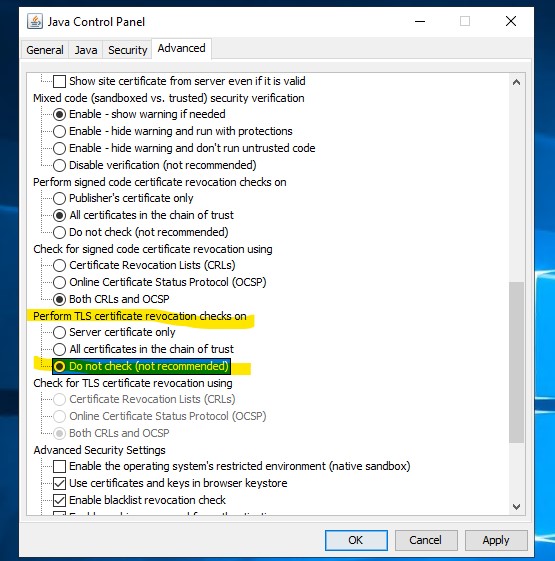
- NMC 사용자 인터페이스를 시작합니다.
Additional Information
Article Properties
Article Number: 000287639
Article Type: Solution
Last Modified: 28 Feb 2025
Version: 1
Find answers to your questions from other Dell users
Support Services
Check if your device is covered by Support Services.