NMC 使用者介面需要很長時間才能啟動
Summary: NMC 需要 4 至 5 分鐘才能開啟登入頁面。
This article applies to
This article does not apply to
This article is not tied to any specific product.
Not all product versions are identified in this article.
Symptoms
- NMC 需要 4 至 5 分鐘才能開啟登入頁面。
- Java 追蹤記錄 (C:\Users\<user>\AppData\LocalLow\Sun\Java\Deployment\log\javaws_<some numbers.trace>) 顯示連線逾時錯誤。
network: Connecting socket://ocsp.entrust.net:80 with proxy=DIRECT
security: Failing over to CRLs: java.net.SocketTimeoutException: connect timed out
network: Connecting socket://crl.entrust.net:80 with proxy=DIRECT
com.sun.deploy.security.RevocationChecker$StatusUnknownException: java.net.SocketTimeoutException: connect timed out
Suppressed: com.sun.deploy.security.RevocationChecker$StatusUnknownException: sun.security.provider.certpath.PKIX$CertStoreTypeException: java.net.SocketTimeoutException: connect timed out
Caused by: sun.security.provider.certpath.PKIX$CertStoreTypeException: java.net.SocketTimeoutException: connect timed out
Caused by: java.net.SocketTimeoutException: connect timed out
Cause
回應時間緩慢是由 NMC 用戶端缺少互聯網或外部連接造成的。NMC UI 啟動時,Java 會嘗試聯絡 Entrust 網頁以驗證憑證。嘗試數次失敗後,就會逾時。
Resolution
在 Java 中停用撤銷檢查。
- 開啟 JAVA 控制台。前往進階標籤 - 執行 TLS 憑證撤銷檢查。
- 對於 NRE:前往 C:\Program Files\NRE\java\jre#.#.#_###\bin\javacpl.exe
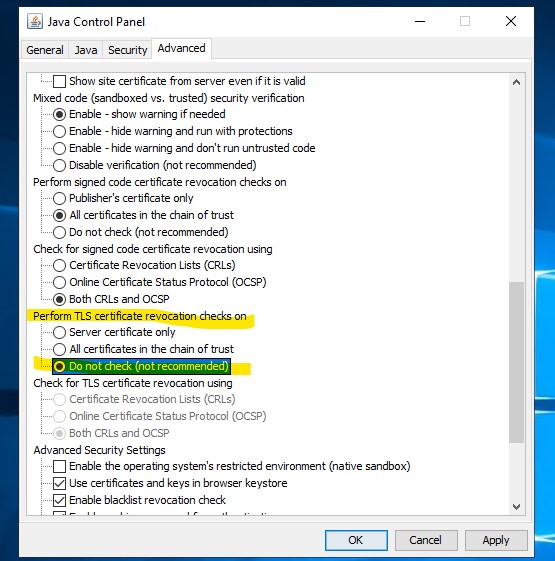
- 啟動 NMC 使用者介面。
Additional Information
Article Properties
Article Number: 000287639
Article Type: Solution
Last Modified: 28 Feb 2025
Version: 1
Find answers to your questions from other Dell users
Support Services
Check if your device is covered by Support Services.