NMC 用户界面需要很长时间才能启动
Summary: NMC 需要 4 到 5 分钟才能打开登录页面。
This article applies to
This article does not apply to
This article is not tied to any specific product.
Not all product versions are identified in this article.
Symptoms
- NMC 需要 4 到 5 分钟才能打开登录页面。
- Java 跟踪日志 (C:\Users\<user>\AppData\LocalLow\Sun\Java\Deployment\log\javaws_<some numbers.trace>) 显示连接超时错误。
network: Connecting socket://ocsp.entrust.net:80 with proxy=DIRECT
security: Failing over to CRLs: java.net.SocketTimeoutException: connect timed out
network: Connecting socket://crl.entrust.net:80 with proxy=DIRECT
com.sun.deploy.security.RevocationChecker$StatusUnknownException: java.net.SocketTimeoutException: connect timed out
Suppressed: com.sun.deploy.security.RevocationChecker$StatusUnknownException: sun.security.provider.certpath.PKIX$CertStoreTypeException: java.net.SocketTimeoutException: connect timed out
Caused by: sun.security.provider.certpath.PKIX$CertStoreTypeException: java.net.SocketTimeoutException: connect timed out
Caused by: java.net.SocketTimeoutException: connect timed out
Cause
响应时间缓慢是由于 NMC 客户端缺少互联网或外部连接造成的。启动 NMC UI 时,Java 会尝试联系 Entrust 网页以验证证书。多次尝试失败后,它超时。
Resolution
在 Java 中禁用吊销检查。
- 打开 Java 控制面板。转至“高级”选项卡 — 对其执行 TLS 证书吊销检查。
- 对于 NRE:转至 C:\Program Files\NRE\java\jre#.#.#_###\bin\javacpl.exe
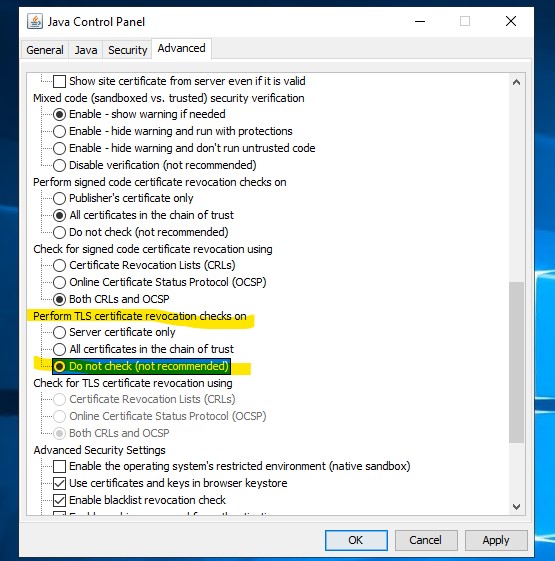
- 启动 NMC 用户界面。
Additional Information
Article Properties
Article Number: 000287639
Article Type: Solution
Last Modified: 28 Feb 2025
Version: 1
Find answers to your questions from other Dell users
Support Services
Check if your device is covered by Support Services.