VxRail:如何手動修補 ESXi 節點
Summary: 本文概述管理客戶服務要求 (SR) 的程序,以透過手動修補來解決 VxRail 或 VCF On VxRail 環境中的安全性漏洞 (VMSA)。
This article applies to
This article does not apply to
This article is not tied to any specific product.
Not all product versions are identified in this article.
Symptoms
VMware by Broadcom 會定期發佈公告以解決安全漏洞。下列步驟詳細說明手動修補選項,以防 VxRail/VCF 升級版本延遲,或客戶因任何情況無法執行完整升級時,可降低 VMware 基礎結構中的安全性風險。
Cause
萬一 VxRail/VCF 升級版本發生延遲,或客戶因任何情況無法執行完整升級。
Resolution
Dell VXRAIL 強烈建議客戶等待包含修正的 VXRAIL 或 VCF-ON-VXRAIL 版本
在 VxRail 或 VCF-on-VxRail 升級之外的主機上升級 ESXi 的程序。
注意:由於 vSAN FTT=1 的限制,建議一次更新一台主機。
手動修補可能會在 vCenter 中觸發 VxRail Manager 不相容警報。ESXi 版本不符合與觸發警報的 VxRail 組建一致的版本。這可能會影響需要支援互動才能補救的未來升級。
- 將 ESXi 修補程式上傳至每個主機上的服務資料存放區。
- 使用「確保存取功能」選項,讓節點進入維護模式
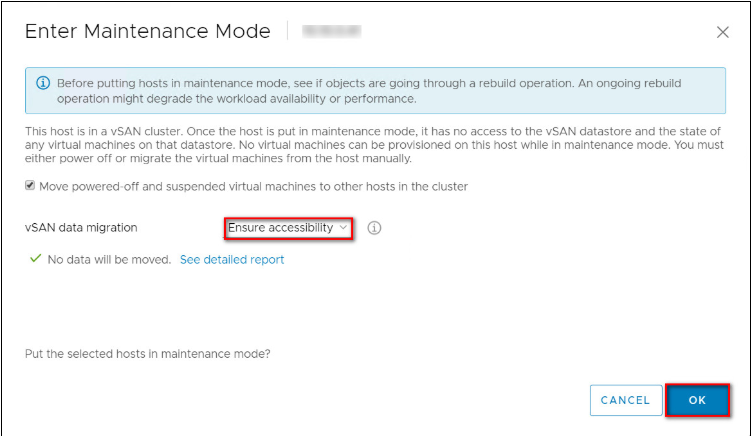
- 執行下列命令 -
請注意,以下版本可供知識庫 (KB) 參考。原始修正版本可能與命令範例中使用的版本不同。
# esxcli software sources profile list --depot='/<patch_location>/VMware-ESXi-7.0U3s-24585291-depot.zip'
# esxcli software profile update -p ESXi-7.0U3s-24585291-standard --depot='/<patch_location>/VMware-ESXi-7.0U3s-24585291-depot.zip'


請使用--no-hardware-warning命令中的引數,以略過硬體檢查 (如有需要)。esxcli software profile update -d /vmfs/volumes/*-datastore-name*/VMware-ESXi-8.0U2d-24585300-depot.zip -p ESXi-8.0U2d-24585300-standard --no-hardware-warning
- 將節點重新開機,然後退出維護模式。
- 在其餘節點上重複這些步驟,一次一次。
見證裝置也可手動修補類似的步驟,接著是 KB 中提到的步驟 - VxRail:如何使用 CLI 手動更新 vSAN 見證裝置
Affected Products
VxRail, VxRail 460 and 470 Nodes, VxRail Appliance Series, VxRail G Series Nodes, VxRail D Series Nodes, VxRail E Series Nodes, VxRail P Series Nodes, VxRail S Series Nodes, VxRail Software, VxRail V Series NodesProducts
VxRail VD Series NodesArticle Properties
Article Number: 000345284
Article Type: Solution
Last Modified: 25 Aug 2025
Version: 4
Find answers to your questions from other Dell users
Support Services
Check if your device is covered by Support Services.