VxRail:如何手动修补 ESXi 节点
Summary: 本文概述了通过手动修补解决 VxRail 或 VCF On VxRail 环境中的安全漏洞 (VMSA) 的客户服务请求 (SR) 的过程。
This article applies to
This article does not apply to
This article is not tied to any specific product.
Not all product versions are identified in this article.
Symptoms
VMware by Broadcom 会定期发布公告以解决安全漏洞。以下步骤详细说明了手动修补选项,以缓解 VMware 基础架构中的安全风险,以防 VxRail/VCF 升级版本出现延迟或客户由于任何情况而无法执行完整升级。
Cause
如果 VxRail/VCF 升级版本出现延迟,或者客户由于任何情况而无法执行完整升级。
Resolution
Dell VXRAIL 强烈建议客户等待包含修复程序的 VXRAIL 或 VCF-ON-VxRAIL 版本
在 VxRail 或 VCF-on-VxRail 升级之外的主机上升级 ESXi 的过程。
提醒:由于 vSAN FTT=1 限制,建议一次更新一个主机。
手动修补可能会在 vCenter 中触发 VxRail Manager 不合规警报。ESXi 版本与触发警报的 VxRail 内部版本不一致。这可能会影响需要支持人员交互才能修正的未来升级。
- 将 ESXi 修补程序上传到每个主机上的服务数据存储区。
- 使用选项“Ensure Accessibility”将节点置于维护模式
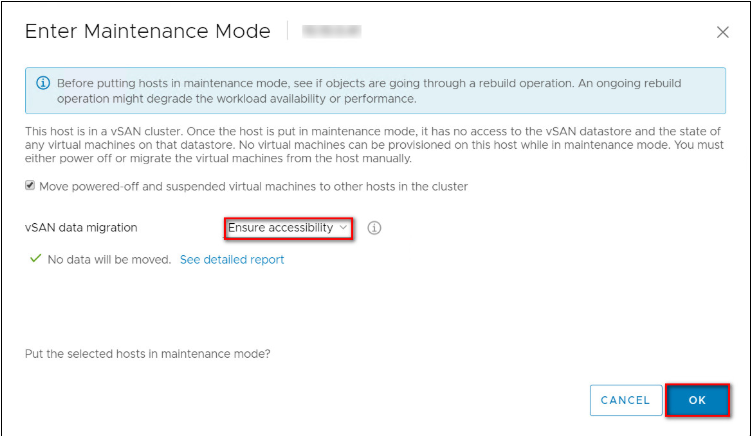
- 执行以下命令—
请注意,以下版本在知识库 (KB) 中供参考。原始修复版本可能与命令示例中使用的版本不同。
# esxcli software sources profile list --depot='/<patch_location>/VMware-ESXi-7.0U3s-24585291-depot.zip'
# esxcli software profile update -p ESXi-7.0U3s-24585291-standard --depot='/<patch_location>/VMware-ESXi-7.0U3s-24585291-depot.zip'


请使用--no-hardware-warning参数,以绕过硬件检查(如果需要)。esxcli software profile update -d /vmfs/volumes/*-datastore-name*/VMware-ESXi-8.0U2d-24585300-depot.zip -p ESXi-8.0U2d-24585300-standard --no-hardware-warning
- 重新启动节点并从维护模式中退出。
- 在其余节点上重复这些步骤,每次一次。
对于 Witness 一体机手动修补,可以遵循类似的步骤,然后按照知识库文章 — VxRail中提到的步骤作:如何使用 CLI 手动更新 vSAN Witness 一体机
Affected Products
VxRail, VxRail 460 and 470 Nodes, VxRail Appliance Series, VxRail G Series Nodes, VxRail D Series Nodes, VxRail E Series Nodes, VxRail P Series Nodes, VxRail S Series Nodes, VxRail Software, VxRail V Series NodesProducts
VxRail VD Series NodesArticle Properties
Article Number: 000345284
Article Type: Solution
Last Modified: 25 Aug 2025
Version: 4
Find answers to your questions from other Dell users
Support Services
Check if your device is covered by Support Services.