USB Type C Port Support Features on Certain Dell Laptops
Summary: Information about USB Type C ports on certain Dell laptops that may not support power delivery and video output.
This article applies to
This article does not apply to
This article is not tied to any specific product.
Not all product versions are identified in this article.
Symptoms
Certain Dell laptops cannot output video to an external monitor or charge devices using the USB Type C port.
Affected Laptops:
- Dell 15 DC15250
- Dell 15 DC15255
- Inspiron 15 3520
- Inspiron 15 3530
- Vostro 3420
- Vostro 3520
- Vostro 14 3430
- Vostro 15 3535
Cause
This behavior is working as designed.
Resolution
USB Type C Port
Check that the USB Type C supported features on your laptop.
- The USB Type C port with a "D" logo next to the port supports data transferring, video output, and power delivery.
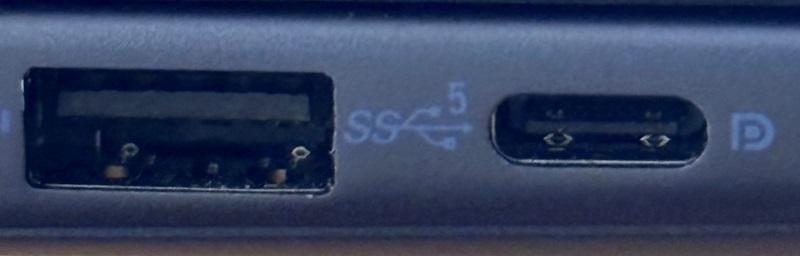
- The USB Type C port with an "SS" logo next to the port only supports data transferring.
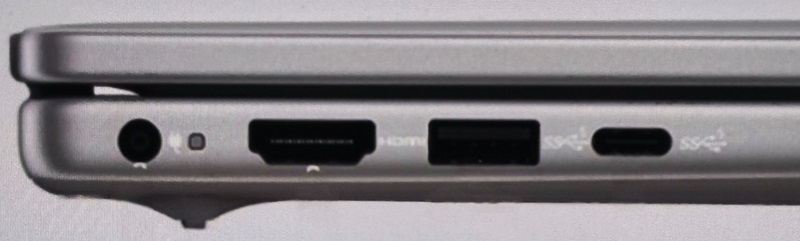
Go to the Owners Manual if you need more information about your laptops USB Type C specifications.
Dell Computer Manuals
Affected Products
Dell 15 DC15250, Dell 15 DC15255, Inspiron 15 3520, Inspiron 15 3530, Vostro 3420, Vostro 14 3430, Vostro 3520, Vostro 15 3535Article Properties
Article Number: 000354027
Article Type: Solution
Last Modified: 04 Dec 2025
Version: 2
Find answers to your questions from other Dell users
Support Services
Check if your device is covered by Support Services.