AC 어댑터가 제대로 삽입되지 않아 Latitude가 충전되지 않거나 전원이 들어오지 않음
Summary: 이 문서에서는 Latitude가 충전되지 않거나 AC 어댑터가 충전 포트에 완전히 삽입되지 않아 전원이 들어오지 않는 문제에 대한 자세한 정보를 제공합니다.
This article applies to
This article does not apply to
This article is not tied to any specific product.
Not all product versions are identified in this article.
Symptoms
해당되는 플랫폼:
- Latitude 3450
- Latitude 3550
- Latitude 3440
- Latitude 3540
AC 어댑터가 올바르게 삽입되지 않은 경우:
- LED가 계속 켜져 있음

- BIOS에 알림이 있습니다.
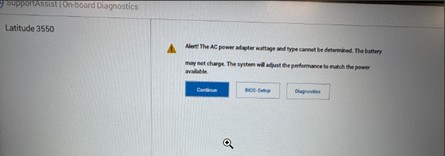
- BIOS에서 배터리 상태가 유휴 상태입니다.

Cause
AC 어댑터가 올바르게 삽입되지 않음
Resolution
이 문제를 해결하려면 AC 어댑터를 뽑았다가 충전 포트에 다시 삽입하고 배럴을 포트에 완전히 삽입해야 합니다.
AC 어댑터가 올바르게 삽입되지 않음: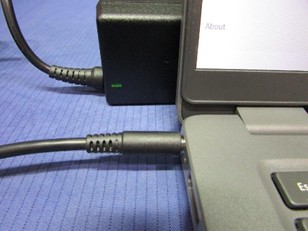
AC 어댑터가 올바르게 삽입됨: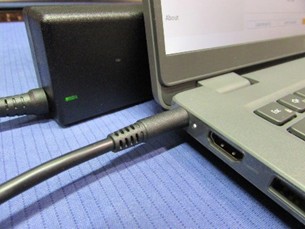
올바르게 삽입하면 BIOS에 배터리 상태가 충전 중으로 표시됩니다.
Affected Products
Latitude 3440, Latitude 3450, Latitude 3540, Latitude 3550Article Properties
Article Number: 000355513
Article Type: Solution
Last Modified: 15 Sept 2025
Version: 2
Find answers to your questions from other Dell users
Support Services
Check if your device is covered by Support Services.