交流電變壓器未正確插入,導致 Latitude 無法充電或沒有電源
Summary: 本文提供有關 Latitude 因 AC 變壓器未完全插入充電連接埠而無法充電及無電源的詳細資訊。
This article applies to
This article does not apply to
This article is not tied to any specific product.
Not all product versions are identified in this article.
Symptoms
受影響的平台:
- Latitude 3450
- Latitude 3550
- Latitude 3440
- Latitude 3540
當 AC 變壓器未正確插入時:
- LED 保持發光

- BIOS 中有警示
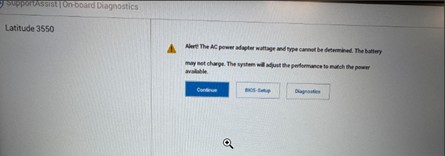
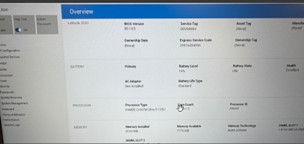
- BIOS 中的電池狀態為閒置
Cause
交流電變壓器未正確插入
Resolution
若要解決此問題,請拔下 AC 變壓器,然後將其重新插入充電連接埠,請務必將圓柱型接頭完全插入連接埠。
交流電變壓器未正確插入: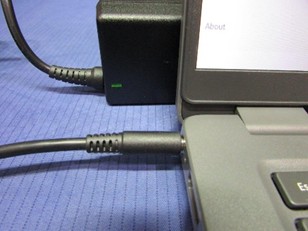
已正確插入交流電變壓器: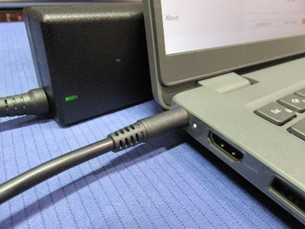
正確插入時,BIOS 會顯示電池狀態 為充電中。
Affected Products
Latitude 3440, Latitude 3450, Latitude 3540, Latitude 3550Article Properties
Article Number: 000355513
Article Type: Solution
Last Modified: 15 Sept 2025
Version: 2
Find answers to your questions from other Dell users
Support Services
Check if your device is covered by Support Services.