Unisphere per PowerMax 10.3: Come configurare i server di posta elettronica SMTP sicuri per gli avvisi?
Summary: Come configurare server e-mail SMTP sicuri per gli avvisi in Unisphere per PowerMax.
This article applies to
This article does not apply to
This article is not tied to any specific product.
Not all product versions are identified in this article.
Instructions
La configurazione del server e-mail SMTP sicuro per gli avvisi è disponibile da Unisphere per PowerMax versione 10.3.0 e successive.
Procedura:
-
Passare a Impostazioni.
-
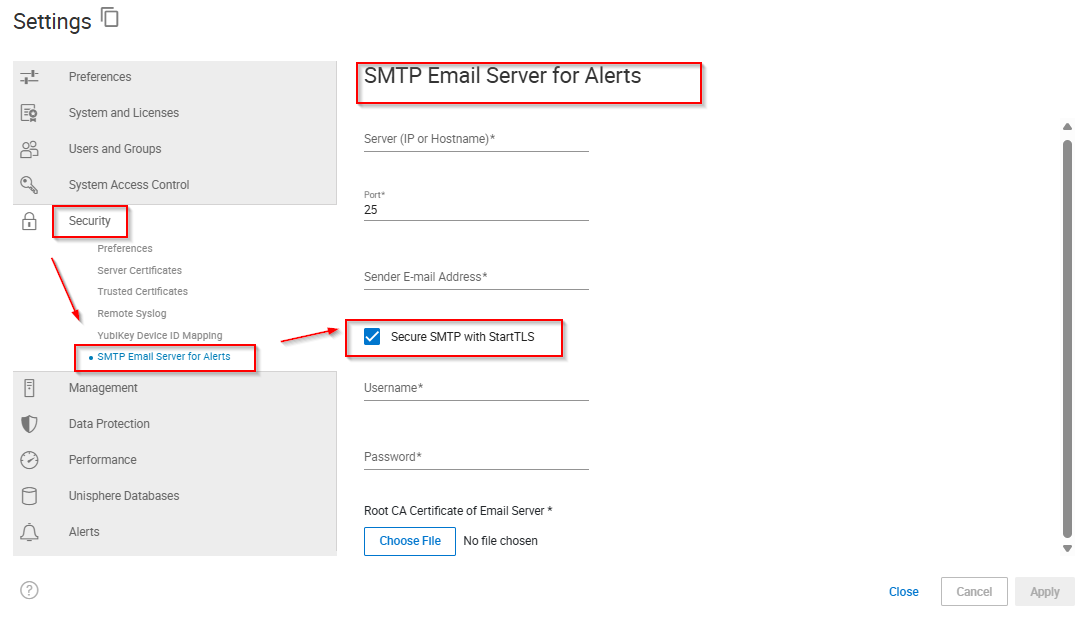
Selezionare Security > SMTP Email Server for Alerts.
-
Digitare il nome o l'indirizzo del server (IP o nome host).
-
Digitare un Port number.
-
Digitare l'indirizzo e-mail del mittente.
-
Se si desidera utilizzare StartTLS, completare la seguente procedura:
-
Selezionare Secure SMTP with StartTSL.
-
Digitare un Username.
-
Digitare una password.
-
Cliccare su Choose File.
-
Selezionare il certificato CA radice del server e-mail e cliccare su Open.
-
-
Cliccare su Apply.
Additional Information
N/D
Affected Products
Unisphere for PowerMaxArticle Properties
Article Number: 000380011
Article Type: How To
Last Modified: 16 Dec 2025
Version: 2
Find answers to your questions from other Dell users
Support Services
Check if your device is covered by Support Services.