Unisphere for PowerMax 10.3: アラート用にセキュアなSMTP Eメール サーバーを構成する方法
Summary: Unisphere For PowerMaxでアラート用にセキュアなSMTP Eメール サーバーを設定する方法。
This article applies to
This article does not apply to
This article is not tied to any specific product.
Not all product versions are identified in this article.
Instructions
アラート用のSecure SMTP Eメール サーバーの構成は、Unisphere For PowerMaxバージョン10.3.0以降から利用できます。
手順:
-
[設定]を選択します。
-
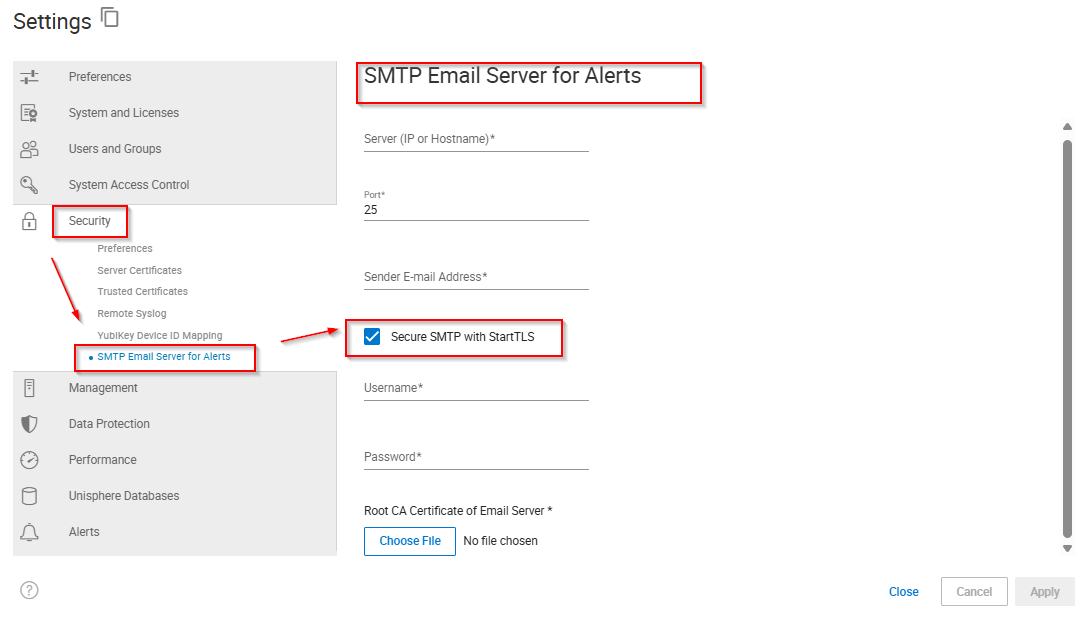
Security > SMTP Email Server for Alertsを選択します。
-
サーバー(IPまたはホスト名)の名前またはアドレスを入力します。
-
ポート番号を入力します。
-
送信者の Eメール アドレスを入力します。
-
StartTLS を使用する場合は、以下のステップを実行します。
-
Secure SMTP with StartTSLを選択します。
-
ユーザー名を入力します。
-
パスワードを入力します。
-
Choose Fileをクリックします。
-
Eメール サーバーのルートCA証明書を選択し、 開くをクリックします。
-
-
「Apply(適用)」をクリックします。
Additional Information
なし
Affected Products
Unisphere for PowerMaxArticle Properties
Article Number: 000380011
Article Type: How To
Last Modified: 16 Dec 2025
Version: 2
Find answers to your questions from other Dell users
Support Services
Check if your device is covered by Support Services.