PowerMax 10.3용 Unisphere: 알림을 위한 보안 SMTP 이메일 서버를 구성하는 방법
Summary: Unisphere for PowerMax에서 알림에 대해 보안 SMTP 이메일 서버를 구성하는 방법
This article applies to
This article does not apply to
This article is not tied to any specific product.
Not all product versions are identified in this article.
Instructions
알림을 위한 보안 SMTP 이메일 서버 구성은 Unisphere For PowerMax 버전 10.3.0 이상에서 사용할 수 있습니다.
단계:
-
Settings로 이동합니다.
-
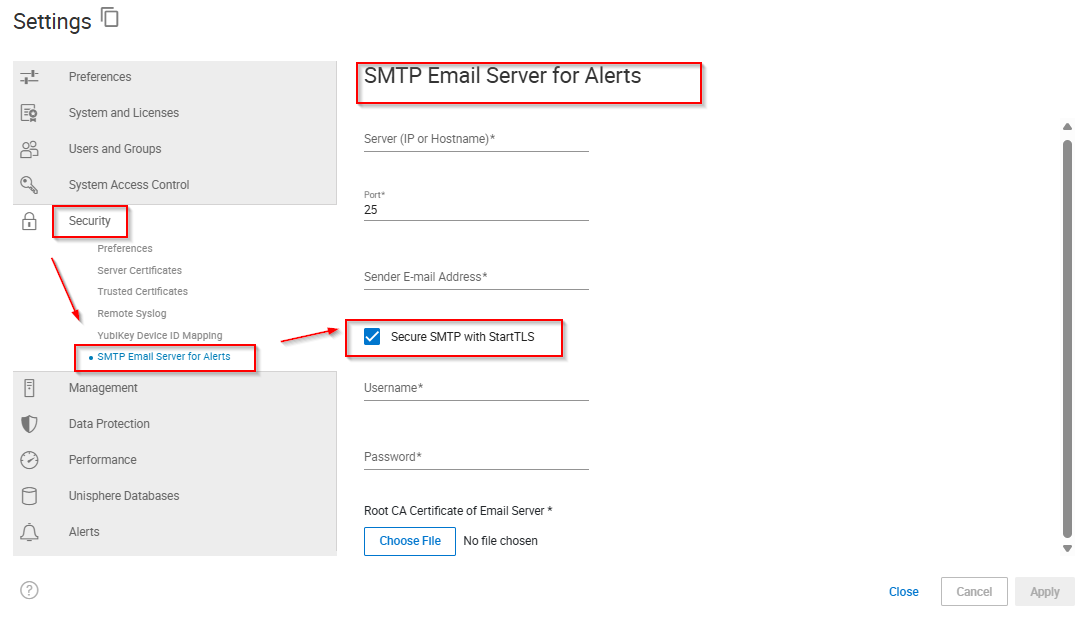
알림을 보려면 SecuritySMTP > Email Server를 선택합니다.
-
서버(IP 또는 호스트 이름) 이름 또는 주소를 입력합니다.
-
Port number를 입력합니다.
-
Sender E-mail Address를 입력합니다.
-
StartTLS를 사용하려면 다음 단계를 완료하십시오.
-
Secure SMTP with StartTSL을 선택합니다.
-
Username을 입력합니다.
-
Password를 입력합니다.
-
Choose File을 클릭합니다.
-
이메일 서버의 루트 CA 인증서를 선택하고 Open을 클릭합니다.
-
-
적용을 클릭합니다.
Additional Information
N/A
Affected Products
Unisphere for PowerMaxArticle Properties
Article Number: 000380011
Article Type: How To
Last Modified: 16 Dec 2025
Version: 2
Find answers to your questions from other Dell users
Support Services
Check if your device is covered by Support Services.