Unisphere för PowerMax 10.3: Hur konfigurerar jag säkra SMTP-e-postservrar för varningar?
Summary: Konfigurera säkra SMTP-e-postservrar för varningar i Unisphere för PowerMax.
This article applies to
This article does not apply to
This article is not tied to any specific product.
Not all product versions are identified in this article.
Instructions
Konfigurering av säker SMTP-e-postserver för varningar är tillgänglig från Unisphere för PowerMax version 10.3.0 och senare.
Steg:
-
Gå till Inställningar.
-
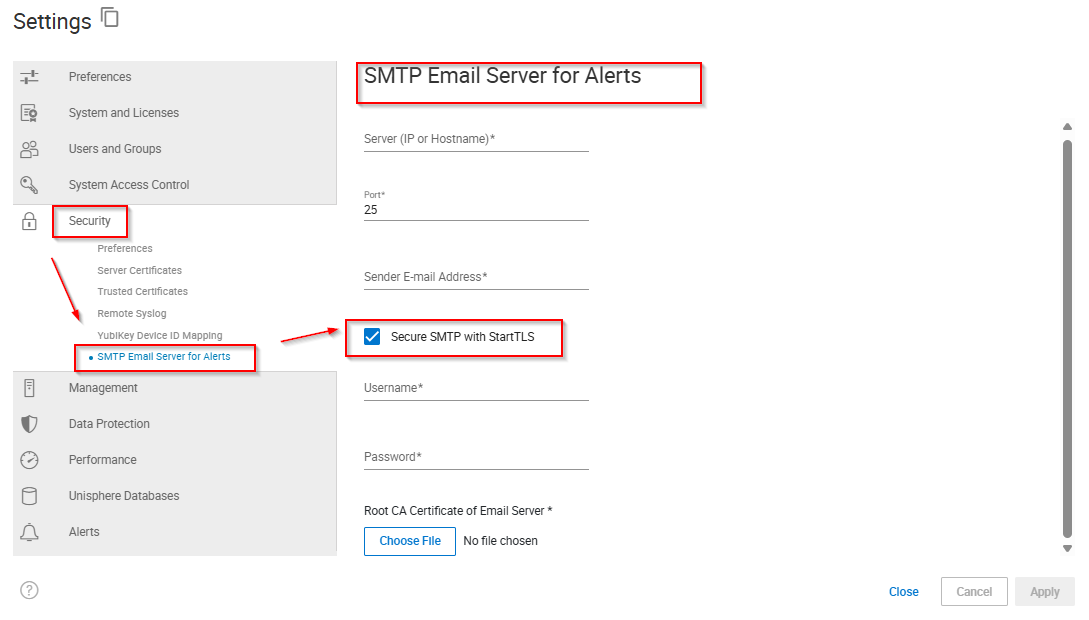
Välj Säkerhet > SMTP-e-postserver för varningar.
-
Ange ett servernamn eller en adress (IP eller värdnamn ).
-
Ange ett portnummer .
-
Ange avsändarens e-postadress.
-
Om du vill använda StartTLS utför du följande steg:
-
Välj Säker SMTP med StartTSL.
-
Ange ett användarnamn.
-
Ange ett lösenord.
-
Klicka på Välj fil.
-
Välj rotcertifikatutfärdarcertifikatet för e-postservern och klicka på Öppna.
-
-
Klicka på Verkställ.
Additional Information
Ej tillämpligt
Affected Products
Unisphere for PowerMaxArticle Properties
Article Number: 000380011
Article Type: How To
Last Modified: 16 Dec 2025
Version: 2
Find answers to your questions from other Dell users
Support Services
Check if your device is covered by Support Services.