NetWorker: Sikkerhedskopiering af Azure VM-snapshot mislykkes "nsrazure_save: Kommandoen blev ikke fundet"
Summary: NetWorker er konfigureret til at udføre sikkerhedskopiering af snapshots af Azure Virtual Machine (VM). Sikkerhedskopieringspolitikken mislykkes og rapporterer "nsrazure_save: Kommandoen blev ikke fundet" ...
Symptoms
Sikkerhedskopieringer af NetWorker Azure Virtual Machine (VM) mislykkes.
Rapporten over sikkerhedskopilogfiler:
139545 1763882807 5 1 23 1811937024 6033 0 CLIENT_NAME nsrexecd 32 Unable to spawn process '%s': %s 2 23 13 nsrazure_save 24 25 No such file or directory
nsrazure_save: Command not found
Logplacering på NetWorker-server:
- Linux: /nsr/logs/policy/POLICY-NAME/WORKFLOW-NAME/ACTION-NAME_JOBID/JOBID.log
- Windows (standard): C:\Programmer\EMC NetWorker\nsr\logs\policy\POLICY-NAME\WORKFLOW-NAME\ACTION-NAME_JOBID\JOBID.log
Cause
Den klient, der bruges til Azure VM-sikkerhedskopieringerne, har ikke NetWorker Extended Client-softwaren installeret.
Resolution
Kommandoen nsrazure_save er inkluderet i installationen af NetWorker Extended Client-softwaren. Dette krav er dokumenteret i integrationsvejledningen til Dell NetWorker og Azure VM Snapshot: Support til NetWorker | Vejledninger og dokumenter
Den udvidede klientpakke er inkluderet i NetWorker-installationspakkerne, der downloades fra: Support til NetWorker | Drivere og downloads
For Linux-værter:
[root@nsr linux_x86_64]# ls -l | grep lgtoxtd
-rw-r--r--. 1 root games  74111264 Sep  3 08:36 lgtoxtdclnt-19.12.0.3-1.x86_64.rpm
-rw-r--r--. 1 root games  40050174 Sep  3 04:59 lgtoxtdclnt_19.12.0.3_amd64.deb
For SLES-, Red Hat- eller Oracle-baserede systemer skal du køre: sudo rpm -ivh lgtoxtdclnt-version.rpm
For Ubuntu- eller Debian-baserede systemer skal du køre: sudo dpkg -i lgtoxtdclnt_version.deb
For Windows-værter:
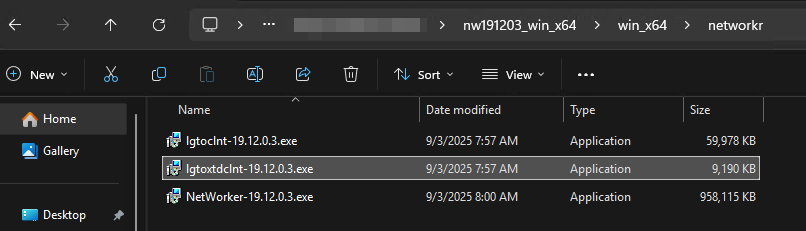
Højreklik på ikonet lgtoxtdclnt , og klik på Kør som administrator.
NetWorker-installationsvejledningen indeholder yderligere OS-specifikke installationsinstruktioner.