NetWorker:Azure VM スナップショットのバックアップが失敗します "nsrazure_save: コマンドが見つかりません」
Summary: NetWorkerは、Azure仮想マシン(VM)スナップショット バックアップを実行するように構成されています。バックアップ ポリシーが失敗し、「nsrazure_save: コマンドが見つかりません」
This article applies to
This article does not apply to
This article is not tied to any specific product.
Not all product versions are identified in this article.
Symptoms
NetWorker Azure仮想マシン(VM)のバックアップが失敗します。
バックアップ ログは次のように報告します。
139545 1763882807 5 1 23 1811937024 6033 0 CLIENT_NAME nsrexecd 32 Unable to spawn process '%s': %s 2 23 13 nsrazure_save 24 25 No such file or directory
nsrazure_save: Command not found
NetWorkerサーバー上のログの場所:
- Linuxの場合/nsr/logs/policy/POLICY-NAME/WORKFLOW-NAME/ACTION-NAME_JOBID/JOBID.log
- Windows(デフォルト): C:\Program Files\EMC NetWorker\nsr\logs\policy\POLICY-NAME\WORKFLOW-NAME\ACTION-NAME_JOBID\JOBID.log
Cause
Azure VMバックアップに使用されるクライアントに、NetWorker拡張クライアント ソフトウェアがインストールされていない。
Resolution
nsrazure_saveコマンドは、NetWorker拡張クライアント ソフトウェアのインストールに含まれています。この要件については、『 Dell NetWorkerおよびAzure VMスナップショット統合ガイド』を参照してください。NetWorkerのサポート |マニュアルおよび文書
拡張クライアント パッケージは、以下からダウンロードしたNetWorkerインストール バンドルに含まれています。NetWorkerのサポート |ドライバーおよびダウンロード
Linuxホストの場合:
[root@nsr linux_x86_64]# ls -l | grep lgtoxtd
-rw-r--r--. 1 root games  74111264 Sep  3 08:36 lgtoxtdclnt-19.12.0.3-1.x86_64.rpm
-rw-r--r--. 1 root games  40050174 Sep  3 04:59 lgtoxtdclnt_19.12.0.3_amd64.deb
SLES、Red Hat、またはOracleベースのシステムの場合は、次のコマンドを実行します。 sudo rpm -ivh lgtoxtdclnt-version.rpm
UbuntuまたはDebianベースのシステムの場合は、次のコマンドを実行します。 sudo dpkg -i lgtoxtdclnt_version.deb
Windowsホストの場合:
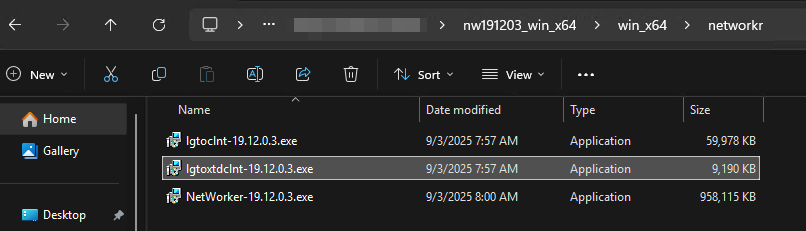
右クリック lgtoxtdclnt パッケージを選択し、「管理者として実行」をクリックします。
OS固有の追加インストール手順については、 NetWorkerインストール ガイド を参照してください。
Affected Products
NetWorkerProducts
NetWorker FamilyArticle Properties
Article Number: 000400353
Article Type: Solution
Last Modified: 05 Dec 2025
Version: 2
Find answers to your questions from other Dell users
Support Services
Check if your device is covered by Support Services.