NetWorker:Azure VM 快照備份失敗「nsrazure_save:找不到命令」
Summary: NetWorker 已設定為執行 Azure 虛擬機器 (VM) 快照備份。備份原則失敗,報告「nsrazure_save:找不到命令」
This article applies to
This article does not apply to
This article is not tied to any specific product.
Not all product versions are identified in this article.
Symptoms
NetWorker Azure 虛擬機器 (VM) 備份失敗。
備份記錄報告:
139545 1763882807 5 1 23 1811937024 6033 0 CLIENT_NAME nsrexecd 32 Unable to spawn process '%s': %s 2 23 13 nsrazure_save 24 25 No such file or directory
nsrazure_save: Command not found
NetWorker 伺服器上的記錄位置:
- Linux:/nsr/logs/policy/POLICY-NAME/WORKFLOW-NAME/ACTION-NAME_JOBID/JOBID.log
- Windows (預設):C:\Program Files\EMC NetWorker\nsr\logs\policy\POLICY-NAME\WORKFLOW-NAME\ACTION-NAME_JOBID\JOBID.log
Cause
用於 Azure VM 備份的用戶端未安裝 NetWorker 擴充式用戶端軟體。
Resolution
nsrazure_save 命令包含在 NetWorker Extended Client 軟體的安裝中。此需求記錄在 Dell NetWorker 與 Azure VM 快照整合指南中:NetWorker 支援 |手冊與文件
延伸用戶端套裝包含在從下方下載的 NetWorker 安裝套裝中:NetWorker 支援 |驅動程式與下載
若為 Linux 主機:
[root@nsr linux_x86_64]# ls -l | grep lgtoxtd
-rw-r--r--. 1 root games  74111264 Sep  3 08:36 lgtoxtdclnt-19.12.0.3-1.x86_64.rpm
-rw-r--r--. 1 root games  40050174 Sep  3 04:59 lgtoxtdclnt_19.12.0.3_amd64.deb
如果是 SLES、Red Hat 或 Oracle 型系統,請執行下列步驟: sudo rpm -ivh lgtoxtdclnt-version.rpm
若為 Ubuntu 或 Debian 型系統,請執行: sudo dpkg -i lgtoxtdclnt_version.deb
若為 Windows 主機:
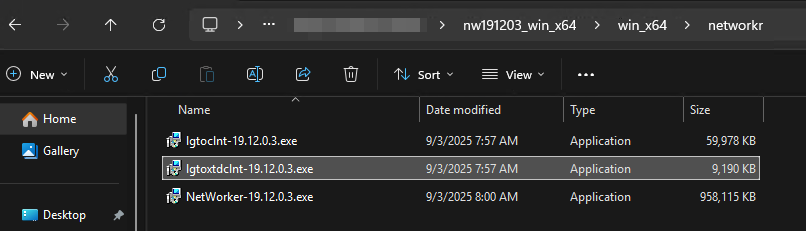
以滑鼠右鍵按一下 lgtoxtdclnt 包,然後按兩下 以管理員身份運行。
NetWorker 安裝指南提供其他作業系統專屬的安裝指示。
Affected Products
NetWorkerProducts
NetWorker FamilyArticle Properties
Article Number: 000400353
Article Type: Solution
Last Modified: 05 Dec 2025
Version: 2
Find answers to your questions from other Dell users
Support Services
Check if your device is covered by Support Services.