NVEロールアップ アップデートが4/18で失敗する
Summary: 現象: インストールされているパッケージが最新バージョン(18件中4件)かどうかを確認しています - このパッケージ バージョンxxxxxはすでにインストールされています。
Symptoms
workflow.log
2のエラー025-12-08 12:28:08 (-0500) 47384385583780 INFO: Report home message: 2025-12-08 12:28:08 -0500|usdc1-nwrbkpv07.pbi.global.pvt|unknown|NveOsRollup|19.12.0.86|/space/avamar/repo/temp/NvePlatformOsRollup_2025-R2-v3.avp_1765214841316/tmp|AvPlatformOssuPackageVersionCheck|Checking if the package being installed is the latest version (4 of 18)|ERROR: AvPlatformOssuPackageVersionCheck::do This package version 2025-R2-v3 is already installed! - operation failed2025-12-08 12:28:08 (-0500) 47384385583780 ERROR: This package version 2025-R2-v3 is already installed! - operation failed2025-12-08 12:28:08 (-0500) 47384385583780 INFO: post: This package version 2025-R2-v3 is already installed! - operation failed
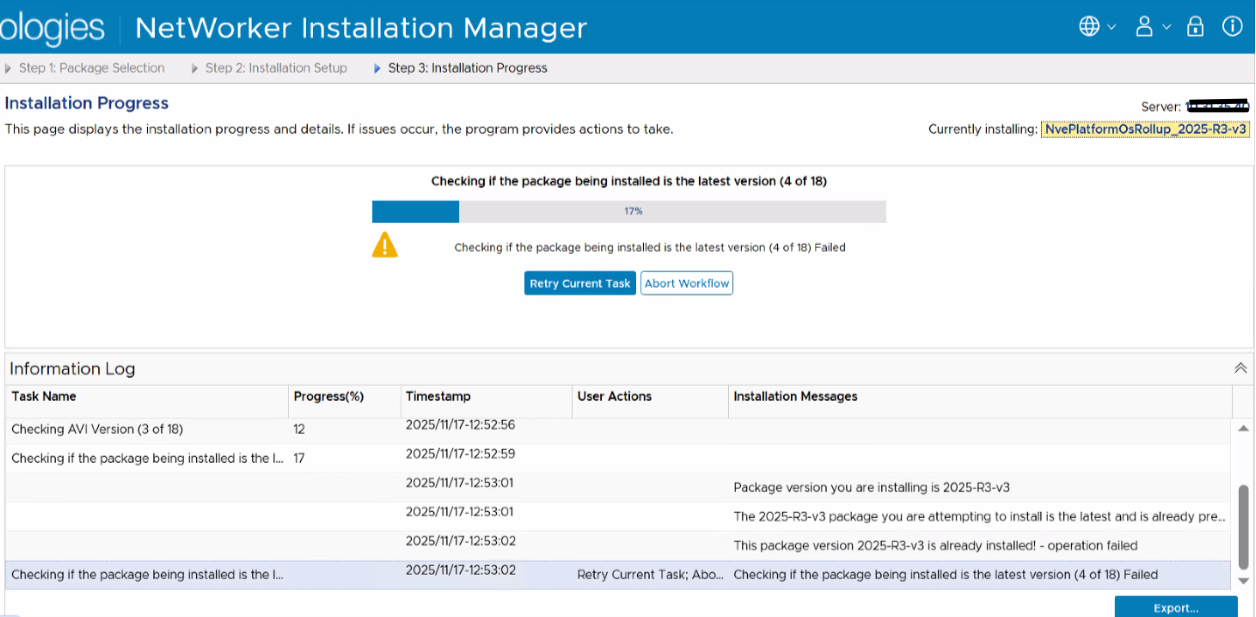
Cause
問題を修正した後、NWREE-28382 - 「https://www.dell.com/support/kbdoc/000366911
アップグレード プロセスの続行に失敗します」を参照してください
この問題は、NWREE-28679で報告されています。
Resolution
1)NVEが最後にインストールされているロールアップかどうかを確認します# avosrollup -VAvamar Platform OS Security Rollup:OS[SLES12.5] Version[2025-R2-v3] Installation Time[2025-10-17-13-01-37]
これは、システムにすでにインストールされているロールアップを示します。ただし、プロセスはまだ完了していません。
2)ロールアップ後のアップデートXMLファイルが存在するかどうかを確認します nve193:~ # grep package-survey /usr/local/avamar/var/package-survey-*-post_errata_installation*.xml
:::::/usr/local/avamar/var/package-survey-SLES12.5-post_errata_installation-2025-10-17-13-01-37.xml:<package-survey version="2025-R2-v3"/>/usr/local/avamar/var/package-survey-SLES12.5-post_errata_installation-2025-10-17-13-01-37.xml:<package-survey>/usr/local/avamar/var/package-survey-SLES12.5-post_errata_installation-2025-10-17-13-01-37.xml:</package-survey>
3)xmlファイルを削除します# mv /usr/local/avamar/var/package-survey-SLES12.5-post_errata_installation-2025-10-17-13-01-37.xml /tmp# mv /usr/local/avamar/var/package-survey-SLES12.5-pre_errata_installation-2025-10-17-13-01-37.xml: /tmp
4)aviサービスを再起動しますnve193:~ # avinstaller.pl --restart
5) NetWorker Install Manager GUIにログインし、[Retry Current Task]をクリックしてロールアップ アップデート プロセスを続行します。