PowerEdge:當連接的 MD3060e 中的磁碟故障時,系統在初始化韌體時停止回應
Summary: 本文提供當連接的 PV MD3060e 中的硬碟故障時,LSI 9207-8e SAS HBA 在韌體初始化時停止回應的解決方案。
This article applies to
This article does not apply to
This article is not tied to any specific product.
Not all product versions are identified in this article.
Symptoms
伺服器在初始化韌體時停止回應。
Cause
當搭載 LSI 9207-8e SAS HBA 的 Dell PowerEdge 伺服器連接到具有故障磁碟機的 PowerVault (PV) MD3060e 時。
Resolution
停用 LSI 9207-8e SAS HBA 上的開機驅動程式,然後更換故障的磁碟機。
故障的磁碟機 會閃爍綠色, 其行為與其他磁碟機不同。
-
在開啟系統電源時按下「F2」,進入「BIOS 設定」。
-
進入 BIOS 後,進入「整合式裝置」。

圖 1:系統 BIOS 設定 -
向下捲動以檢視功能表的其餘部分。

圖 2:系統 BIOS 整合式裝置 (1) -
按一下「停用插槽」。
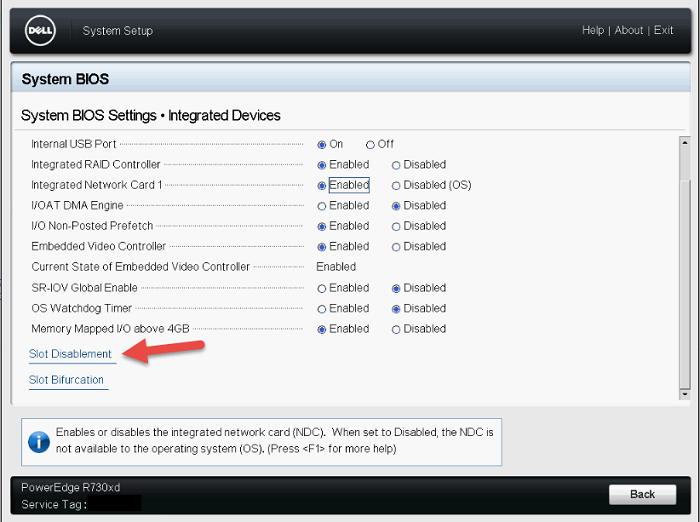
圖 3:系統 BIOS 整合式裝置 (2) -
請務必停用 LSI 9207-8e HBA 的開機驅動程式。
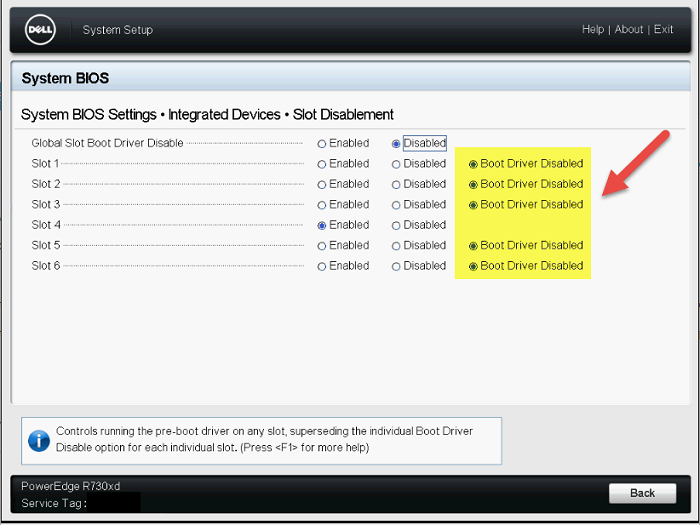
圖 4:「停用插槽」功能表 -
重新啟動系統,觀察是否可完成 POST。
-
MD3060e 中很可能有故障的磁碟機,導致停止回應。視需要更換故障的磁碟機。
Affected Products
OEMR R720, OEMR R720xd, OEMR R730, OEMR R730xd, OEMR R740, OEMR R740xd, OEMR T620, OEMR T630, OEMR T640, OEMR XL T640, PowerEdge R720, PowerEdge R720XD, PowerEdge R730, PowerEdge R730xd, PowerEdge R740, PowerEdge R740XD, PowerEdge T620
, PowerEdge T630, PowerEdge T640, PowerVault MD3060e
...
Article Properties
Article Number: 000143093
Article Type: Solution
Last Modified: 18 Dec 2024
Version: 5
Find answers to your questions from other Dell users
Support Services
Check if your device is covered by Support Services.